Apache Flume简介
概述
Flume是Cloudera提供的一个高可用的,高可靠的,分布式的海量日志采集、聚合和传输的软件。
Flume的核心是把数据从数据源(source)收集过来,再将收集到的数据送到指定的目的地(sink)。为了保证输送的过程一定成功,在送到目的地(sink)之前,会先缓存数据(channel),待数据真正到达目的地(sink)后,flume在删除自己缓存的数据。
Flume支持定制各类数据发送方,用于收集各类型数据;同时,Flume支持定制各种数据接受方,用于最终存储数据。一般的采集需求,通过对flume的简单配置即可实现。针对特殊场景也具备良好的自定义扩展能力。因此,flume可以适用于大部分的日常数据采集场景。
当前Flume有两个版本。Flume 0.9X版本的统称Flume OG(original generation),Flume1.X版本的统称Flume NG(next generation)。由于Flume NG经过核心组件、核心配置以及代码架构重构,与Flume OG有很大不同,使用时请注意区分。改动的另一原因是将Flume纳入 apache 旗下,Cloudera Flume 改名为 Apache Flume。
运行机制
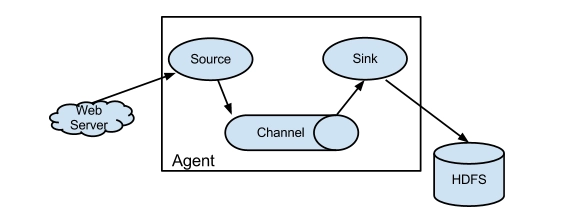
Flume系统中核心的角色是agent,agent本身是一个Java进程,一般运行在日志收集节点。
每一个agent相当于一个数据传递员,内部有三个组件:
- Source: 采集源,用于跟数据源对接,以获取数据;
- Sink: 下沉地,采集数据的传送目的,用于往下一级agent传递数据或者往
最终存储系统传递数据; - Channel: agent内部的数据传输通道,用于从source将数据传递到sink;
在整个数据的传输的过程中,流动的是 event ,它是Flume内部数据传输的最基本单元。event将传输的数据进行封装。如果是文本文件,通常是一行记录,event也是事务的基本单位。event从source,流向channel,再到sink,本身为一个字节数组,并可携带headers(头信息)信息。event代表着一个数据的最小完整单元,从外部数据源来,向外部的目的地去。
一个完整的event包括:event headers、event body、event信息,其中event信息就是flume收集到的日记记录。
Flume采集系统结构图
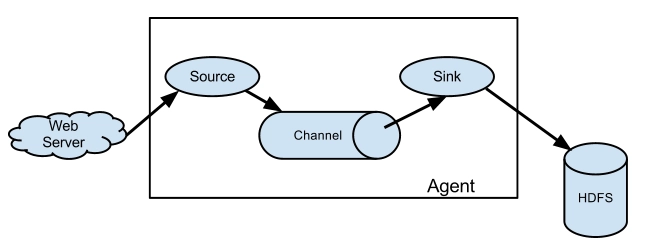
简单结构
单个agent采集数据
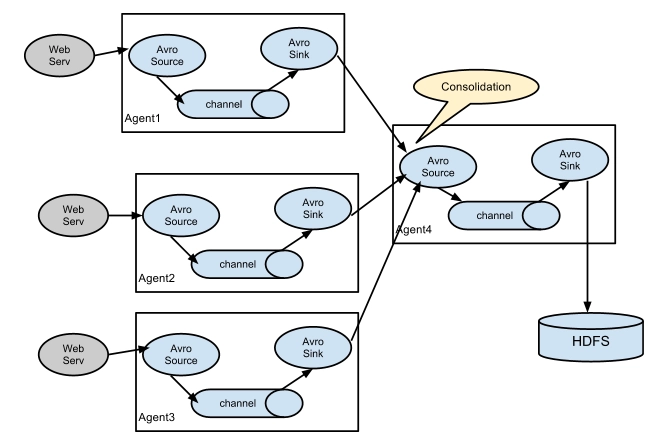
复杂结构
多级agent之间串联
Flume安装部署
- Flume的安装非常简单
上传安装包到数据源所在节点上
然后解压 tar -zxvf apache-flume-1.8.0-bin.tar.gz
然后进入flume的目录,修改conf下的flume-env.sh,在里面配置JAVA_HOME - 根据数据采集需求配置采集方案,描述在配置文件中(文件名可任意自定义)
- 指定采集方案配置文件,在相应的节点上启动flume agent
先用一个最简单的例子来测试一下程序环境是否正常
1、先在flume的conf目录下新建一个文件
vi netcat-logger.conf
# 定义这个agent中各组件的名字
a1.sources = r1
a1.sinks = k1
a1.channels = c1

# 描述和配置source组件:r1
a1.sources.r1.type = netcat
a1.sources.r1.bind = localhost
a1.sources.r1.port = 44444

# 描述和配置sink组件:k1
a1.sinks.k1.type = logger

# 描述和配置channel组件,此处使用是内存缓存的方式
a1.channels.c1.type = memory
a1.channels.c1.capacity = 1000
a1.channels.c1.transactionCapacity = 100

# 描述和配置source  channel   sink之间的连接关系
a1.sources.r1.channels = c1
a1.sinks.k1.channel = c1
2、启动agent去采集数据
bin/flume-ng agent -c conf -f conf/netcat-logger.conf -n a1 -Dflume.root.logger=INFO,console
-c conf 指定flume自身的配置文件所在目录
-f conf/netcat-logger.con 指定我们所描述的采集方案
-n a1 指定我们这个agent的名字
3、测试
先要往agent采集监听的端口上发送数据,让agent有数据可采。
随便在一个能跟agent节点联网的机器上:
telnet anget-hostname port (telnet localhost 44444)
Flume简单案例
采集目录到HDFS
采集需求:服务器的某特定目录下,会不断产生新的文件,每当有新文件出现,就需要把文件采集到HDFS中去
根据需求,首先定义以下3大要素
- 采集源,即source——监控文件目录 : spooldir
- 下沉目标,即sink——HDFS文件系统 : hdfs sink
- source和sink之间的传递通道——channel,可用file channel 也可以用内存channel
配置文件编写:
# Name the components on this agent
a1.sources = r1
a1.sinks = k1
a1.channels = c1

# Describe/configure the source
##注意:不能往监控目中重复丢同名文件
a1.sources.r1.type = spooldir
a1.sources.r1.spoolDir = /root/logs
a1.sources.r1.fileHeader = true

# Describe the sink
a1.sinks.k1.type = hdfs
a1.sinks.k1.hdfs.path = /flume/events/%y-%m-%d/%H%M/
a1.sinks.k1.hdfs.filePrefix = events-
a1.sinks.k1.hdfs.round = true
a1.sinks.k1.hdfs.roundValue = 10
a1.sinks.k1.hdfs.roundUnit = minute
a1.sinks.k1.hdfs.rollInterval = 3
a1.sinks.k1.hdfs.rollSize = 20
a1.sinks.k1.hdfs.rollCount = 5
a1.sinks.k1.hdfs.batchSize = 1
a1.sinks.k1.hdfs.useLocalTimeStamp = true
#生成的文件类型,默认是Sequencefile,可用DataStream,则为普通文本
a1.sinks.k1.hdfs.fileType = DataStream

# Use a channel which buffers events in memory
a1.channels.c1.type = memory
a1.channels.c1.capacity = 1000
a1.channels.c1.transactionCapacity = 100

# Bind the source and sink to the channel
a1.sources.r1.channels = c1
a1.sinks.k1.channel = c1
Channel参数解释:
capacity:默认该通道中最大的可以存储的event数量
trasactionCapacity:每次最大可以从source中拿到或者送到sink中的event数量
采集文件到HDFS
采集需求:比如业务系统使用log4j生成的日志,日志内容不断增加,需要把追加到日志文件中的数据实时采集到hdfs
根据需求,首先定义以下3大要素
- 采集源,即source——监控文件内容更新 : exec ‘tail -F file’
- 下沉目标,即sink——HDFS文件系统 : hdfs sink
- Source和sink之间的传递通道——channel,可用file channel 也可以用 内存channel
配置文件编写:
# Name the components on this agent
a1.sources = r1
a1.sinks = k1
a1.channels = c1

# Describe/configure the source
a1.sources.r1.type = exec
a1.sources.r1.command = tail -F /root/logs/test.log
a1.sources.r1.channels = c1

# Describe the sink
a1.sinks.k1.type = hdfs
a1.sinks.k1.hdfs.path = /flume/tailout/%y-%m-%d/%H%M/
a1.sinks.k1.hdfs.filePrefix = events-
a1.sinks.k1.hdfs.round = true
a1.sinks.k1.hdfs.roundValue = 10
a1.sinks.k1.hdfs.roundUnit = minute
a1.sinks.k1.hdfs.rollInterval = 3
a1.sinks.k1.hdfs.rollSize = 20
a1.sinks.k1.hdfs.rollCount = 5
a1.sinks.k1.hdfs.batchSize = 1
a1.sinks.k1.hdfs.useLocalTimeStamp = true
#生成的文件类型,默认是Sequencefile,可用DataStream,则为普通文本
a1.sinks.k1.hdfs.fileType = DataStream

# Use a channel which buffers events in memory
a1.channels.c1.type = memory
a1.channels.c1.capacity = 1000
a1.channels.c1.transactionCapacity = 100

# Bind the source and sink to the channel
a1.sources.r1.channels = c1
a1.sinks.k1.channel = c1
参数解析:
- rollInterval
默认值:30
hdfs sink间隔多长将临时文件滚动成最终目标文件,单位:秒;
如果设置成0,则表示不根据时间来滚动文件;
注:滚动(roll)指的是,hdfs sink将临时文件重命名成最终目标文件,并新打开一个临时文件来写入数据; - rollSize
默认值:1024
当临时文件达到该大小(单位:bytes)时,滚动成目标文件;
如果设置成0,则表示不根据临时文件大小来滚动文件; - rollCount
默认值:10
当events数据达到该数量时候,将临时文件滚动成目标文件;
如果设置成0,则表示不根据events数据来滚动文件; - round
默认值:false
是否启用时间上的“舍弃”,这里的“舍弃”,类似于“四舍五入”。 - roundValue
默认值:1
时间上进行“舍弃”的值; - roundUnit
默认值:seconds
时间上进行“舍弃”的单位,包含:second,minute,hour
示例:
a1.sinks.k1.hdfs.path = /flume/events/%y-%m-%d/%H%M/%S
a1.sinks.k1.hdfs.round = true
a1.sinks.k1.hdfs.roundValue = 10
a1.sinks.k1.hdfs.roundUnit = minute
当时间为2015-10-16 17:38:59时候,hdfs.path依然会被解析为:
/flume/events/20151016/17:30/00
因为设置的是舍弃10分钟内的时间,因此,该目录每10分钟新生成一个。
Flume的load-balance、failover
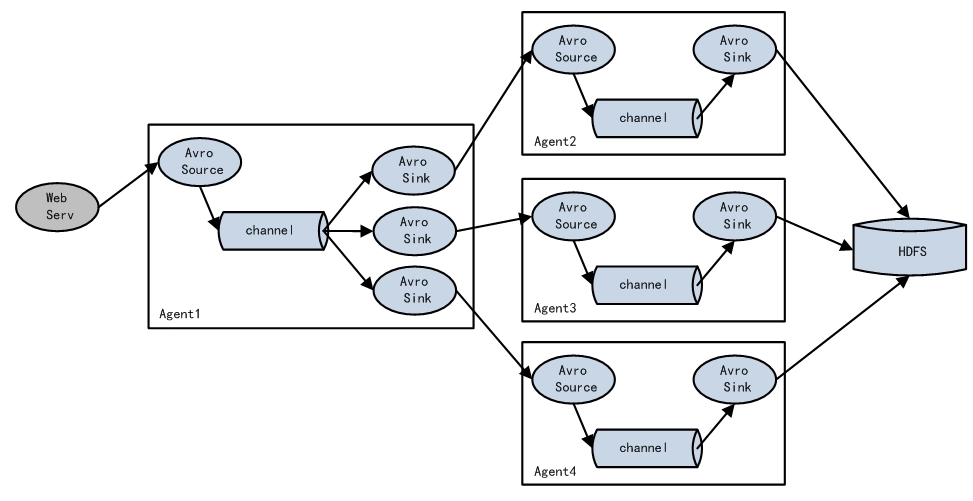
负载均衡是用于解决一台机器(一个进程)无法解决所有请求而产生的一种算法。Load balancing Sink Processor能够实现load balance功能,如下图Agent1是一个路由节点,负责将Channel暂存的Event均衡到对应的多个Sink组件上,而每个Sink组件分别连接到一个独立的Agent上,示例配置,如下所示:
a1.sinkgroups = g1
a1.sinkgroups.g1.sinks = k1 k2 k3
a1.sinkgroups.g1.processor.type = load_balance
a1.sinkgroups.g1.processor.backoff = true  #如果开启,则将失败的sink放入黑名单
a1.sinkgroups.g1.processor.selector = round_robin  # 另外还支持random
a1.sinkgroups.g1.processor.selector.maxTimeOut=10000 #在黑名单放置的超时时间,超时结束时,若仍然无法接收,则超时时间呈指数增长
Failover Sink Processor能够实现failover功能,具体流程类似load balance,但是内部处理机制与load balance完全不同。
Failover Sink Processor维护一个优先级Sink组件列表,只要有一个Sink组件可用,Event就被传递到下一个组件。故障转移机制的作用是将失败的Sink降级到一个池,在这些池中它们被分配一个冷却时间,随着故障的连续,在重试之前冷却时间增加。一旦Sink成功发送一个事件,它将恢复到活动池。 Sink具有与之相关的优先级,数量越大,优先级越高。
例如,具有优先级为100的sink在优先级为80的Sink之前被激活。如果在发送事件时汇聚失败,则接下来将尝试下一个具有最高优先级的Sink发送事件。如果没有指定优先级,则根据在配置中指定Sink的顺序来确定优先级。
示例配置如下所示:
a1.sinkgroups = g1
a1.sinkgroups.g1.sinks = k1 k2 k3
a1.sinkgroups.g1.processor.type = failover
a1.sinkgroups.g1.processor.priority.k1 = 5  #优先级值, 绝对值越大表示优先级越高
a1.sinkgroups.g1.processor.priority.k2 = 7
a1.sinkgroups.g1.processor.priority.k3 = 6
a1.sinkgroups.g1.processor.maxpenalty = 20000  #失败的Sink的最大回退期(millis)
Flume拦截器实战案例
日志的采集和汇总
案例场景
A、B两台日志服务机器实时生产日志主要类型为access.log、nginx.log、web.log
现在要求:
把A、B 机器中的access.log、nginx.log、web.log 采集汇总到C机器上然后统一收集到hdfs中。
但是在hdfs中要求的目录为:
/source/logs/access/20160101/**
/source/logs/nginx/20160101/**
/source/logs/web/20160101/**
场景分析
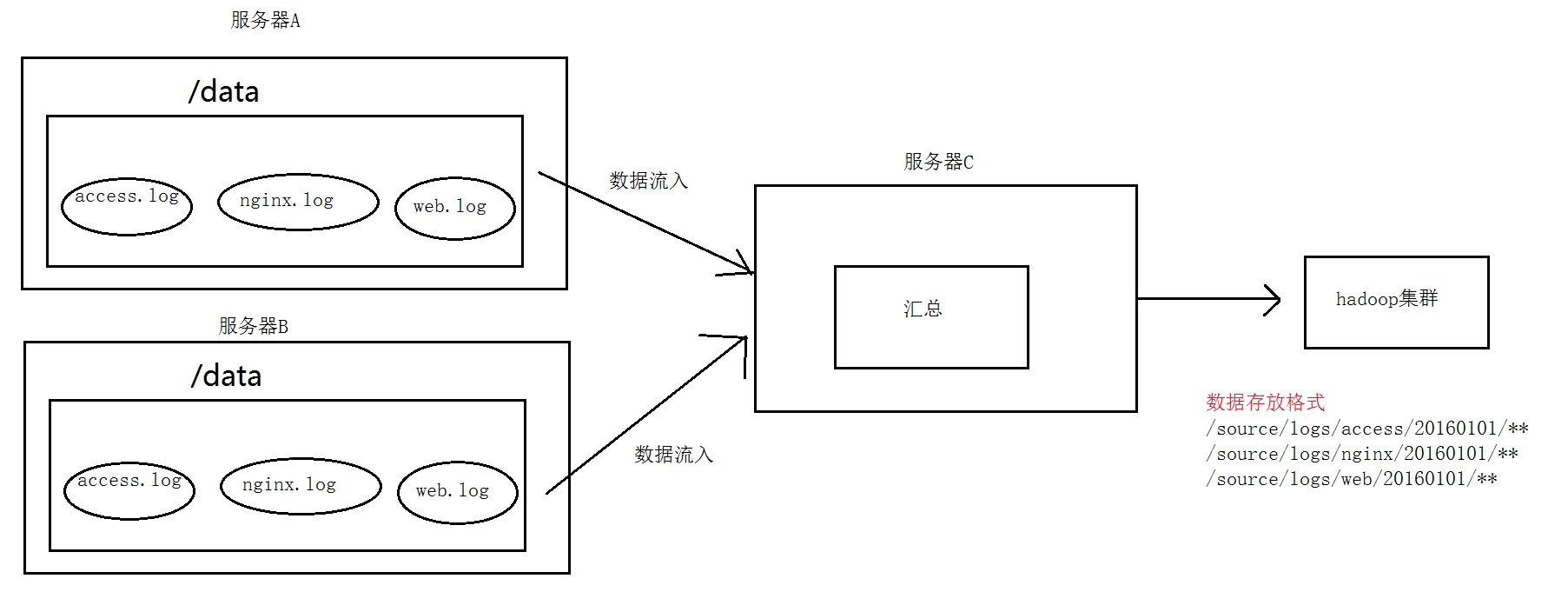
数据流程处理分析
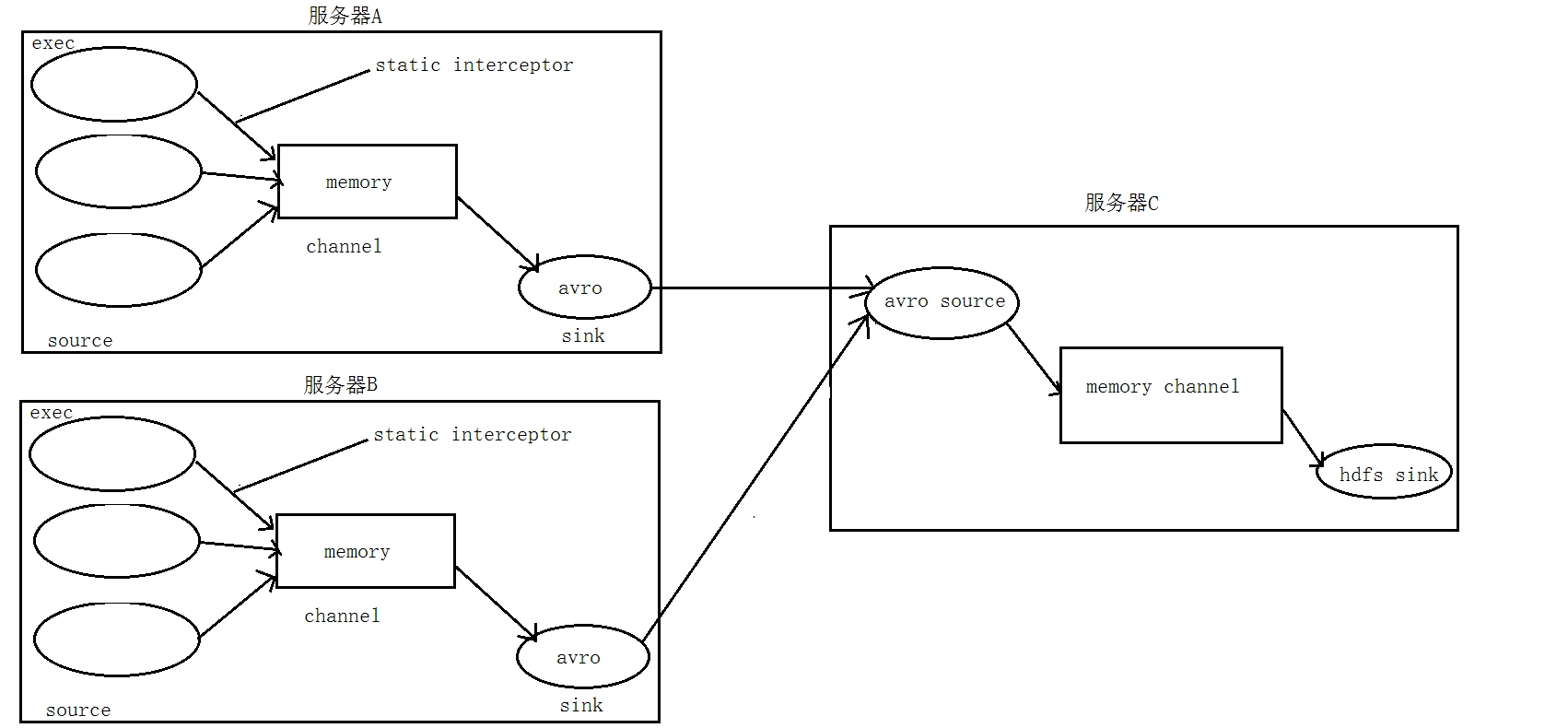
功能实现
① 在服务器A和服务器B上
创建配置文件  exec_source_avro_sink.conf

# Name the components on this agent
a1.sources = r1 r2 r3
a1.sinks = k1
a1.channels = c1

# Describe/configure the source
a1.sources.r1.type = exec
a1.sources.r1.command = tail -F /root/data/access.log
a1.sources.r1.interceptors = i1
a1.sources.r1.interceptors.i1.type = static
###  static拦截器的功能就是往采集到的数据的header中插入自##  己定义的key-value对
a1.sources.r1.interceptors.i1.key = type
a1.sources.r1.interceptors.i1.value = access

a1.sources.r2.type = exec
a1.sources.r2.command = tail -F /root/data/nginx.log
a1.sources.r2.interceptors = i2
a1.sources.r2.interceptors.i2.type = static
a1.sources.r2.interceptors.i2.key = type
a1.sources.r2.interceptors.i2.value = nginx

a1.sources.r3.type = exec
a1.sources.r3.command = tail -F /root/data/web.log
a1.sources.r3.interceptors = i3
a1.sources.r3.interceptors.i3.type = static
a1.sources.r3.interceptors.i3.key = type
a1.sources.r3.interceptors.i3.value = web

# Describe the sink
a1.sinks.k1.type = avro
a1.sinks.k1.hostname = 192.168.200.101
a1.sinks.k1.port = 41414

# Use a channel which buffers events in memory
a1.channels.c1.type = memory
a1.channels.c1.capacity = 20000
a1.channels.c1.transactionCapacity = 10000

# Bind the source and sink to the channel
a1.sources.r1.channels = c1
a1.sources.r2.channels = c1
a1.sources.r3.channels = c1
a1.sinks.k1.channel = c1

② 在服务器C上创建配置文件  avro_source_hdfs_sink.conf  文件内容为

#定义agent名, source、channel、sink的名称
a1.sources = r1
a1.sinks = k1
a1.channels = c1

#定义source
a1.sources.r1.type = avro
a1.sources.r1.bind = mini2
a1.sources.r1.port =41414

#添加时间拦截器
a1.sources.r1.interceptors = i1
a1.sources.r1.interceptors.i1.type =
org.apache.flume.interceptor.TimestampInterceptor$Builder

#定义channels
a1.channels.c1.type = memory
a1.channels.c1.capacity = 20000
a1.channels.c1.transactionCapacity = 10000

#定义sink
a1.sinks.k1.type = hdfs
a1.sinks.k1.hdfs.path=hdfs://192.168.200.101:9000/source/logs/%{type}/%Y%m%d
a1.sinks.k1.hdfs.filePrefix =events
a1.sinks.k1.hdfs.fileType = DataStream
a1.sinks.k1.hdfs.writeFormat = Text
#时间类型
a1.sinks.k1.hdfs.useLocalTimeStamp = true
#生成的文件不按条数生成
a1.sinks.k1.hdfs.rollCount = 0
#生成的文件按时间生成
a1.sinks.k1.hdfs.rollInterval = 30
#生成的文件按大小生成
a1.sinks.k1.hdfs.rollSize  = 10485760
#批量写入hdfs的个数
a1.sinks.k1.hdfs.batchSize = 10000
flume操作hdfs的线程数(包括新建,写入等)
a1.sinks.k1.hdfs.threadsPoolSize=10
#操作hdfs超时时间
a1.sinks.k1.hdfs.callTimeout=30000

#组装source、channel、sink
a1.sources.r1.channels = c1
a1.sinks.k1.channel = c1
③ 配置完成之后,在服务器A和B上的/root/data有数据文件access.log、nginx.log、web.log。先启动服务器C上的flume,启动命令
在flume安装目录下执行 :
bin/flume-ng agent -c conf -f conf/avro_source_hdfs_sink.conf -name a1 -Dflume.root.logger=DEBUG,console

然后在启动服务器上的A和B,启动命令
在flume安装目录下执行 :
bin/flume-ng agent -c conf -f conf/exec_source_avro_sink.conf -name a1 -Dflume.root.logger=DEBUG,console
Flume自定义拦截器
案例背景介绍
Flume是Cloudera提供的一个高可用的,高可靠的,分布式的海量日志采集、聚合和传输的系统,Flume支持在日志系统中定制各类数据发送方,用于收集数据;同时,Flume提供对数据进行简单处理,并写到各种数据接受方(可定制)的能力。Flume 有各种自带的拦截器,比如: TimestampInterceptor 、 HostInterceptor 、 RegexExtractorInterceptor 等, 通过使用不同的拦截器,实现不同的功能。 但是以上的这些拦截器,不能改变原有日志数据的内容或者对日志信息添加一定的处理逻辑,当一条日志信息有几十个甚至上百个字段的时候,在传统的Flume处理下,收集到的日志还是会有对应这么多的字段,也不能对你想要的字段进行对应的处理。
自定义拦截器
根据实际业务的需求,为了更好的满足数据在应用层的处理,通过自定义Flume拦截器,过滤掉不需要的字段,并对指定字段加密处理,将源数据进行预处理。减少了数据的传输量,降低了存储的开销。
功能实现
本技术方案核心包括二部分:
Ø 编写java代码,自定义拦截器
内容包括:
- 定义一个类CustomParameterInterceptor实现Interceptor接口。
- 在CustomParameterInterceptor类中定义变量,这些变量是需要到 Flume的配置文件中进行配置使用的。每一行字段间的分隔符(fields_separator)、通过分隔符分隔后,所需要列字段的下标(indexs)、多个下标使用的分隔符(indexs_separator)、多个下标使用的分隔符(indexs_separator)。
- 添加CustomParameterInterceptor的有参构造方法。并对相应的变量进行处理。将配置文件中传过来的unicode编码进行转换为字符串。
- 写具体的要处理的逻辑intercept()方法,一个是单个处理的,一个是批量处理。
- 接口中定义了一个内部接口Builder,在configure方法中,进行一些参数配置。并给出,在flume的conf中没配置一些参数时,给出其默认值。通过其builder方法,返回一个CustomParameterInterceptor对象。
 定义一个静态类,类中封装MD5加密方法
- 通过以上步骤,自定义拦截器的代码开发已完成,然后打包成jar, 放到Flume的根目录下的lib中
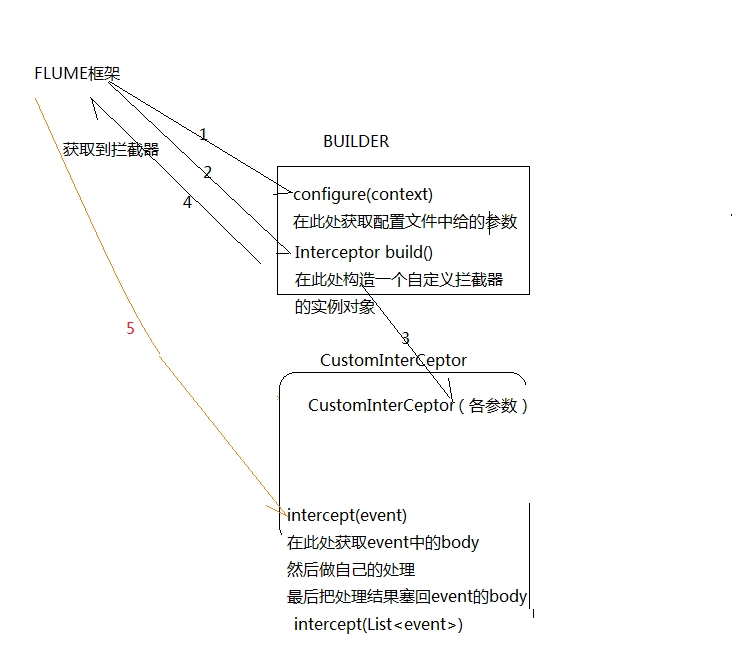
修改Flume的配置信息
新增配置文件spool-interceptor-hdfs.conf,内容为:
a1.channels = c1
a1.sources = r1
a1.sinks = s1
#channel
a1.channels.c1.type = memory
a1.channels.c1.capacity=100000
a1.channels.c1.transactionCapacity=50000
#source
a1.sources.r1.channels = c1
a1.sources.r1.type = spooldir
a1.sources.r1.spoolDir = /root/data/
a1.sources.r1.batchSize= 50
a1.sources.r1.inputCharset = UTF-8
a1.sources.r1.interceptors =i1 i2
a1.sources.r1.interceptors.i1.type =cn.itcast.interceptor.CustomParameterInterceptor$Builder
a1.sources.r1.interceptors.i1.fields_separator=\\u0009
a1.sources.r1.interceptors.i1.indexs =0,1,3,5,6
a1.sources.r1.interceptors.i1.indexs_separator =\\u002c
a1.sources.r1.interceptors.i1.encrypted_field_index =0
a1.sources.r1.interceptors.i2.type = org.apache.flume.interceptor.TimestampInterceptor$Builder
#sink
a1.sinks.s1.channel = c1
a1.sinks.s1.type = hdfs
a1.sinks.s1.hdfs.path =hdfs://192.168.200.101:9000/flume/%Y%m%d
a1.sinks.s1.hdfs.filePrefix = event
a1.sinks.s1.hdfs.fileSuffix = .log
a1.sinks.s1.hdfs.rollSize = 10485760
a1.sinks.s1.hdfs.rollInterval =20
a1.sinks.s1.hdfs.rollCount = 0
a1.sinks.s1.hdfs.batchSize = 1500
a1.sinks.s1.hdfs.round = true
a1.sinks.s1.hdfs.roundUnit = minute
a1.sinks.s1.hdfs.threadsPoolSize = 25
a1.sinks.s1.hdfs.useLocalTimeStamp = true
a1.sinks.s1.hdfs.minBlockReplicas = 1
a1.sinks.s1.hdfs.fileType =DataStream
a1.sinks.s1.hdfs.writeFormat = Text
a1.sinks.s1.hdfs.callTimeout = 60000
a1.sinks.s1.hdfs.idleTimeout =60
启动:
bin/flume-ng agent -c conf -f conf/spool-interceptor-hdfs.conf -name a1 -Dflume.root.logger=DEBUG,console
项目实现截图
原始文件内容

采集之后数据内容:

Flume高阶自定义组件
Flume自定义Source (扩展)
自定义Source说明
Source是负责接收数据到Flume Agent的组件。Source组件可以处理各种类型、各种格式的日志数据,包括avro、thrift、exec、jms、spooling directory、netcat、sequence generator、syslog、http、legacy。官方提供的source类型已经很多,但是有时候并不能满足实际开发当中的需求,此时我们就需要根据实际需求自定义某些source。
如:实时监控MySQL,从MySQL中获取数据传输到HDFS或者其他存储框架,所以此时需要我们自己实现 MySQLSource 。
官方也提供了自定义source的接口:
官网说明:https://flume.apache.org/FlumeDeveloperGuide.html#source
自定义Source原理
根据官方说明自定义mysqlsource需要继承AbstractSource类并实现Configurable和PollableSource接口。
实现相应方法:
getBackOffSleepIncrement() //暂不用
getMaxBackOffSleepInterval() //暂不用
configure(Context context) //初始化context
process() //获取数据(从mysql获取数据,业务处理比较复杂,所以我们定义一个专门的类——QueryMysql来处理跟mysql的交互),封装成event并写入channel,这个方法被循环调用
stop() //关闭相关的资源
自定义Source具体实现
创建mysql数据库以及mysql数据库表
CREATE DATABASE `mysqlsource`;
USE `mysqlsource`;
/*Table structure for table `flume_meta` */
DROP TABLE
IF EXISTS `flume_meta`;

CREATE TABLE `flume_meta` (
    `source_tab` VARCHAR (255) NOT NULL,
    `currentIndex` VARCHAR (255) NOT NULL,
    PRIMARY KEY (`source_tab`)
) ENGINE = INNODB DEFAULT CHARSET = utf8;

/*Data for the table `flume_meta` */
INSERT INTO `flume_meta` (
    `source_tab`,
    `currentIndex`
)
VALUES
    ('student', '4');

/*Table structure for table `student` */
DROP TABLE
IF EXISTS `student`;

CREATE TABLE `student` (
    `id` INT (11) NOT NULL AUTO_INCREMENT,
    `name` VARCHAR (255) NOT NULL,
    PRIMARY KEY (`id`)
) ENGINE = INNODB AUTO_INCREMENT = 5 DEFAULT CHARSET = utf8;

/*Data for the table `student` */
INSERT INTO `student` (`id`, `name`)
VALUES
    (1, 'zhangsan'), (2, 'lisi'), (3, 'wangwu'), (4, 'zhaoliu');
创建maven工程导入pom依赖
<dependencies>
    <dependency>
        <groupId>org.apache.flume</groupId>
        <artifactId>flume-ng-core</artifactId>
        <version>1.8.0</version>
        <scope>provided</scope>
    </dependency>

    <dependency>
        <groupId>mysql</groupId>
        <artifactId>mysql-connector-java</artifactId>
        <version>5.1.38</version>
    </dependency>
    <dependency>
        <groupId>org.apache.commons</groupId>
        <artifactId>commons-lang3</artifactId>
        <version>3.6</version>
    </dependency>
</dependencies>
定义QueryMysql工具类
详细见附件参考资料
定义MySqlSource主类
详细见附件参考资料
功能测试
使用maven对工程进行打包,需要将mysql的依赖包一起打到jar包里,然后将打包好的jar包放到flume的lib目录下。
编辑flume的配置文件如下:
a1.sources = r1
a1.sinks = k1
a1.channels = c1

# Describe/configure the source
a1.sources.r1.type = cn.itcast.flumesource.MySqlSource
a1.sources.r1.connection.url = jdbc:mysql://node-1:3306/mysqlsource
a1.sources.r1.connection.user = root
a1.sources.r1.connection.password = hadoop
a1.sources.r1.table = student
a1.sources.r1.columns.to.select = *
a1.sources.r1.incremental.column.name = id
a1.sources.r1.incremental.value = 0
a1.sources.r1.run.query.delay=3000

# Describe the sink
a1.sinks.k1.type = logger

# Describe the channel
a1.channels.c1.type = memory
a1.channels.c1.capacity = 1000
a1.channels.c1.transactionCapacity = 100

# Bind the source and sink to the channel
a1.sources.r1.channels = c1
a1.sinks.k1.channel = c1
启动flume并查看结果:
bin/flume-ng agent -c conf -f conf/mysqlsource.conf -n a1 -Dflume.root.logger=INFO,console
Flume自定义Sink(扩展)
自定义Sink说明
同自定义source类似,对于某些sink如果没有我们想要的,我们也可以自定义sink实现将数据保存到我们想要的地方去,例如kafka,或者mysql,或者文件等等都可以
需求:从网络端口当中发送数据,自定义sink,使用sink从网络端口接收数据,然后将数据保存到本地文件当中去。
自定义Sink原理实现
自定义MySink
public class MySink extends AbstractSink implements Configurable {
    private Context context ;
    private String filePath = "";
    private String fileName = "";
    private File fileDir;

    //这个方法会在初始化调用,主要用于初始化我们的Context,获取我们的一些配置参数
    @Override
    public void configure(Context context) {
        try {
            this.context = context;
            filePath = context.getString("filePath");
            fileName = context.getString("fileName");
            fileDir = new File(filePath);
            if(!fileDir.exists()){
                fileDir.mkdirs();
            }
        } catch (Exception e) {
            e.printStackTrace();
        }
    }
    //这个方法会被反复调用
    @Override
    public Status process() throws EventDeliveryException {
        Event event = null;
        Channel channel = this.getChannel();
        Transaction transaction = channel.getTransaction();
        transaction.begin();
        while(true){
            event = channel.take();
            if(null != event){
                break;
            }
        }
        byte[] body = event.getBody();
        String line = new String(body);
        try {
            FileUtils.write(new File(filePath+File.separator+fileName),line,true);
            transaction.commit();
        } catch (IOException e) {
            transaction.rollback();
            e.printStackTrace();
            return Status.BACKOFF;
        }finally {
            transaction.close();
        }
        return Status.READY;
    }
}
功能测试
将代码使用打包插件,打成jar包,注意一定要将commons-langs这个依赖包打进去,放到flume的lib目录下
开发flume的配置文件: