Wordpress主题Argon和外观详细配置 - 梦呓
前言 经过前面文章的学习,相信小伙伴们已经搭建好了一个基础博客,界面啥的还都是默认的,但是颜值即正义嘛~ 漂亮的页面和丝滑的操作读文章也会开心很多,经过本文章的学习,大家会有一个炫酷好看博客的~
经过多方调研,最终选定了Argon 这款主题,首先它文档相对完善,国内用户多,能找到一些教程或魔改思路。界面美观,功能相对完整,自带文章目录(TOC)、代码高亮、文章点赞/打赏、分享功能。评论区美化,内置表情、Ajax 评论。支持 Banner 图、文章封面、卡片式排版等。访问速度也较快,前端资源经过优化,CSS/JS体积不算太大,支持懒加载、部分功能异步加载,利于性能和 SEO。内置基础 SEO 优化(标题、描述、Open Graph 等)。结构化数据支持较友好。
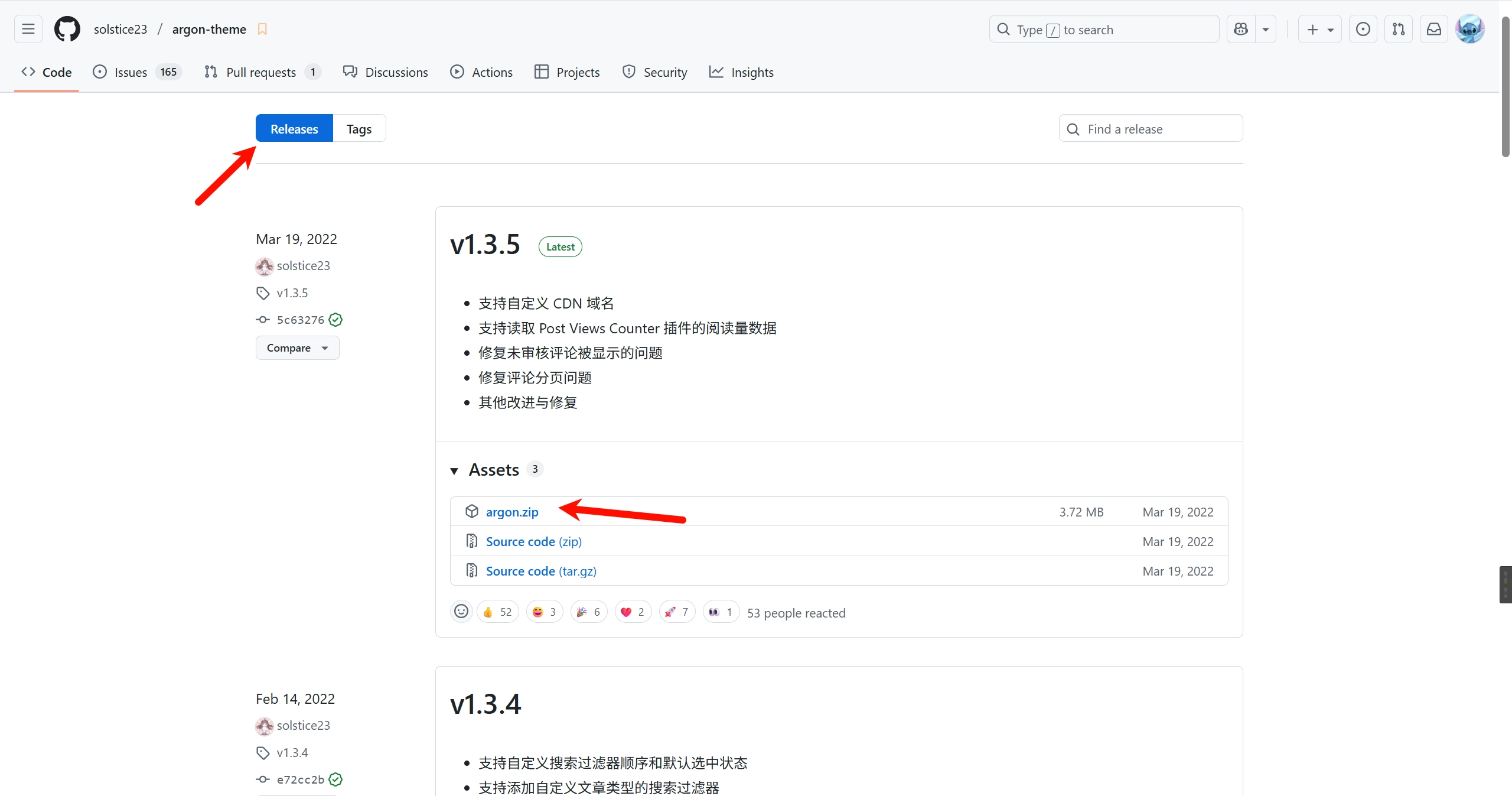
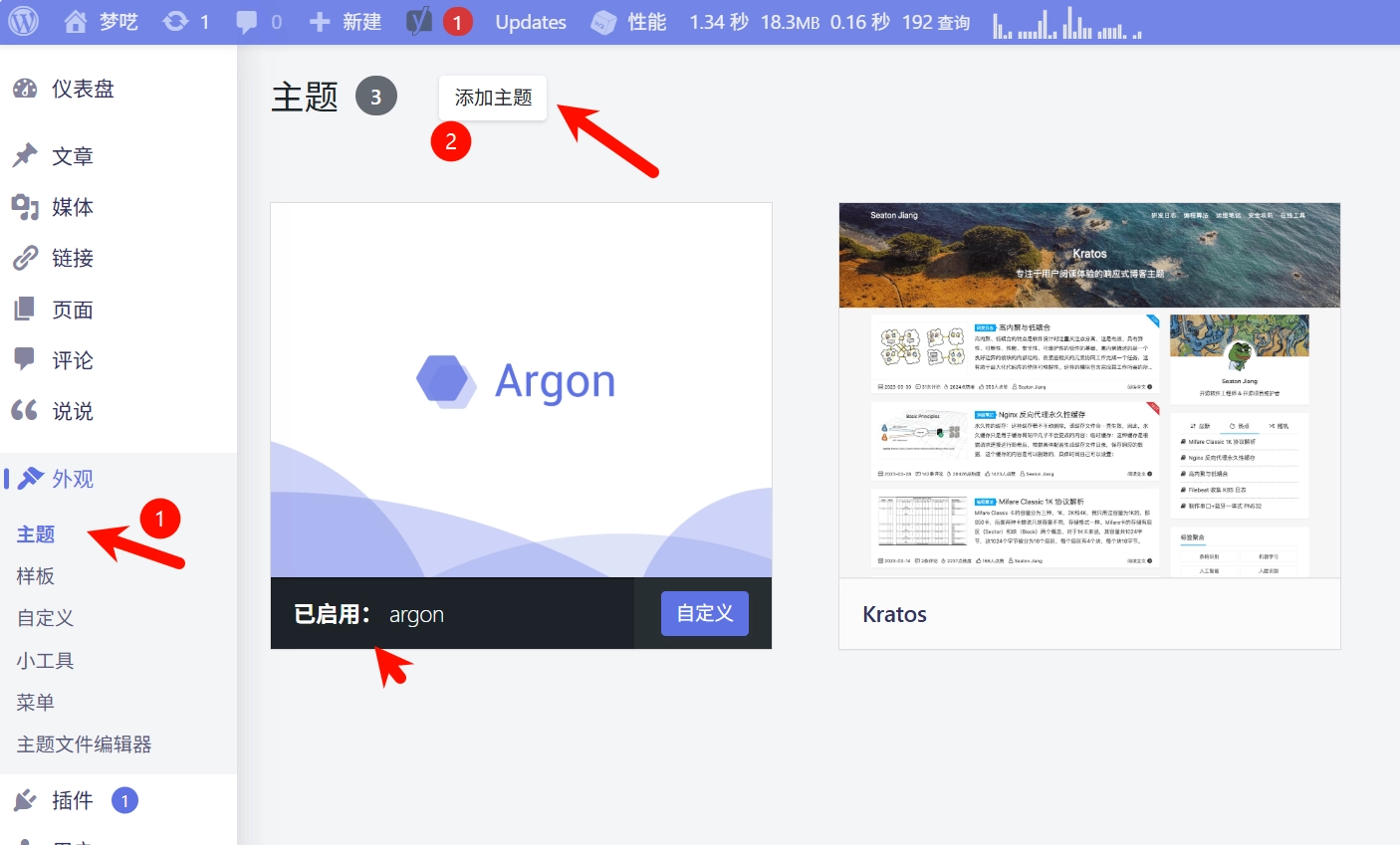
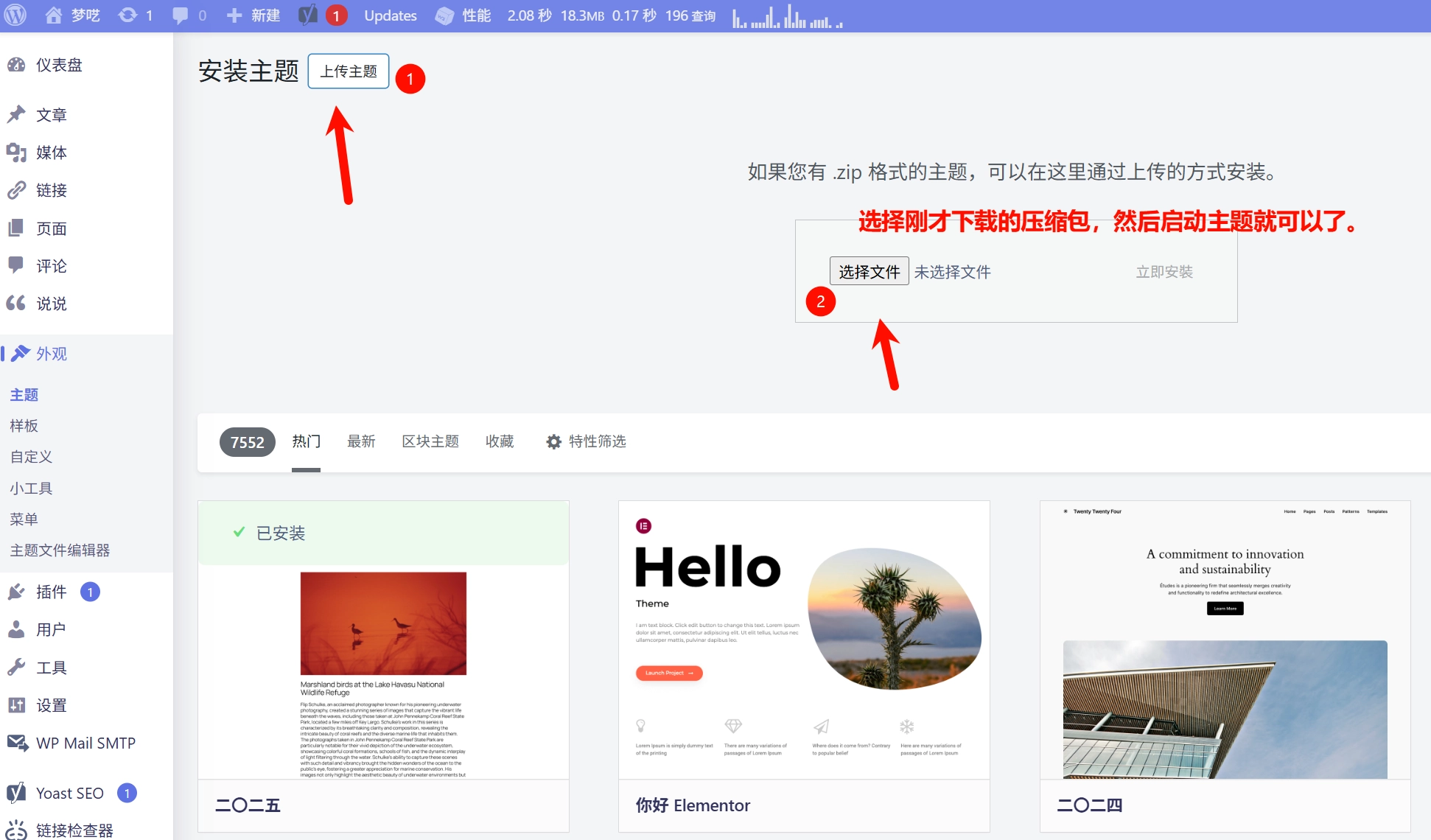
Argon主题配置 安装 由于Argon是第三方主题,所以不能在wordpress插件市场里直接安装,需要下载主题压缩包上传安装。首先在Github 下载压缩包,不能翻墙的小伙伴可以从这里下载。下载完成后直接在插件列表这里上传插件即可:
详细配置 安装完成后可以在左侧菜单栏找到Argon主题选项 菜单就可以进行设置了,以下是我的详细设置,大家可以参考:
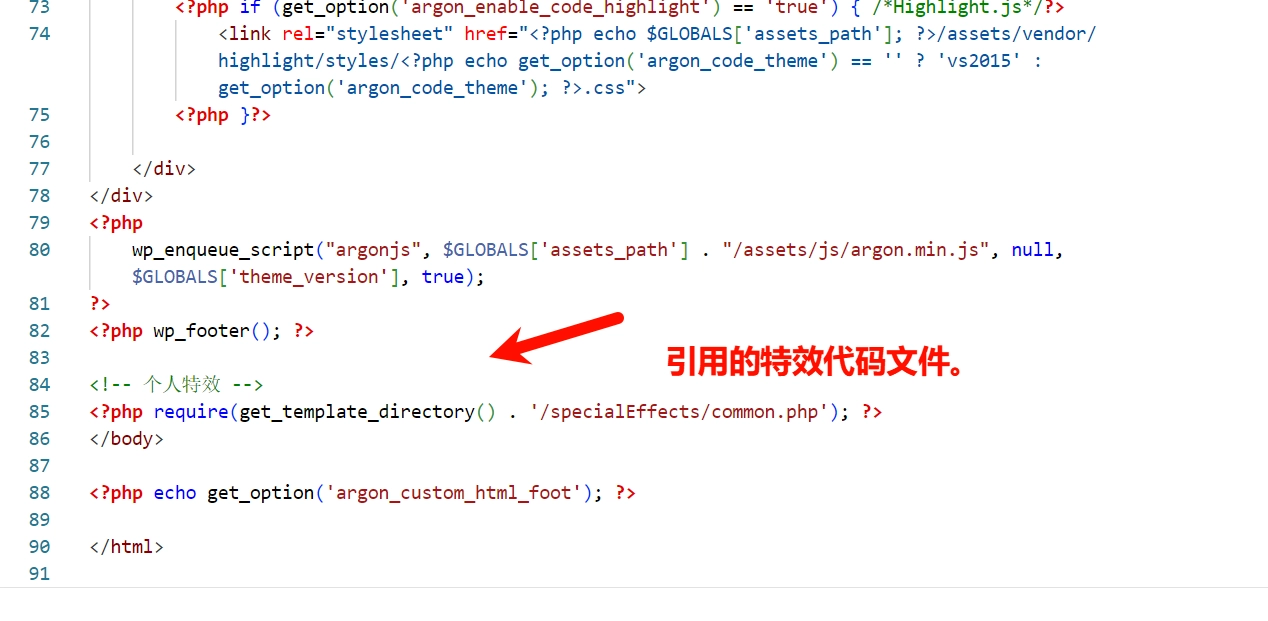
特效配置 除了Argon对页面的美化,我们还加入了一些自定义的美化,大家可以根据自己需要添加。他们都是基于/usr/apps/blog/wordpressData/wp-content/themes/argon/footer.php文件进行添加的。
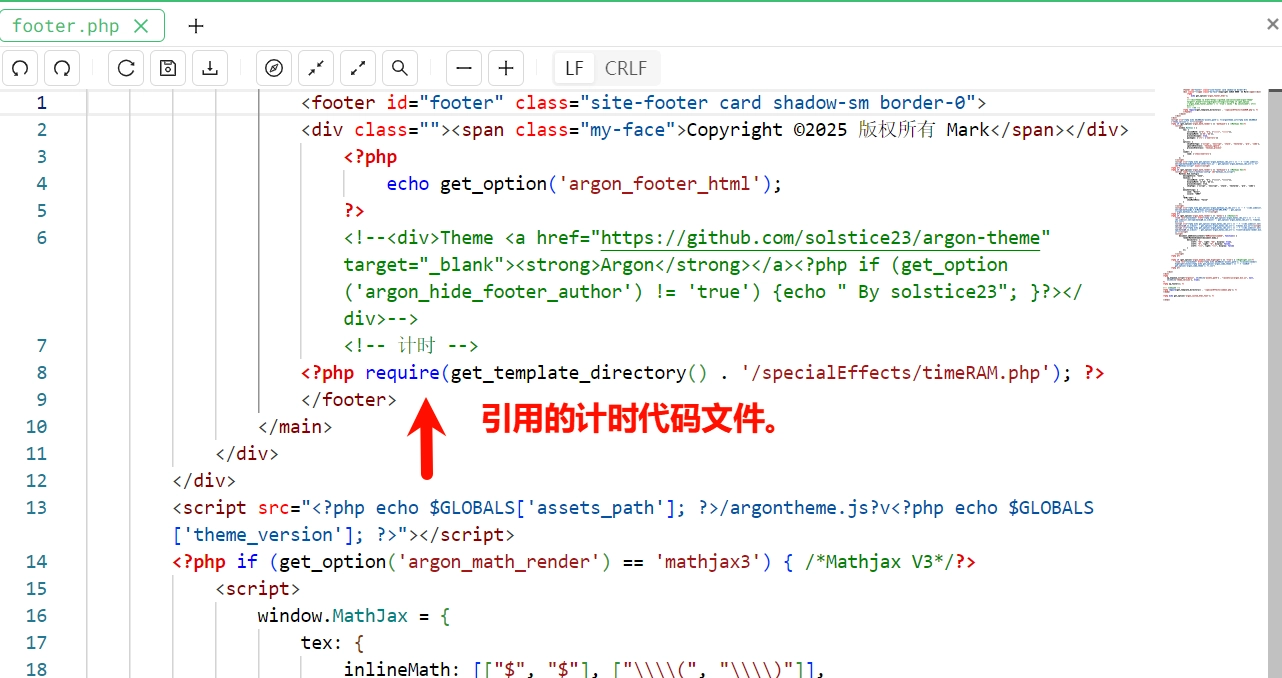
已经通过两个文件——common.php和timeRAM.php托管平时经常编辑的特效代码,这和直接在footer.php里添加是等价的。在footer.php引用的方法类似于:
这样做的原因有两个:(1)分开托管逻辑比较清晰,源代码不容易因为更新丢失(禁用了argon自动更新,然后还有备份,其实还好)
common.php文件 在在footer.php同级目录新建文件夹和文件/specialEffects/common.php,以下是详细内容,图省事可以直接复制使用,下方有详细说明。
<!-- 用法
    在footer.php中</body>标签前引用下列命令即可:第一个!记得去掉!
    <!?php require('./specialEffects/common.php'); ?>
-->


<!-- 数学公式支持-->
<script type="text/x-mathjax-config">
  MathJax.Hub.Config({
    tex2jax: {
      inlineMath: [['$','$'], ['\\(','\\)']],
      processEscapes: true
    }
  });
</script>


<!-- 设备判断JS脚本
    用法:https://github.com/hgoebl/mobile-detect.js#readme
    也可至bloghelper取得: https://fastly.jsdelivr.net/gh/huangwb8/bloghelper@latest/js/mobile-detect.js
-->
<script src="https://cdn.jsdelivr.net/gh/huangwb8/bloghelper@latest/js/mobile-detect.js"></script>

<!--全页特效开始-->
<script type="text/javascript">

    // 设备检测
    var md = new MobileDetect(window.navigator.userAgent);

    // PC生效,手机/平板不生效
    // md.mobile(); md.phone();
    if(!md.phone()){

        if(!md.tablet()){

            // 雪花
            // $.getScript("https://cdn.jsdelivr.net/gh/huangwb8/bloghelper@latest/js/xiaxue.js");

            // 樱花
           // $.getScript("https://cdn.jsdelivr.net/gh/huangwb8/bloghelper@latest/js/yinghua.js");

            // 小烟花特效
            // $.getScript("https://cdn.jsdelivr.net/gh/huangwb8/bloghelper@latest/js/mouse-click.js");

            // 大烟花特效 z-index:217483647; pointer-events: none;
            // $.getScript("https://fastly.jsdelivr.net/gh/huangwb8/bloghelper@latest/mouse/mouse-click-02/mouse-canvas.js");
            // document.write('<style>#mouse-canvas {z-index:217483647; pointer-events: none;  box-sizing: border-box !important; display: block !important; position: fixed !important; left: 0; right: 0; top: 0; bottom: 0; width: 100%; height: 100vh;}</style>')

            // 鼠标移动的仙女棒特效
            $.getScript("https://cdn.jsdelivr.net/gh/huangwb8/bloghelper@latest/mouse/halo-dream/fairyDustCursor.min.js");

            // 鼠标移动的泡泡特效
            // $.getScript("https://cdn.jsdelivr.net/gh/huangwb8/bloghelper@latest/mouse/joe/censor10.js");

        }

        // 春节灯笼
        // document.write('<link href="https://cdn.jsdelivr.net/gh/huangwb8/bloghelper@latest/css/deng.css" rel="stylesheet">');
        // document.write('<div class="deng-box"><div class="deng"><div class="xian"></div><div class="deng-a"><div class="deng-b"><div class="deng-t">春节</div></div></div><div class="shui shui-a"><div class="shui-c"></div><div class="shui-b"></div></div></div></div>');
        // document.write('<div class="deng-box1"><div class="deng"><div class="xian"></div><div class="deng-a"><div class="deng-b"><div class="deng-t">快乐</div></div></div><div class="shui shui-a"><div class="shui-c"></div><div class="shui-b"></div></div></div></div>');

        // 随机图API之动态壁纸
        // document.write('<style type="text/css" id="wp-custom-css">#content:before{opacity: 0;}</style>');
        // document.write('<video src="https://blognas.hwb0307.com/imgapi/index-animated.php" class="bg-video" autoplay="" loop="loop" muted=""></video>');
        // document.write('<style> video.bg-video {position: fixed; z-index: -1;left: 0;right: 0;top: 0;bottom: 0;width: 100vw;height: 100vh; object-fit: cover;pointer-events: none;transition: opacity .3s ease;}</style>')
    }
</script>
<!--全页特效结束-->

<!--鼠标悬停3D效果start-->
<div class="article.post:not(.post-full)" data-tilt></div>
<div class=".shuoshuo-preview-container" data-tilt></div>
<!-- <script type="text/javascript" src="https://cdn.jsdelivr.net/gh/huangwb8/bloghelper@latest/vanilla3D/vanilla-tilt_v1.7.3.js"></script> -->
<script type="text/javascript" src="https://cdn.jsdelivr.net/gh/huangwb8/bloghelper@latest/vanilla3D/vanilla-tilt.js"></script>
<script type="text/javascript">
    // 设备检测
    var md = new MobileDetect(window.navigator.userAgent);

    // PC生效,手机/平板不生效
    // md.mobile(); md.phone();
    if(!md.phone() && !md.tablet()){
        window.pjaxLoaded = function(){
            // 正文卡片
            VanillaTilt.init(document.querySelectorAll("article.post:not(.post-full)"),{
                reverse:                true,  // reverse the tilt direction
                max:                    8,     // max tilt rotation (degrees)
                startX:                 0,      // the starting tilt on the X axis, in degrees.
                startY:                 0,      // the starting tilt on the Y axis, in degrees.
                perspective:            1000,   // Transform perspective, the lower the more extreme the tilt gets.
                scale:                  1.02,      // 2 = 200%, 1.5 = 150%, etc..
                speed:                  600,    // Speed of the enter/exit transition
                transition:             false,   // Set a transition on enter/exit.
                axis:                   "y",    // What axis should be banned. Can be "x", "y", or null
                reset:                  true,   // If the tilt effect has to be reset on exit.
                easing:                 "cubic-bezier(.03,.98,.52,.99)",    // Easing on enter/exit.
                glare:                  false,  // if it should have a "glare" effect
                "max-glare":            0.8,      // the maximum "glare" opacity (1 = 100%, 0.5 = 50%)
                "glare-prerender":      false,  // false = VanillaTilt creates the glare elements for you, otherwise
                                                // you need to add .js-tilt-glare>.js-tilt-glare-inner by yourself
                "mouse-event-element":  null,   // css-selector or link to HTML-element what will be listen mouse events
                gyroscope:              true,   // Boolean to enable/disable device orientation detection,
                gyroscopeMinAngleX:     -45,    // This is the bottom limit of the device angle on X axis, meaning that a device rotated at this angle would tilt the element as if the mouse was on the left border of the element;
                gyroscopeMaxAngleX:     45,     // This is the top limit of the device angle on X axis, meaning that a device rotated at this angle would tilt the element as if the mouse was on the right border of the element;
                gyroscopeMinAngleY:     -45,    // This is the bottom limit of the device angle on Y axis, meaning that a device rotated at this angle would tilt the element as if the mouse was on the top border of the element;
                gyroscopeMaxAngleY:     45,     // This is the top limit of the device angle on Y axis, meaning that a device rotated at this angle would tilt the element as if the mouse was on the bottom border of the element;
            })

            // 说说卡片
            VanillaTilt.init(document.querySelectorAll(".shuoshuo-preview-container"),{
                 reverse:                true,  // reverse the tilt direction
                 max:                    5,     // max tilt rotation (degrees)
                 startX:                 0,      // the starting tilt on the X axis, in degrees.
                 startY:                 0,      // the starting tilt on the Y axis, in degrees.
                 perspective:            2000,   // Transform perspective, the lower the more extreme the tilt gets.
                 scale:                  1.02,      // 2 = 200%, 1.5 = 150%, etc..
                 speed:                  300,    // Speed of the enter/exit transition
                 transition:             false,   // Set a transition on enter/exit.
                 axis:                   "y",    // What axis should be banned. Can be "x", "y", or null
                 reset:                  true,   // If the tilt effect has to be reset on exit.
                 easing:                 "cubic-bezier(.03,.98,.52,.99)",    // Easing on enter/exit.
                 glare:                  false,  // if it should have a "glare" effect
                 "max-glare":            0.8,      // the maximum "glare" opacity (1 = 100%, 0.5 = 50%)
                 "glare-prerender":      false,  // false = VanillaTilt creates the glare elements for you, otherwise
                                                 // you need to add .js-tilt-glare>.js-tilt-glare-inner by yourself
                 "mouse-event-element":  null,   // css-selector or link to HTML-element what will be listen mouse events
                 gyroscope:              true,   // Boolean to enable/disable device orientation detection,
                 gyroscopeMinAngleX:     -45,    // This is the bottom limit of the device angle on X axis, meaning that a device rotated at this angle would tilt the element as if the mouse was on the left border of the element;
                 gyroscopeMaxAngleX:     45,     // This is the top limit of the device angle on X axis, meaning that a device rotated at this angle would tilt the element as if the mouse was on the right border of the element;
                 gyroscopeMinAngleY:     -45,    // This is the bottom limit of the device angle on Y axis, meaning that a device rotated at this angle would tilt the element as if the mouse was on the top border of the element;
                 gyroscopeMaxAngleY:     45,     // This is the top limit of the device angle on Y axis, meaning that a device rotated at this angle would tilt the element as if the mouse was on the bottom border of the element;
             })
        }
        $(window.pjaxLoaded);
        $(document).on('pjax:end', window.pjaxLoaded);
    }
</script>
<!--鼠标悬停3D效果end-->

<!--鼠标名单开始-->
<!-- <script type="text/javascript">
    var a_idx = 0;
    jQuery(document).ready(function($) {
    $("body").click(function(e) {
    //        var a = new Array("❤腿堡-苯苯❤","❤ALSO STARRING-榕榕❤","❤腿堡-亚伯❤","❤腿堡-银露❤","❤腿堡-枫叶❤","❤腿堡-培根❤","❤腿堡-老丘❤","❤腿堡-倩倩❤","❤腿堡-小o❤","❤腿堡-蛇蛇❤","❤腿堡-培根❤","❤腿堡-十九❤","❤腿堡-萝卜卜❤","❤腿堡-千泓❤","❤腿堡-萌波❤","❤腿堡-经历❤","❤letter-韩露❤","❤腿堡-记忆❤","❤叛徒-绝恋❤","❤腿堡-小离❤","❤腿堡-七秒❤","❤腿堡/剑花-U哥❤","❤大佬-幕哥❤","❤退谷-糕糕❤","❤退谷-肥鸡❤","❤退谷-气气❤","❤退谷-小幻❤","❤退谷-狂总❤","❤剑花-君故-会刷buff❤","❤剑花-肥少❤","❤剑花-太阳❤","❤剑花-我腿❤","❤剑花-笙哥❤","❤剑花-零点夫妇❤","❤还有很多小伙伴记不太清了❤");
        // var a = new Array("富强", "民主", "文明", "和谐", "自由", "平等", "公正", "法治", "爱国", "敬业", "诚信", "友善");
        // var a = new Array("❤为汝祈福❤", "❤早日康复❤");
        var a = new Array("❤身体健康❤", "❤万事如意❤", "❤心想事成❤", "❤笑口常开❤", "❤年年有余❤", "❤金榜题名❤", "❤前程似锦❤", "❤一帆风顺❤");
        var $i = $("<span/>").text(a[a_idx]);
        a_idx = (a_idx + 1) % a.length;
        var x = e.pageX,
        y = e.pageY;
        $i.css({
            "z-index": 999999999999999999999999999999999999999999999999999999999999999999999,
            // "z-index": -1,
            "top": y - 20,
            "left": x,
            "position": "absolute",
            "font-weight": "bold",
            "color": "#ff6651"
        });
        $("body").append($i);
        $i.animate({
            "top": y - 180,
            "opacity": 0
        },
        1500,
        function() {
            $i.remove();
        });
    });
    });
</script> -->
<!--鼠标名单结束-->

<!--鼠标指针特效2-->
<style type="text/css">
    .main-content img,body{cursor:url(https://cdn.jsdelivr.net/gh/huangwb8/bloghelper@latest/mouse/halo-dream/cursor/breeze/Arrow.cur),auto}.actions>div,.expand-done,.main-content figure>figcaption div,.navbar-above .navbar-nav .item,.navbar-searchicon,.navbar-slideicon,.photos .picture-details,.widget .ad-tag .click-close,a,button{cursor:url(https://cdn.jsdelivr.net/gh/huangwb8/bloghelper@latest/mouse/halo-dream/cursor/breeze/Hand.cur),auto}blockquote,code,h1,h2,h3,h4,h5,h6,hr,input[type=text],li,p,td,textarea,th{cursor:url(https://cdn.jsdelivr.net/gh/huangwb8/bloghelper@latest/mouse/halo-dream/cursor/breeze/IBeam.cur),auto}
</style>

<!-- 标题自动锚点: Start -->
<script>
window.addEventListener('load', function() {
    // 构建标题文本与 Argon ID 的映射表
    const headers = document.querySelectorAll('h1[id], h2[id], h3[id], h4[id], h5[id], h6[id]');
    const textToIdMap = new Map();
    headers.forEach(header => {
        const id = header.id;
        const text = header.textContent.trim();
        textToIdMap.set(text, id); // 标题文本 -> ID 映射
    });

    // 替换页面中的基于文本的锚点链接
    const links = document.querySelectorAll('a[href^="#"]');
    links.forEach(link => {
        const targetText = decodeURIComponent(link.getAttribute('href').slice(1)); // 获取锚点文本
        if (textToIdMap.has(targetText)) {
            link.setAttribute('href', `#${textToIdMap.get(targetText)}`); // 替换为 Argon 的 ID
        }
    });

    //文外跳转
    if (window.location.hash) {
        const hash = window.location.hash.slice(1);  // 去掉 #
        let targetElement;
        // 优先检查哈希值是否是一个有效的 ID
        targetElement = document.getElementById(hash);
        if (!targetElement) {
            // 如果哈希值是标题文本,检查映射表
            const decodedHash = decodeURIComponent(hash);  // 解码哈希值
            if (textToIdMap.has(decodedHash)) {
                const targetId = textToIdMap.get(decodedHash);  // 获取对应的 ID
                targetElement = document.getElementById(targetId);  // 查找对应 ID 的元素
            }
             // 替换图片的 src 属性
            const lazyImages = document.querySelectorAll('img.lazyload[data-original]');
            lazyImages.forEach(img => {
                img.src = img.getAttribute('data-original'); // 直接替换为真正的图片链接
            });
        }
        // 如果找到了目标元素,滚动到该元素
        if (targetElement) {
            targetElement.scrollIntoView({ behavior: 'smooth', block: 'start' });
        }
    }
});
</script>
<!-- 标题自动锚点: End -->


<!--网站输入效果-->
<script src="https://cdn.jsdelivr.net/gh/huangwb8/bloghelper@latest/js/input-with-fire.js"></script>

<!--主题搞笑字符-->
 <!--<script src="https://cdn.jsdelivr.net/gh/huangwb8/bloghelper@latest/js/onfocus.js"></script> -->

<!--文字抖动特效-->
<link href="https://cdn.jsdelivr.net/gh/huangwb8/bloghelper@latest/css/myface.css" rel="stylesheet">

<!--WordPress防镜像  -->
<img style="display:none" src=" " onerror='this.onerror=null;var currentDomain="hyly" + ".net"; var str1=currentDomain; str2="docu"+"ment.loca"+"tion.host"; str3=eval(str2) ;if( str1!=str3 ){ do_action = "loca" + "tion." + "href = loca" + "tion.href" + ".rep" + "lace(docu" +"ment"+".loca"+"tion.ho"+"st," + "currentDomain" + ")";eval(do_action) }' />

<img style="display:none" src=" " onerror='
this.onerror=null;
var currentDomain = "hyly.net";
var allowedDomains = [currentDomain, "www." + currentDomain];
var currentHost = document.location.host;
if (!allowedDomains.includes(currentHost)) {
    location.href = location.href.replace(currentHost, currentDomain);
}
' />

<!--正文自动编号-->
<style type="text/css">h1:not(.title){counter-reset:h2counter;counter-increment:h1counter;}h1:not(.title):not(.post-title)::before{content:counter(h1counter) " ";}h2{counter-reset:h3counter;counter-increment:h2counter;}h2:not(.comments-title):not(.post-comment-title)::before{content:counter(h1counter) "." counter(h2counter) " ";}h3{counter-reset:h4counter;counter-increment:h3counter;}h3:not(.text-black)::before{content:counter(h1counter) "." counter(h2counter) "." counter(h3counter) " ";}h4{counter-reset:h5counter;counter-increment:h4counter;}h4:not(.modal-title)::before{content:counter(h1counter) "." counter(h2counter) "." counter(h3counter) "." counter(h4counter) " ";}h5:not(.modal-title){counter-reset:h6counter;counter-increment:h5counter;}h5::before{content:counter(h1counter) "." counter(h2counter) "." counter(h3counter) "." counter(h4counter) "." counter(h5counter) " ";}h6:not(#leftbar_overview_author_name):not(#leftbar_overview_author_description){counter-increment:h6counter;}h6:not(#leftbar_overview_author_name):not(#leftbar_overview_author_description)::before{content:counter(h1counter) "." counter(h2counter) "." counter(h3counter) "." counter(h4counter) "." counter(h5counter) "." counter(h6counter) " ";}body{counter-reset:h1counter;}</style>
<!--滚动模糊-->
 <script>
window.addEventListener("scroll", function (e) {
  if (window.scrollY > window.innerHeight * 0.5) {
    document.querySelector("#content").classList.add("scrolled");
  } else {
    document.querySelector("#content").classList.remove("scrolled");
  }
});</script>
<style>
#content.scrolled::before, #content.scrolled::after {
  filter: blur(4px);
  transform: scale(1.02);
}
#content::before, #content::after {
  transition: filter .3s ease, transform .3s ease !important;
  filter: blur(0px);
  transform: scale(1.02);
}</style>


<style type="text/css" id="wp-custom-css">

/*设置网站字体*/
/*原则上你可以设置多个字体,然后在不同的部位使用不同的字体*/
@font-face{
    font-family:btfFont;
  src: url(https://cdn.jsdelivr.net/gh/huangwb8/bloghelper@latest/fonts/13.woff2) format('woff2')
  /*     src: url(https://bensz.onmicrosoft.cn/fonts/13.woff2) format('woff2')*/

}
body{
    font-family:"btfFont" !important
}

/*设置加粗字体颜色*/
strong {
    color: #A7727D;
}
html.darkmode strong {
    color: #FAAB78;
}

/*说说预览模式*/
pre {
    /*白天*/
    color: #A7727D;
}
html.darkmode pre {
    /*夜晚*/
    color: #FAAB78;
}

/* Github卡片样式*/
.github-info-card-header a {
    /*Github卡片抬头颜色*/
    color: black !important;
    font-size: 1.5rem;
}
html.darkmode .github-info-card-header a {
    /*Github卡片抬头颜色——夜间*/
    color: #FAAB78 !important;
    font-size: 1.5rem;
}
.github-info-card {
    /*Github卡片文字(非链接)*/
    font-size: 1rem;
    color: black !important;
}
html.darkmode .github-info-card {
    /*Github卡片文字(非链接)——夜间*/
    font-size: 1rem;
    color: #FAAB78 !important;
}
.github-info-card.github-info-card-full.card.shadow-sm {
    /*Github卡片背景色*/
    background-color: rgba(var(--themecolor-rgbstr), 0.1) !important;
}

/*横幅字体大小*/
.banner-title {
  font-size: 2.5em;
}
.banner-subtitle{
  font-size: 20px;
}

/*文章标题字体大小*/
.post-title {
    font-size: 30px
}

/*正文字体大小(不包含代码)*/
.post-content p{
    font-size: 1.25rem;
}
li{
    font-size: 1.2rem;
}

/*评论区字体大小*/
p {
    font-size: 1.2rem
}

/*评论发送区字体大小*/
.form-control{
    font-size: 1.2rem
}

/*评论勾选项目字体大小*/
.custom-checkbox .custom-control-input~.custom-control-label{
    font-size: 1.2rem
}
/*评论区代码的强调色*/
code {
  color: rgba(var(--themecolor-rgbstr));
}

/*说说字体大小和颜色设置*/
.shuoshuo-title {
    font-size: 25px;
/*  color: rgba(var(--themecolor-rgbstr)); */
}

/*尾注字体大小*/
.additional-content-after-post{
    font-size: 1.2rem
}

/*========颜色设置===========*/

/*文章或页面的正文颜色*/
body{
    color:#364863
}

/*引文属性设置*/
blockquote {
    /*添加弱主题色为背景色*/
    background: rgba(var(--themecolor-rgbstr), 0.1) !important;
    width: 100%
}

/*引文颜色 建议用主题色*/
:root {
    /*也可以用类似于--color-border-on-foreground-deeper: #009688;这样的命令*/
    --color-border-on-foreground-deeper: rgba(var(--themecolor-rgbstr));
}

/*左侧菜单栏突出颜色修改*/
.leftbar-menu-item > a:hover, .leftbar-menu-item.current > a{
    background-color: #f9f9f980;
}

/*站点概览分隔线颜色修改*/
.site-state-item{
    border-left: 1px solid #aaa;
}
.site-friend-links-title {
    border-top: 1px dotted #aaa;
}
#leftbar_tab_tools ul li {
    padding-top: 3px;
    padding-bottom: 3px;
    border-bottom:none;
}
html.darkmode #leftbar_tab_tools ul li {
    border-bottom:none;
}

/*左侧栏搜索框的颜色*/
button#leftbar_search_container {
    background-color: transparent;
}

/*========透明设置===========*/

/*白天卡片背景透明*/
.card{
    background-color:rgba(255, 255, 255, 0.85) !important;
    /*backdrop-filter:blur(6px);*//*毛玻璃效果主要属性*/
    -webkit-backdrop-filter:blur(6px);
}

/*小工具栏背景完全透明*/
/*小工具栏是card的子元素,如果用同一个透明度会叠加变色,故改为完全透明*/
.card .widget,.darkmode .card .widget,#post_content > div > div > div.argon-timeline-card.card.bg-gradient-secondary.archive-timeline-title{
    background-color:#ffffff00 !important;
    backdrop-filter:none;
    -webkit-backdrop-filter:none;
}
.emotion-keyboard,#fabtn_blog_settings_popup{
    background-color:rgba(255, 255, 255, 0.95) !important;
}

/*分类卡片透明*/
.bg-gradient-secondary{
    background:rgba(255, 255, 255, 0.1) !important;
    backdrop-filter: blur(10px);
    -webkit-backdrop-filter:blur(10px);
}

/*夜间透明*/
html.darkmode.bg-white,html.darkmode .card,html.darkmode #footer{
    background:rgba(66, 66, 66, 0.9) !important;
}
html.darkmode #fabtn_blog_settings_popup{
    background:rgba(66, 66, 66, 0.95) !important;
}

/*标签背景
.post-meta-detail-tag {
    background:rgba(255, 255, 255, 0.5)!important;
}*/


/*========排版设置===========*/

/*左侧栏层级置于上层*/
#leftbar_part1 {
    z-index: 1;
}

/*分类卡片文本居中*/
#content > div.page-information-card-container > div > div{
    text-align:center;
}

/*子菜单对齐及样式调整*/
.dropdown-menu .dropdown-item>i{
    width: 10px;
}
.dropdown-menu>a {
    color:var(--themecolor);
}
.dropdown-menu{
    min-width:max-content;
}
.dropdown-menu .dropdown-item {
    padding: .5rem 1.5rem 0.5rem 1rem;
}
.leftbar-menu-subitem{
    min-width:max-content;
}
.leftbar-menu-subitem .leftbar-menu-item>a{
    padding: 0rem 1.5rem 0rem 1rem;
}

/*左侧栏边距修改*/
.tab-content{
    padding:10px 0px 0px 0px !important;
}
.site-author-links{
    padding:0px 0px 0px 10px ;
}
/*目录位置偏移修改*/
#leftbar_catalog{
    margin-left: 0px;
}
/*目录条目边距修改*/
#leftbar_catalog .index-link{
    padding: 4px 4px 4px 4px;
}
/*左侧栏小工具栏字体缩小*/
#leftbar_tab_tools{
    font-size: 14px;
}

/*正文图片边距修改*/
article figure {margin:0;}
/*正文图片居中显示*/
.fancybox-wrapper {
    margin: auto;
}
/*正文表格样式修改*/
article table > tbody > tr > td,
article table > tbody > tr > th,
article table > tfoot > tr > td,
article table > tfoot > tr > th,
article table > thead > tr > td,
article table > thead > tr > th{
    padding: 8px 10px;
    border: 1px solid;
}
/*表格居中样式*/
.wp-block-table.aligncenter{margin:10px auto;}

/*回顶图标放大*/
button#fabtn_back_to_top, button#fabtn_go_to_comment, button#fabtn_toggle_blog_settings_popup, button#fabtn_toggle_sides, button#fabtn_open_sidebar{
    font-size: 1.2rem;
}

/*顶栏菜单*/
/*这里也可以设置刚刚我们设置的btfFont字体。试试看!*/
.navbar-nav .nav-link {
    font-size: 1.2rem;
    font-family: 'btfFont';
}
.nav-link-inner--text {
    /*顶栏菜单字体大小*/
    font-size: 1.1rem;
}
.navbar-nav .nav-item {
    margin-right:0;
}
.mr-lg-5, .mx-lg-5 {
    margin-right:1rem !important;
}
.navbar-toggler-icon {
    width: 1.5rem;
    height: 1.5rem;
}
.navbar-expand-lg .navbar-nav .nav-link {
    padding-right: 0.9rem;
    padding-left: 1rem;
}

/*顶栏图标*/
.navbar-brand {
    font-family: 'Noto Serif SC',serif;
    font-size: 1.25rem;
    /*顶栏图标边界微调*/
    margin-right: 0rem; /*左右偏移*/
    padding-bottom: 0.3rem;
}
.navbar-brand img {
  /* 图片高度*/
    height: 24px;
}

/*隐藏wp-SEO插件带来的线条阴影(不一定要装)*/
*[style='position: relative; z-index: 99998;'] {
    display: none;
}

/*头像调大*/
#leftbar_overview_author_image{
  width: 180px !important;
  height: 180px !important;
}

/*网站黑白色(悼念)需要添加在最底部否则容易与其它样式冲突*/
/* html {
    filter: grayscale(100%);
    -webkit-filter: grayscale(100%);
    -moz-filter: grayscale(100%);
    -ms-filter: grayscale(100%);
    -o-filter: grayscale(100%);
    filter: url("data:image/svg+xml;utf8,#grayscale");
    filter:progid:DXImageTransform.Microsoft.BasicImage(grayscale=1);
    -webkit-filter: grayscale(1);
} */
/*只对正文文字缩进2字符,而不影响引用、标题、列表*/
.post-content p {
    text-indent: 2em;
    //margin-top: 0.8em;   /* 段落之间留点间距 */
    //line-height: 1.8;    /* 增加行距,可读性更好 */
}
.post-content blockquote p,
.post-content h1,
.post-content h2,
.post-content h3,
.post-content h4,
.post-content h5,
.post-content h6,
.post-content h7,
.post-content li {
    text-indent: 0; /* 保证标题、引用、列表、图片不缩进 */
}
/* 取消只有图片的段落缩进 */
.post-content p:has(img) {
    text-indent: 0 !important;
}
</style>
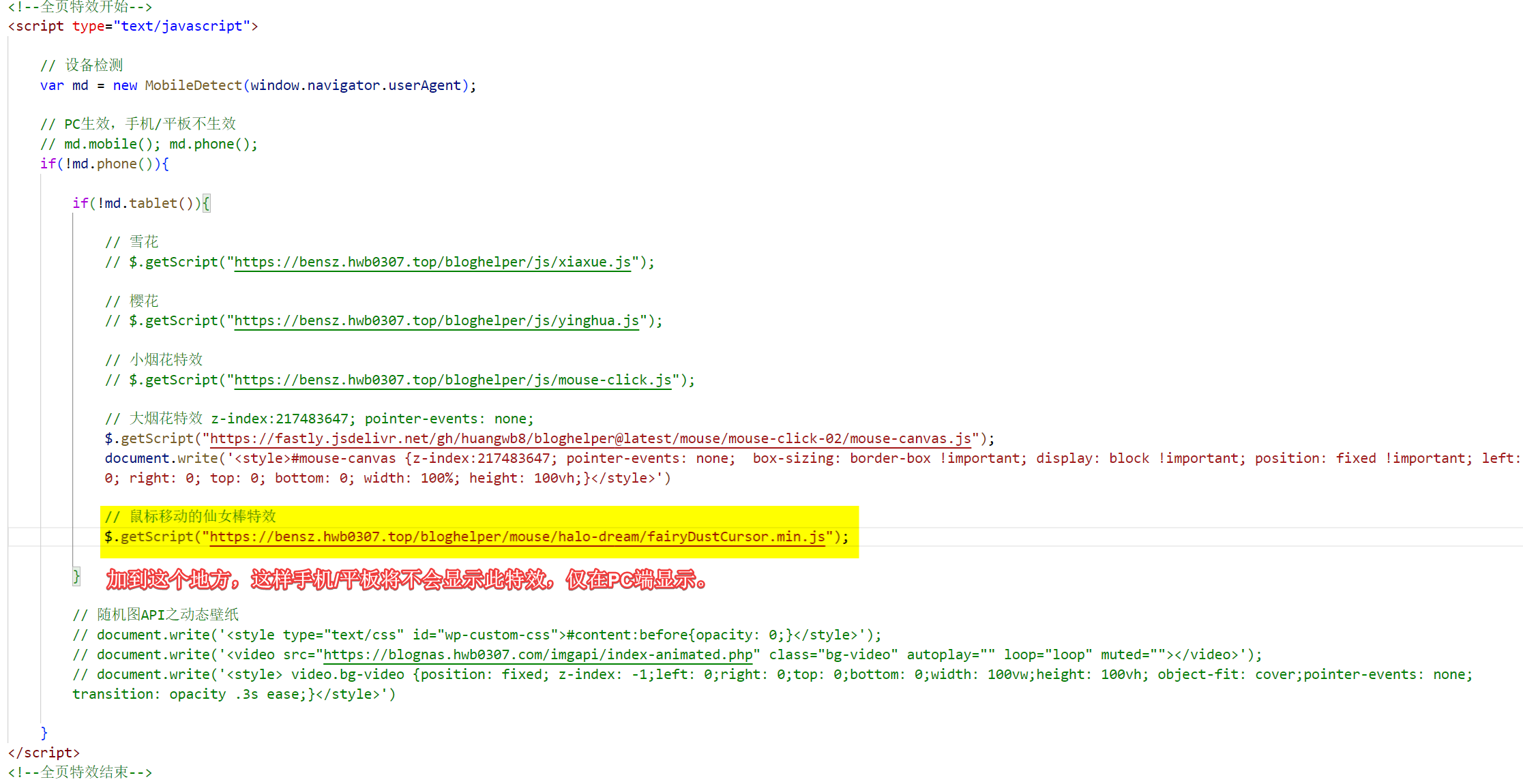
全屏雪花/樱花/烟花特效 这里提供的特效,在手机等设备是不生效的。因为手机的界面太小,特效会导致观看效果很差。设备判断主要利用mobile-detect项目提供的JS脚本(随机图API的php脚本也是类似的)。
用法也是编辑footer.php文件。还是刚刚那个界面。在末尾
<!--全页特效开始-->
<script type="text/javascript">

    // 设备检测
    var md = new MobileDetect(window.navigator.userAgent);

    // PC生效,手机/平板不生效
    // md.mobile(); md.phone();
    if(!md.phone()){

        if(!md.tablet()){

            // 雪花
            // $.getScript("https://cdn.jsdelivr.net/gh/huangwb8/bloghelper@latest/js/xiaxue.js");

            // 樱花
           // $.getScript("https://cdn.jsdelivr.net/gh/huangwb8/bloghelper@latest/js/yinghua.js");

            // 小烟花特效
            // $.getScript("https://cdn.jsdelivr.net/gh/huangwb8/bloghelper@latest/js/mouse-click.js");

            // 大烟花特效 z-index:217483647; pointer-events: none;
            // $.getScript("https://fastly.jsdelivr.net/gh/huangwb8/bloghelper@latest/mouse/mouse-click-02/mouse-canvas.js");
            // document.write('<style>#mouse-canvas {z-index:217483647; pointer-events: none;  box-sizing: border-box !important; display: block !important; position: fixed !important; left: 0; right: 0; top: 0; bottom: 0; width: 100%; height: 100vh;}</style>')

            // 鼠标移动的仙女棒特效
            $.getScript("https://cdn.jsdelivr.net/gh/huangwb8/bloghelper@latest/mouse/halo-dream/fairyDustCursor.min.js");

            // 鼠标移动的泡泡特效
            // $.getScript("https://cdn.jsdelivr.net/gh/huangwb8/bloghelper@latest/mouse/joe/censor10.js");

        }

        // 春节灯笼
        // document.write('<link href="https://cdn.jsdelivr.net/gh/huangwb8/bloghelper@latest/css/deng.css" rel="stylesheet">');
        // document.write('<div class="deng-box"><div class="deng"><div class="xian"></div><div class="deng-a"><div class="deng-b"><div class="deng-t">春节</div></div></div><div class="shui shui-a"><div class="shui-c"></div><div class="shui-b"></div></div></div></div>');
        // document.write('<div class="deng-box1"><div class="deng"><div class="xian"></div><div class="deng-a"><div class="deng-b"><div class="deng-t">快乐</div></div></div><div class="shui shui-a"><div class="shui-c"></div><div class="shui-b"></div></div></div></div>');

        // 随机图API之动态壁纸
        // document.write('<style type="text/css" id="wp-custom-css">#content:before{opacity: 0;}</style>');
        // document.write('<video src="https://blognas.hwb0307.com/imgapi/index-animated.php" class="bg-video" autoplay="" loop="loop" muted=""></video>');
        // document.write('<style> video.bg-video {position: fixed; z-index: -1;left: 0;right: 0;top: 0;bottom: 0;width: 100vw;height: 100vh; object-fit: cover;pointer-events: none;transition: opacity .3s ease;}</style>')
    }
</script>
<!--全页特效结束-->
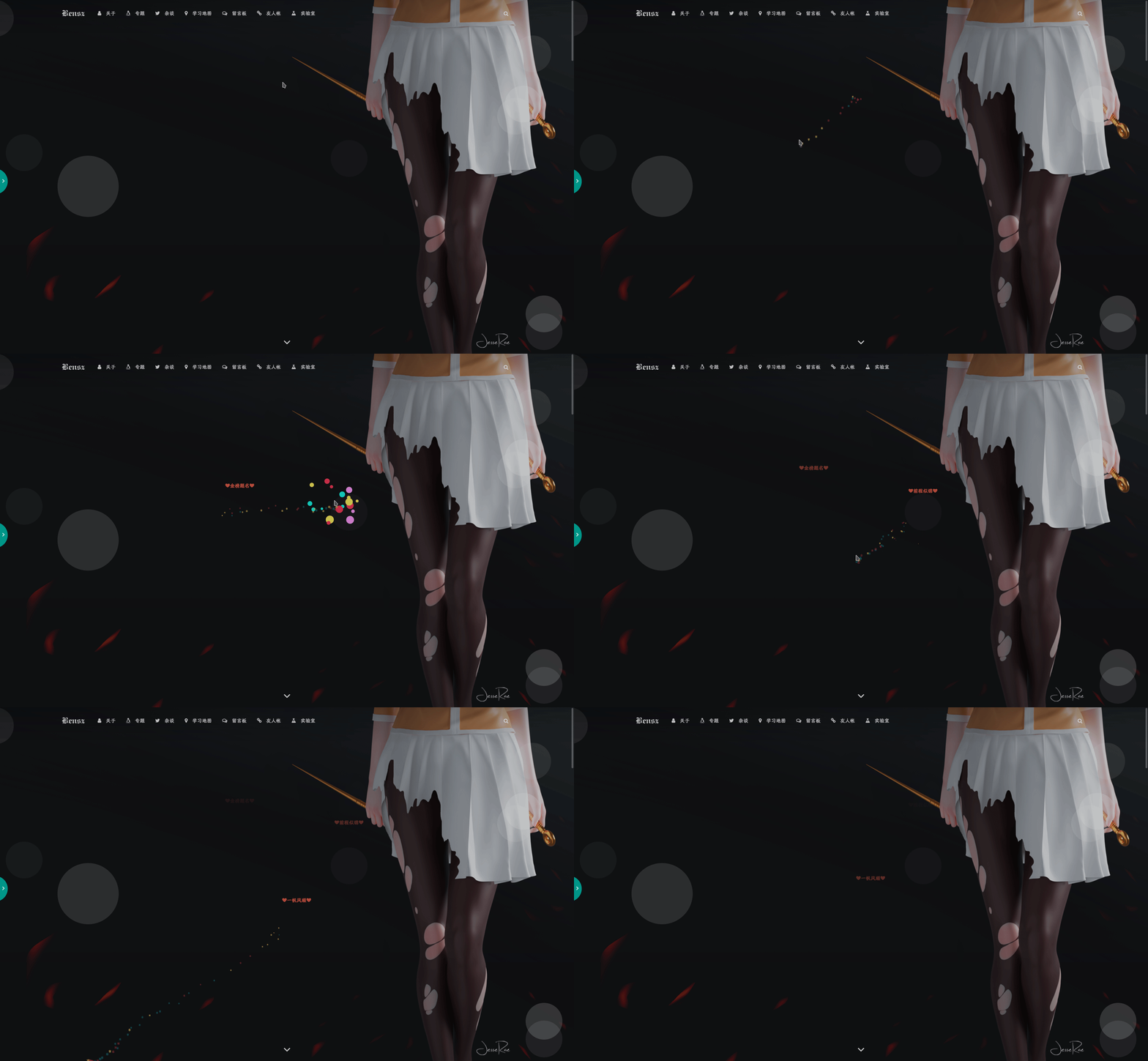
更新文件后生效。效果图如下:
樱花 :截屏时比较小,所以显得比较密集。一般情况下还可以的。
其实,这个樱花的图片换成其它图片就会有不一样的效果。你替换img.src参数背后的数据(是16进制?)即可换成另外一种图片。比如,我偶然发现有个博主 的效果是满屏咸鱼,很秀,哈哈(最近看的时候发现已经取消了)!
鼠标大烟花特效:
z-index和position参数决定了特效在哪一层显示,可按需修改。
鼠标小烟花特效:
鼠标指针特效之仙女棒 来源于halo的dream主题 鼠标移动特效“仙女棒”,特效美观,自然:
首先,在雪花/樱花特效里添加代码(保证只在PC端使用这个特效),它是仙女棒特效的来源,完全基于js生成,所以直接引用大佬们写好的脚本即可。将下列代码加到上面的雪花/樱花/烟花特效的JS框里:
// 鼠标移动的仙女棒特效
            $.getScript("https://cdn.jsdelivr.net/gh/huangwb8/bloghelper@latest/mouse/halo-dream/fairyDustCursor.min.js");
如图所示:
鼠标外观在footer.php里加入这个代码即可:
<!--鼠标指针特效2-->
<style type="text/css">
    .main-content img,body{cursor:url(https://cdn.jsdelivr.net/gh/huangwb8/bloghelper@latest/mouse/halo-dream/cursor/breeze/Arrow.cur),auto}.actions>div,.expand-done,.main-content figure>figcaption div,.navbar-above .navbar-nav .item,.navbar-searchicon,.navbar-slideicon,.photos .picture-details,.widget .ad-tag .click-close,a,button{cursor:url(https://cdn.jsdelivr.net/gh/huangwb8/bloghelper@latest/mouse/halo-dream/cursor/breeze/Hand.cur),auto}blockquote,code,h1,h2,h3,h4,h5,h6,hr,input[type=text],li,p,td,textarea,th{cursor:url(https://cdn.jsdelivr.net/gh/huangwb8/bloghelper@latest/mouse/halo-dream/cursor/breeze/IBeam.cur),auto}
</style>
卡片3D特效 来自中秋明月的个人博客。源项目地址:vanilla-tilt.js
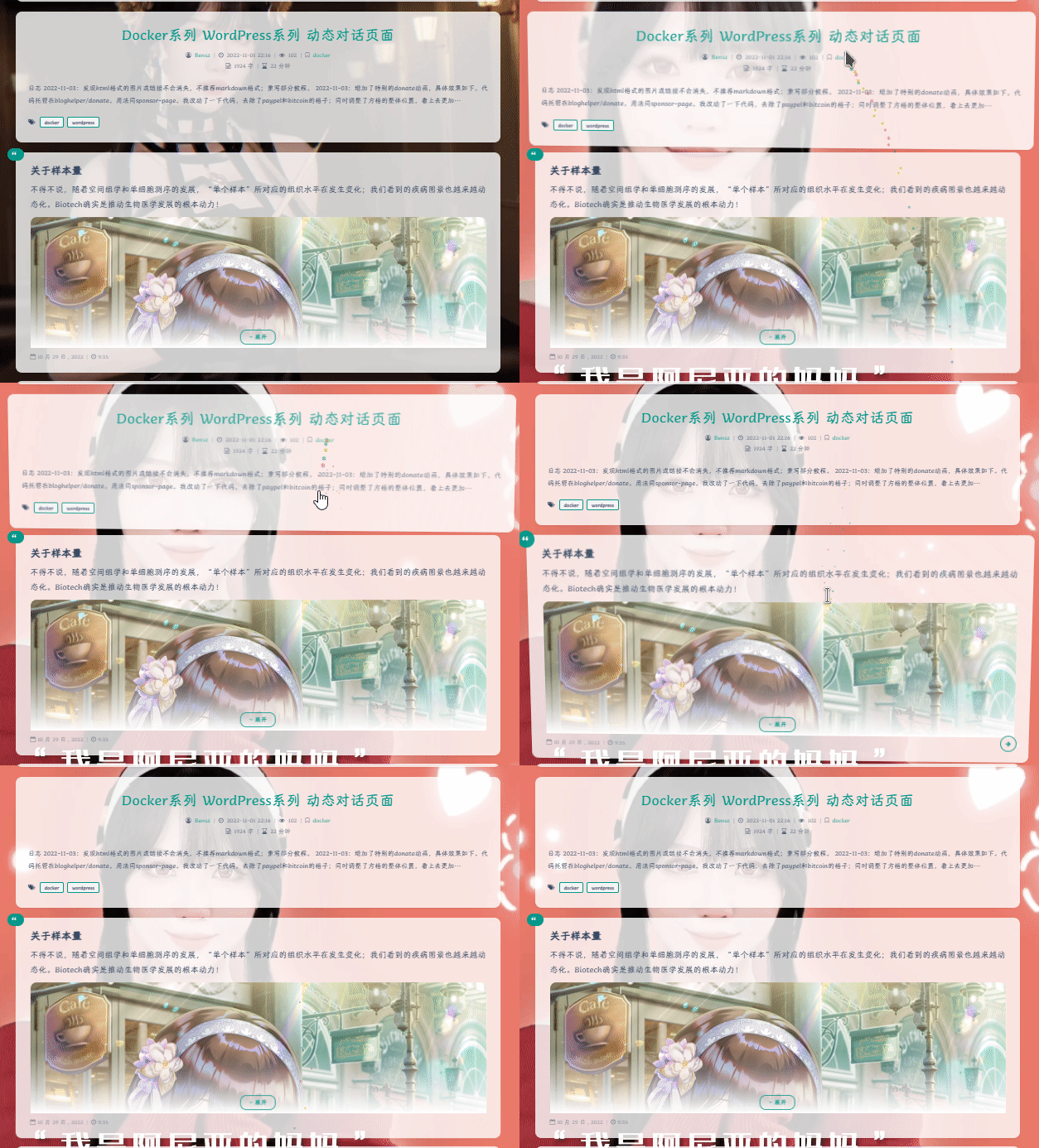
卡片的3D特效如下图:
基本原理大概是定义一个函数,它有多个参数可以调整某个对象的位置、角度等属性,然后通过JS调用。在Argon主题中,所有的卡片都来自.card类。所以,如果你使用VanillaTilt.init(document.querySelectorAll(".card"),那么所有的卡片都会动起来。不过,我只需要让文章卡片article.post:not(.post-full)和说说卡片.shuoshuo-preview-container动起来,所以仅定义了这两个对象的运作。您也可以自定义其它对象,这个就不展开说明了。
具体脚本我已经搬过来了:
<!--鼠标悬停3D效果start-->
<div class="article.post:not(.post-full)" data-tilt></div>
<div class=".shuoshuo-preview-container" data-tilt></div>
<!-- <script type="text/javascript" src="https://cdn.jsdelivr.net/gh/huangwb8/bloghelper@latest/vanilla3D/vanilla-tilt_v1.7.3.js"></script> -->
<script type="text/javascript" src="https://cdn.jsdelivr.net/gh/huangwb8/bloghelper@latest/vanilla3D/vanilla-tilt.js"></script>
<script type="text/javascript">
    // 设备检测
    var md = new MobileDetect(window.navigator.userAgent);

    // PC生效,手机/平板不生效
    // md.mobile(); md.phone();
    if(!md.phone() && !md.tablet()){
        window.pjaxLoaded = function(){
            // 正文卡片
            VanillaTilt.init(document.querySelectorAll("article.post:not(.post-full)"),{
                reverse:                true,  // reverse the tilt direction
                max:                    8,     // max tilt rotation (degrees)
                startX:                 0,      // the starting tilt on the X axis, in degrees.
                startY:                 0,      // the starting tilt on the Y axis, in degrees.
                perspective:            1000,   // Transform perspective, the lower the more extreme the tilt gets.
                scale:                  1.02,      // 2 = 200%, 1.5 = 150%, etc..
                speed:                  600,    // Speed of the enter/exit transition
                transition:             false,   // Set a transition on enter/exit.
                axis:                   "y",    // What axis should be banned. Can be "x", "y", or null
                reset:                  true,   // If the tilt effect has to be reset on exit.
                easing:                 "cubic-bezier(.03,.98,.52,.99)",    // Easing on enter/exit.
                glare:                  false,  // if it should have a "glare" effect
                "max-glare":            0.8,      // the maximum "glare" opacity (1 = 100%, 0.5 = 50%)
                "glare-prerender":      false,  // false = VanillaTilt creates the glare elements for you, otherwise
                                                // you need to add .js-tilt-glare>.js-tilt-glare-inner by yourself
                "mouse-event-element":  null,   // css-selector or link to HTML-element what will be listen mouse events
                gyroscope:              true,   // Boolean to enable/disable device orientation detection,
                gyroscopeMinAngleX:     -45,    // This is the bottom limit of the device angle on X axis, meaning that a device rotated at this angle would tilt the element as if the mouse was on the left border of the element;
                gyroscopeMaxAngleX:     45,     // This is the top limit of the device angle on X axis, meaning that a device rotated at this angle would tilt the element as if the mouse was on the right border of the element;
                gyroscopeMinAngleY:     -45,    // This is the bottom limit of the device angle on Y axis, meaning that a device rotated at this angle would tilt the element as if the mouse was on the top border of the element;
                gyroscopeMaxAngleY:     45,     // This is the top limit of the device angle on Y axis, meaning that a device rotated at this angle would tilt the element as if the mouse was on the bottom border of the element;
            })

            // 说说卡片
            VanillaTilt.init(document.querySelectorAll(".shuoshuo-preview-container"),{
                 reverse:                true,  // reverse the tilt direction
                 max:                    5,     // max tilt rotation (degrees)
                 startX:                 0,      // the starting tilt on the X axis, in degrees.
                 startY:                 0,      // the starting tilt on the Y axis, in degrees.
                 perspective:            2000,   // Transform perspective, the lower the more extreme the tilt gets.
                 scale:                  1.02,      // 2 = 200%, 1.5 = 150%, etc..
                 speed:                  300,    // Speed of the enter/exit transition
                 transition:             false,   // Set a transition on enter/exit.
                 axis:                   "y",    // What axis should be banned. Can be "x", "y", or null
                 reset:                  true,   // If the tilt effect has to be reset on exit.
                 easing:                 "cubic-bezier(.03,.98,.52,.99)",    // Easing on enter/exit.
                 glare:                  false,  // if it should have a "glare" effect
                 "max-glare":            0.8,      // the maximum "glare" opacity (1 = 100%, 0.5 = 50%)
                 "glare-prerender":      false,  // false = VanillaTilt creates the glare elements for you, otherwise
                                                 // you need to add .js-tilt-glare>.js-tilt-glare-inner by yourself
                 "mouse-event-element":  null,   // css-selector or link to HTML-element what will be listen mouse events
                 gyroscope:              true,   // Boolean to enable/disable device orientation detection,
                 gyroscopeMinAngleX:     -45,    // This is the bottom limit of the device angle on X axis, meaning that a device rotated at this angle would tilt the element as if the mouse was on the left border of the element;
                 gyroscopeMaxAngleX:     45,     // This is the top limit of the device angle on X axis, meaning that a device rotated at this angle would tilt the element as if the mouse was on the right border of the element;
                 gyroscopeMinAngleY:     -45,    // This is the bottom limit of the device angle on Y axis, meaning that a device rotated at this angle would tilt the element as if the mouse was on the top border of the element;
                 gyroscopeMaxAngleY:     45,     // This is the top limit of the device angle on Y axis, meaning that a device rotated at this angle would tilt the element as if the mouse was on the bottom border of the element;
             })
        }
        $(window.pjaxLoaded);
        $(document).on('pjax:end', window.pjaxLoaded);
    }
</script>
<!--鼠标悬停3D效果end-->
对于Argon主题的使用者,这样就可以了!在Argon主题中,window.pjaxLoaded函数内的命令会避免使用Pjax并在切换页面时强制刷新,这个必须要用才可以保证特效的完美运行。如果是其它主题的话,你改一下控制对象的名字即可,具体情况具体分析。你也可以自己改动一下参数,看看效果如何 。蛮有趣的一个特效!
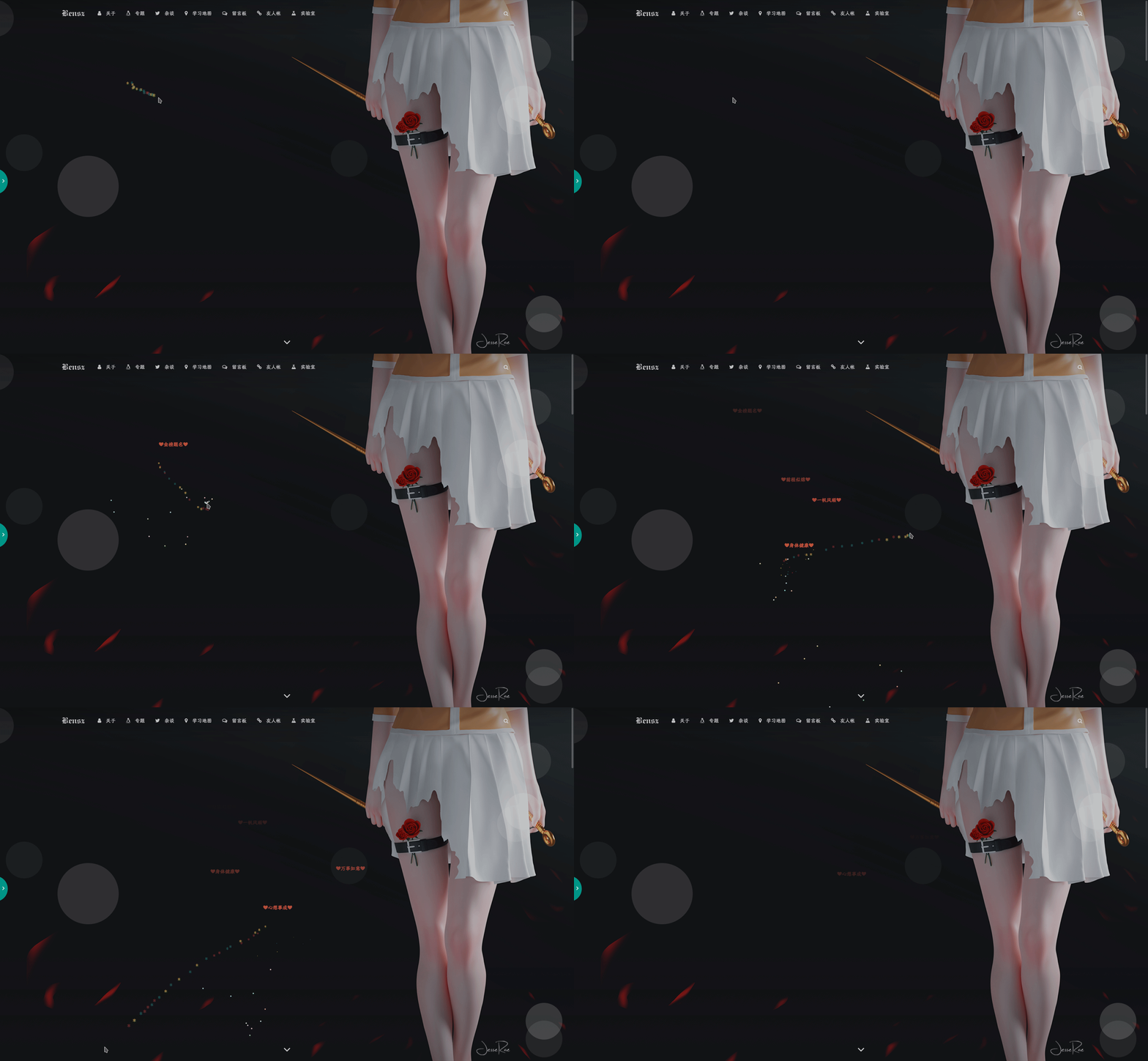
鼠标文字特效 和雪花特效是一样的用法。在末尾</body>上方加入。当然a变量中的文字就自定义了!你可以改成自己喜欢的文字。
<!--鼠标名单开始-->
<!-- <script type="text/javascript">
    var a_idx = 0;
    jQuery(document).ready(function($) {
    $("body").click(function(e) {
    //        var a = new Array("❤腿堡-苯苯❤","❤ALSO STARRING-榕榕❤","❤腿堡-亚伯❤","❤腿堡-银露❤","❤腿堡-枫叶❤","❤腿堡-培根❤","❤腿堡-老丘❤","❤腿堡-倩倩❤","❤腿堡-小o❤","❤腿堡-蛇蛇❤","❤腿堡-培根❤","❤腿堡-十九❤","❤腿堡-萝卜卜❤","❤腿堡-千泓❤","❤腿堡-萌波❤","❤腿堡-经历❤","❤letter-韩露❤","❤腿堡-记忆❤","❤叛徒-绝恋❤","❤腿堡-小离❤","❤腿堡-七秒❤","❤腿堡/剑花-U哥❤","❤大佬-幕哥❤","❤退谷-糕糕❤","❤退谷-肥鸡❤","❤退谷-气气❤","❤退谷-小幻❤","❤退谷-狂总❤","❤剑花-君故-会刷buff❤","❤剑花-肥少❤","❤剑花-太阳❤","❤剑花-我腿❤","❤剑花-笙哥❤","❤剑花-零点夫妇❤","❤还有很多小伙伴记不太清了❤");
        // var a = new Array("富强", "民主", "文明", "和谐", "自由", "平等", "公正", "法治", "爱国", "敬业", "诚信", "友善");
        // var a = new Array("❤为汝祈福❤", "❤早日康复❤");
        var a = new Array("❤身体健康❤", "❤万事如意❤", "❤心想事成❤", "❤笑口常开❤", "❤年年有余❤", "❤金榜题名❤", "❤前程似锦❤", "❤一帆风顺❤");
        var $i = $("<span/>").text(a[a_idx]);
        a_idx = (a_idx + 1) % a.length;
        var x = e.pageX,
        y = e.pageY;
        $i.css({
            "z-index": 999999999999999999999999999999999999999999999999999999999999999999999,
            // "z-index": -1,
            "top": y - 20,
            "left": x,
            "position": "absolute",
            "font-weight": "bold",
            "color": "#ff6651"
        });
        $("body").append($i);
        $i.animate({
            "top": y - 180,
            "opacity": 0
        },
        1500,
        function() {
            $i.remove();
        });
    });
    });
</script> -->
<!--鼠标名单结束-->
后面有小伙伴说影响双击选中单词,我就没上这个特效了。
文内外跳转 理论上适用于h1-h6标签;仅限argon主题。感谢鸦鸦 的改进!
以用类似markdown的方式添加关于标题的锚点。这在浏览一些具有多个标题的长文(比如本文)的时候可能会比较方便 。在footer.php中添加以下代码即可:
<!-- 标题自动锚点: Start -->
<script>
window.addEventListener('load', function() {
    // 构建标题文本与 Argon ID 的映射表
    const headers = document.querySelectorAll('h1[id], h2[id], h3[id], h4[id], h5[id], h6[id]');
    const textToIdMap = new Map();
    headers.forEach(header => {
        const id = header.id;
        const text = header.textContent.trim();
        textToIdMap.set(text, id); // 标题文本 -> ID 映射
    });

    // 替换页面中的基于文本的锚点链接
    const links = document.querySelectorAll('a[href^="#"]');
    links.forEach(link => {
        const targetText = decodeURIComponent(link.getAttribute('href').slice(1)); // 获取锚点文本
        if (textToIdMap.has(targetText)) {
            link.setAttribute('href', `#${textToIdMap.get(targetText)}`); // 替换为 Argon 的 ID
        }
    });

    //文外跳转
    if (window.location.hash) {
        const hash = window.location.hash.slice(1);  // 去掉 #
        let targetElement;
        // 优先检查哈希值是否是一个有效的 ID
        targetElement = document.getElementById(hash);
        if (!targetElement) {
            // 如果哈希值是标题文本,检查映射表
            const decodedHash = decodeURIComponent(hash);  // 解码哈希值
            if (textToIdMap.has(decodedHash)) {
                const targetId = textToIdMap.get(decodedHash);  // 获取对应的 ID
                targetElement = document.getElementById(targetId);  // 查找对应 ID 的元素
            }
             // 替换图片的 src 属性
            const lazyImages = document.querySelectorAll('img.lazyload[data-original]');
            lazyImages.forEach(img => {
                img.src = img.getAttribute('data-original'); // 直接替换为真正的图片链接
            });
        }
        // 如果找到了目标元素,滚动到该元素
        if (targetElement) {
            targetElement.scrollIntoView({ behavior: 'smooth', block: 'start' });
        }
    }
});
</script>
<!-- 标题自动锚点: End -->
使用的时候,在markdown文件中的某个位置添加类似一个内部链接:
新增[正文自动添加序号](#正文自动添加序号),可使长文层次更加分明。
然后通过m2w之类的方法上传文章后,就可以实现该功能。个人感觉效果还是不错的。
实际上,通过修改html等参数,还可以实现不同的动画过渡方式; 但我现在已经满足了,就怎么简单怎么来吧 (~ ̄▽ ̄)~
不过,这个代码暂时存在几个bug:
如果直接访问http://url#标题(包括从其它页面跳转过来),图片加载不出来或者不能完美跳转;或者说,暂时不能完美地支持文外跳转 。因此,如果需要刷新当前页面,可能需要用Ctrl + ←来返回至初级URL后才可以刷新,否则将影响图片的展示。
屏幕顶部可能出现屏闪
容易在移动端里显示异常 日后再想办法修复吧,或者看看其它小伙伴的意见!
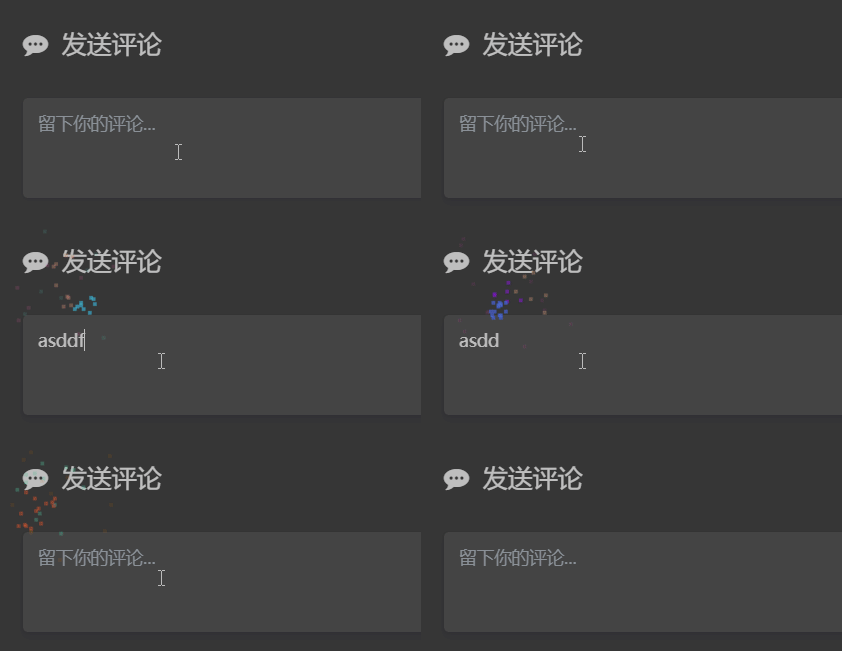
文字输入撒花特效 主要参考突突的教程:https://wangwangyz.site/archives/1059
效果类似:
在末尾</body>上方加入代码:
<!--网站输入效果-->
<script src="https://cdn.jsdelivr.net/gh/huangwb8/bloghelper@latest/js/input-with-fire.js"></script>
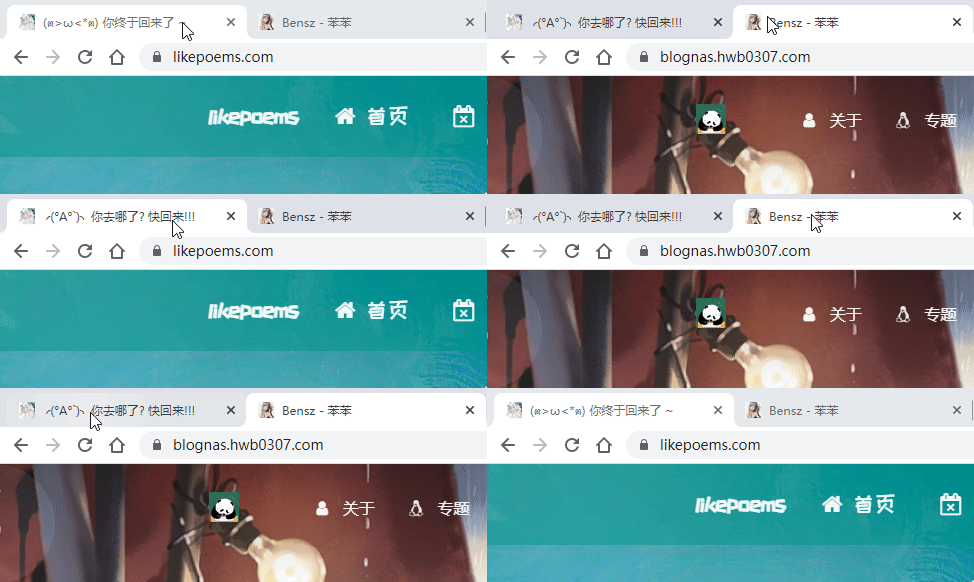
网站标题可爱字符 类似效果为:
注意看左边的网站,它在退出/进入网站页面时,会有些可爱字符。
在末尾</body>上方加入代码:
<!--主题搞笑字符-->
 <!--<script src="https://cdn.jsdelivr.net/gh/huangwb8/bloghelper@latest/js/onfocus.js"></script> -->
文字颤抖 效果大致如下:
源代码来自希卡米 | HiKami ,我只是大佬代码的搬运工。大致的原理是定义一个.my-face class,然后直接在html中调用类的函数。首先,我们在footer.php中添加css脚本:
<!--文字抖动特效-->
<link href="https://cdn.jsdelivr.net/gh/huangwb8/bloghelper@latest/css/myface.css" rel="stylesheet">
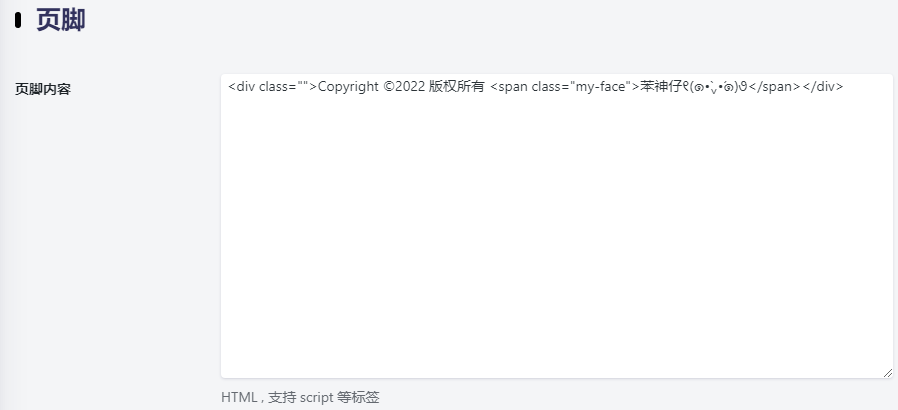
然后,在页脚内容中添加类似命令(以Argon为例):
<div class=""><span class="my-face">Copyright ©2022 版权所有 苯神仔୧(๑•̀⌄•́๑)૭</span></div>
后台的填写类似于:
WordPress防镜像 有时候别人会把域名CNAME解析到我们的域名上边来,然后做镜像站,为了防止这样可以在页面上判断如果根域名不是源站重新跳转刷新下页面,设置如下:
<!--WordPress防镜像  -->
<img style="display:none" src=" " onerror='this.onerror=null;var currentDomain="hyly" + ".net"; var str1=currentDomain; str2="docu"+"ment.loca"+"tion.host"; str3=eval(str2) ;if( str1!=str3 ){ do_action = "loca" + "tion." + "href = loca" + "tion.href" + ".rep" + "lace(docu" +"ment"+".loca"+"tion.ho"+"st," + "currentDomain" + ")";eval(do_action) }' />

<img style="display:none" src=" " onerror='
this.onerror=null;
var currentDomain = "hyly.net";
var allowedDomains = [currentDomain, "www." + currentDomain];
var currentHost = document.location.host;
if (!allowedDomains.includes(currentHost)) {
    location.href = location.href.replace(currentHost, currentDomain);
}
' />
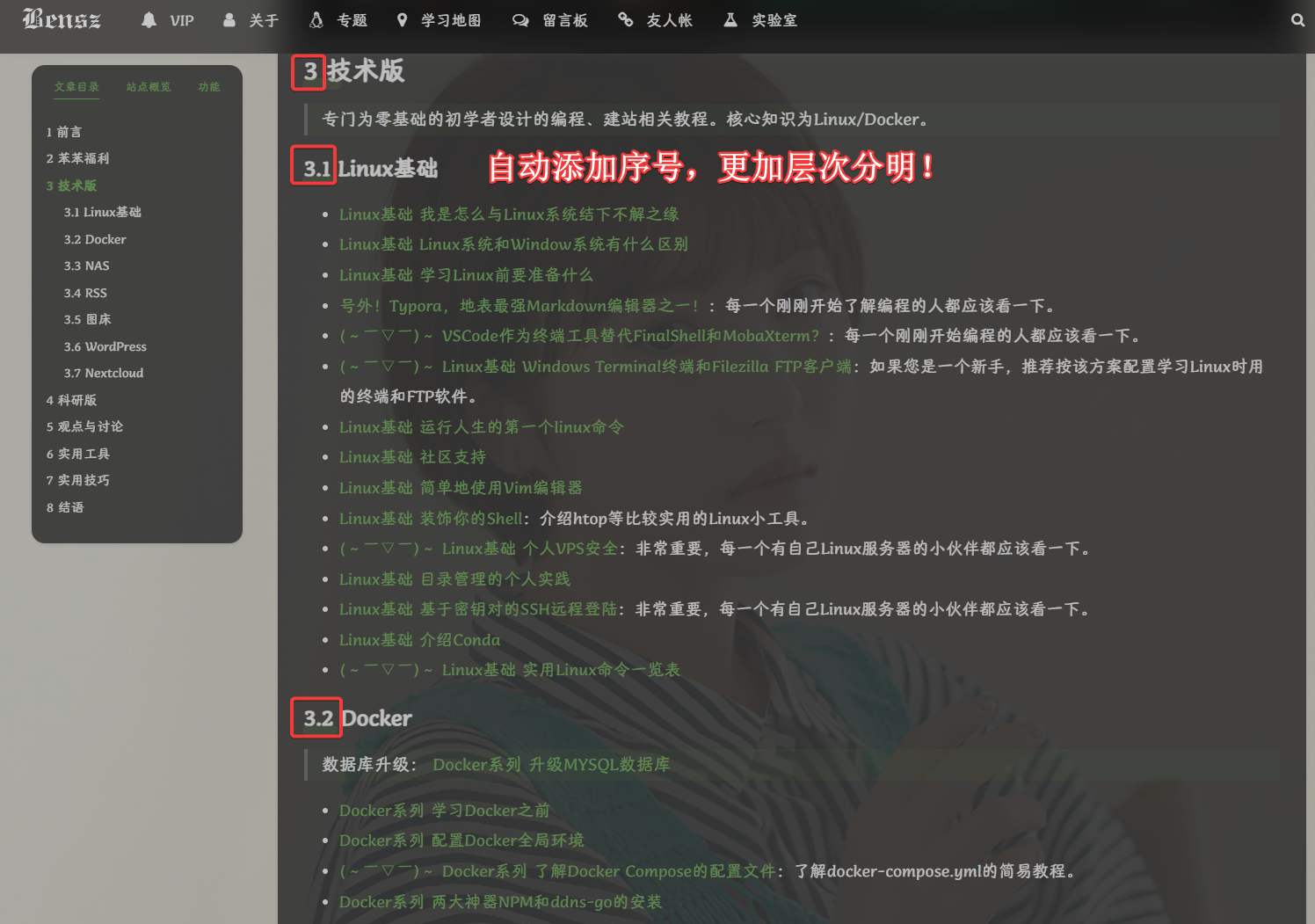
正文自动添加序号 效果如下:
和大多数特效代码一样,下面内容加至footer.php中:
<!--正文自动编号-->
<style type="text/css">h1:not(.title){counter-reset:h2counter;counter-increment:h1counter;}h1:not(.title):not(.post-title)::before{content:counter(h1counter) " ";}h2{counter-reset:h3counter;counter-increment:h2counter;}h2:not(.comments-title):not(.post-comment-title)::before{content:counter(h1counter) "." counter(h2counter) " ";}h3{counter-reset:h4counter;counter-increment:h3counter;}h3:not(.text-black)::before{content:counter(h1counter) "." counter(h2counter) "." counter(h3counter) " ";}h4{counter-reset:h5counter;counter-increment:h4counter;}h4:not(.modal-title)::before{content:counter(h1counter) "." counter(h2counter) "." counter(h3counter) "." counter(h4counter) " ";}h5:not(.modal-title){counter-reset:h6counter;counter-increment:h5counter;}h5::before{content:counter(h1counter) "." counter(h2counter) "." counter(h3counter) "." counter(h4counter) "." counter(h5counter) " ";}h6:not(#leftbar_overview_author_name):not(#leftbar_overview_author_description){counter-increment:h6counter;}h6:not(#leftbar_overview_author_name):not(#leftbar_overview_author_description)::before{content:counter(h1counter) "." counter(h2counter) "." counter(h3counter) "." counter(h4counter) "." counter(h5counter) "." counter(h6counter) " ";}body{counter-reset:h1counter;}</style>
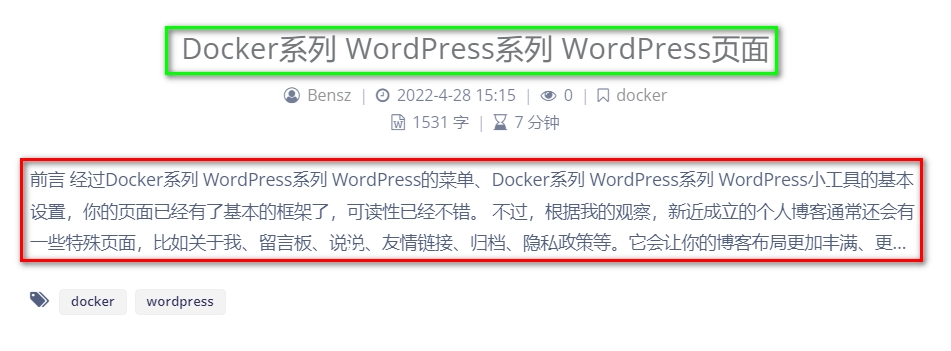
Argon主题点击概要也可以进入文章 在默认情况下,我们的文章只能通过点击标题(绿色框)进入。按这个设置后,你点击概要(红色框)也可以进入文章!
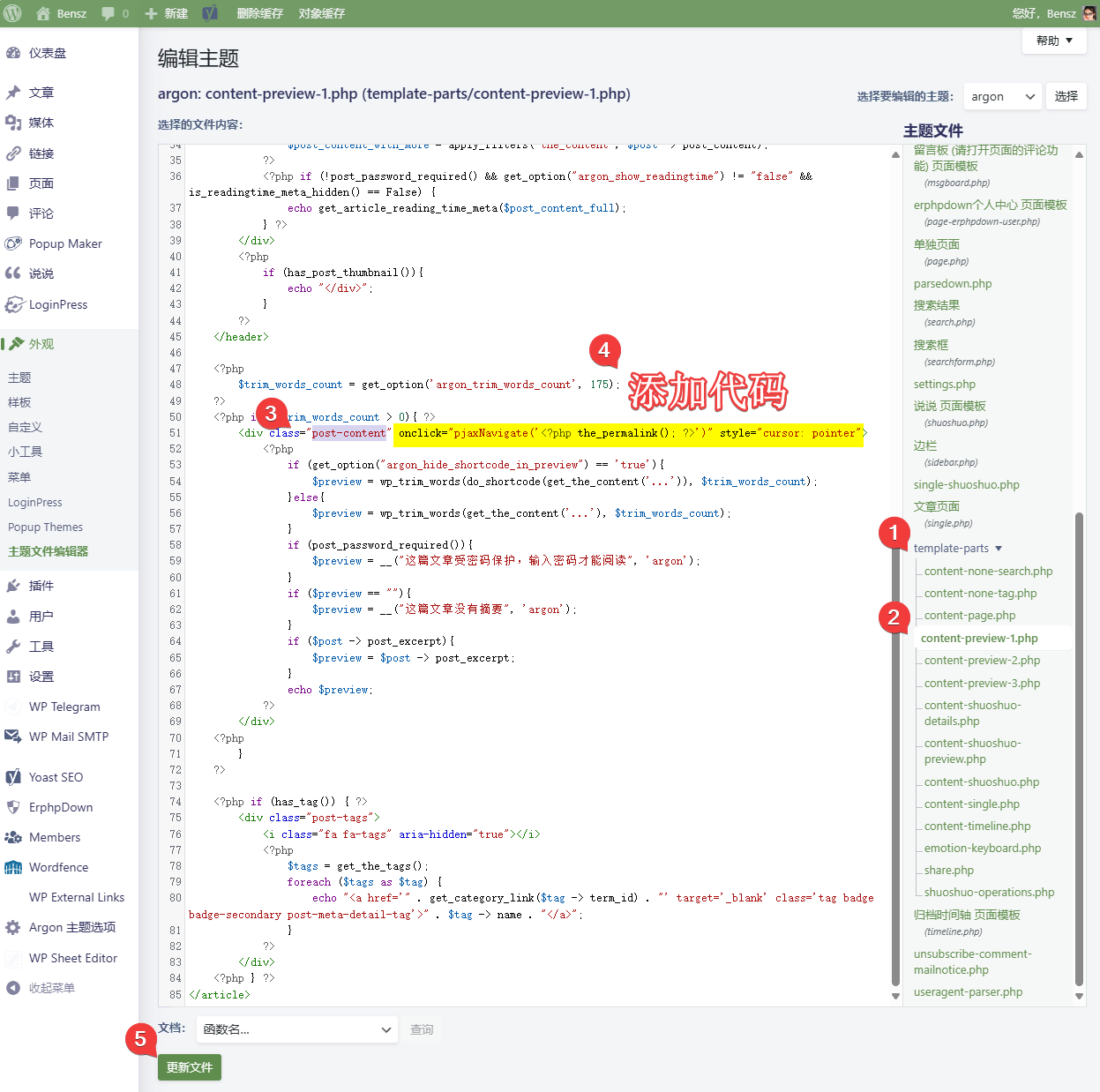
主要参考:https://wangwangyz.site/archives/835。首先,在主题文件编辑器里修改post-content对象后面添加一行代码onclick="pjaxNavigate('<?php the_permalink(); ?>')" style="cursor: pointer":
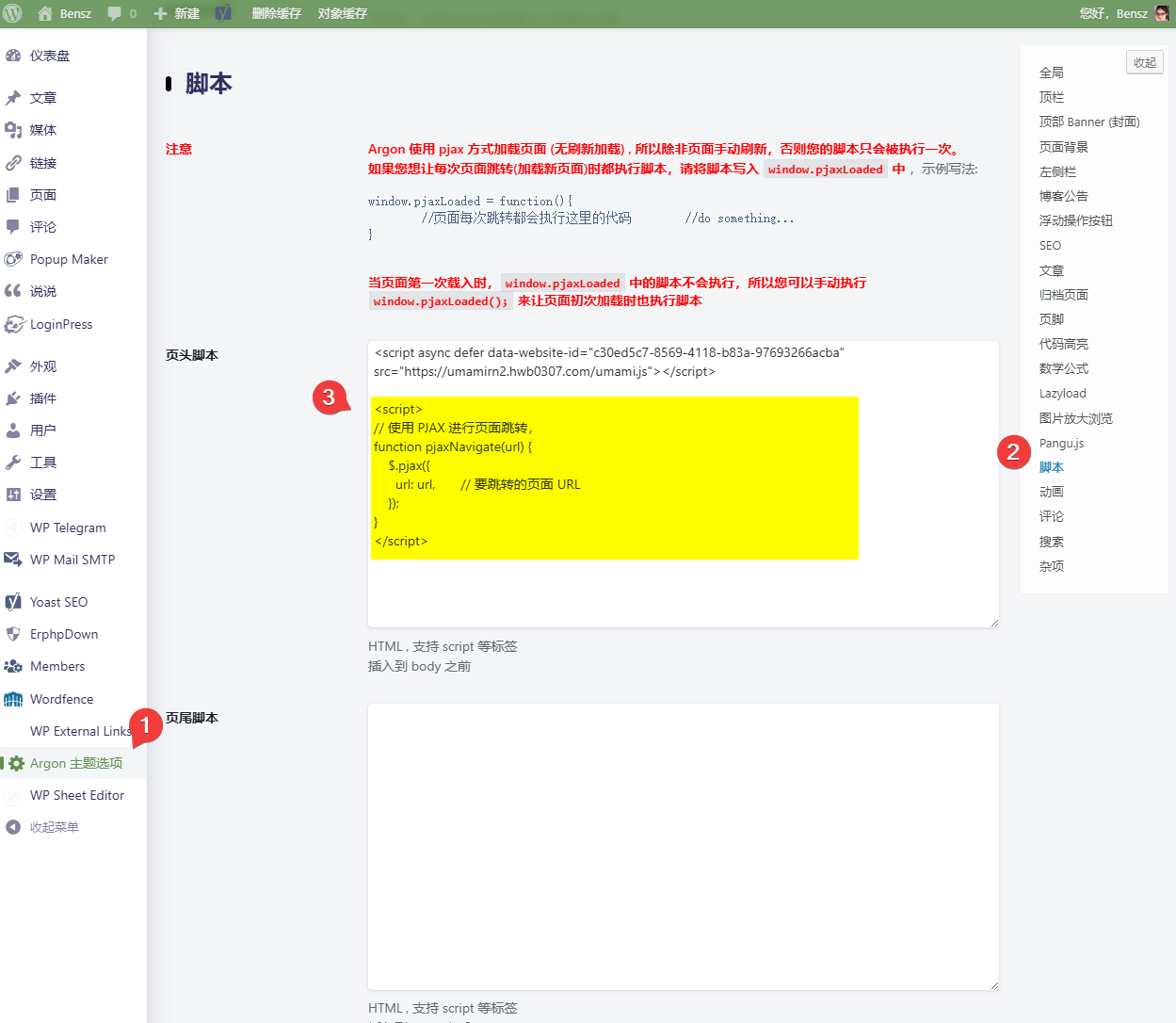
pjaxNavigate函数的作用是为了保持Pjax 效果,即点击链接的时候不会自动刷新页面。我们通过JavaScript定义pjaxNavigate函数来调用pjax:
// 使用 PJAX 进行页面跳转,
function pjaxNavigate(url) {
    $.pjax({
      url: url,       // 要跳转的页面 URL
    });
}
如果你使用argon主题,可以放在这个位置(footer.php之类的地方也可以):
字体 字体可以在字体天下 、100font 等网站里免费下载。通过转换 网站获得woff2格式文件。你可以上传到网站根目录或者某个CDN里,然后添加下列额外CSS(具体方法见下):
/*设置网站字体*/
/*原则上你可以设置多个字体,然后在不同的部位使用不同的字体*/
@font-face{
    font-family:btfFont;
    src: url(https://cdn.jsdelivr.net/gh/huangwb8/bloghelper@latest/fonts/13.woff2) format('woff2')
}
body{
    font-family:"btfFont" !important
}
这里展示所用的13.woff2是汉唐仪美人体 ,它并不是免费商用字体。个人博客毕竟是公开的,最好还是使用免费商用字体,以免未来有版权纠纷。你也可以在bloghelper 里看看我之前找过的某些字体,都蛮漂亮的。font-family: "LXGW WenKai Screen", sans-serif; 也是个不错的字体。下文的额外CSS包含了字体设置 ,多加注意。
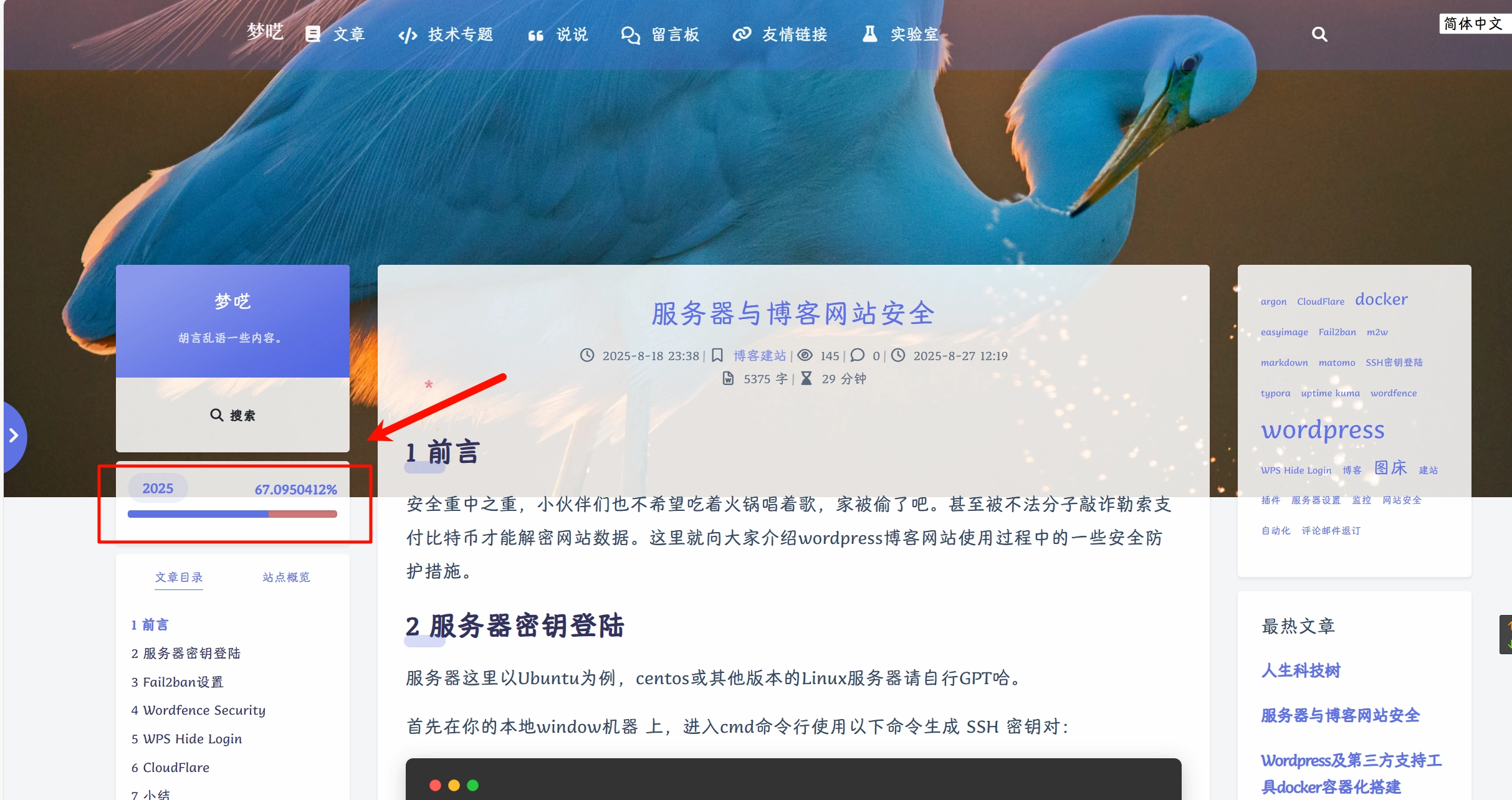
小工具-时间进度条 仅限argon主题。
效果如下:
大致原理是基于html/css/js定义一个时间进度条b。然后,将b插入到sidebar.php的id="leftbar_part2"前面,从而实现在左侧栏的目标位置(站点概览的窗口上方)植入b。
具体做法如下:
下载progress-wrapper.php文件。下载地址:Alist ; Github 。
将progress-wrapper.php保存在WordPress根目录下的某个位置。比如,我放的位置是./specialEffects/progress-wrapper.php。
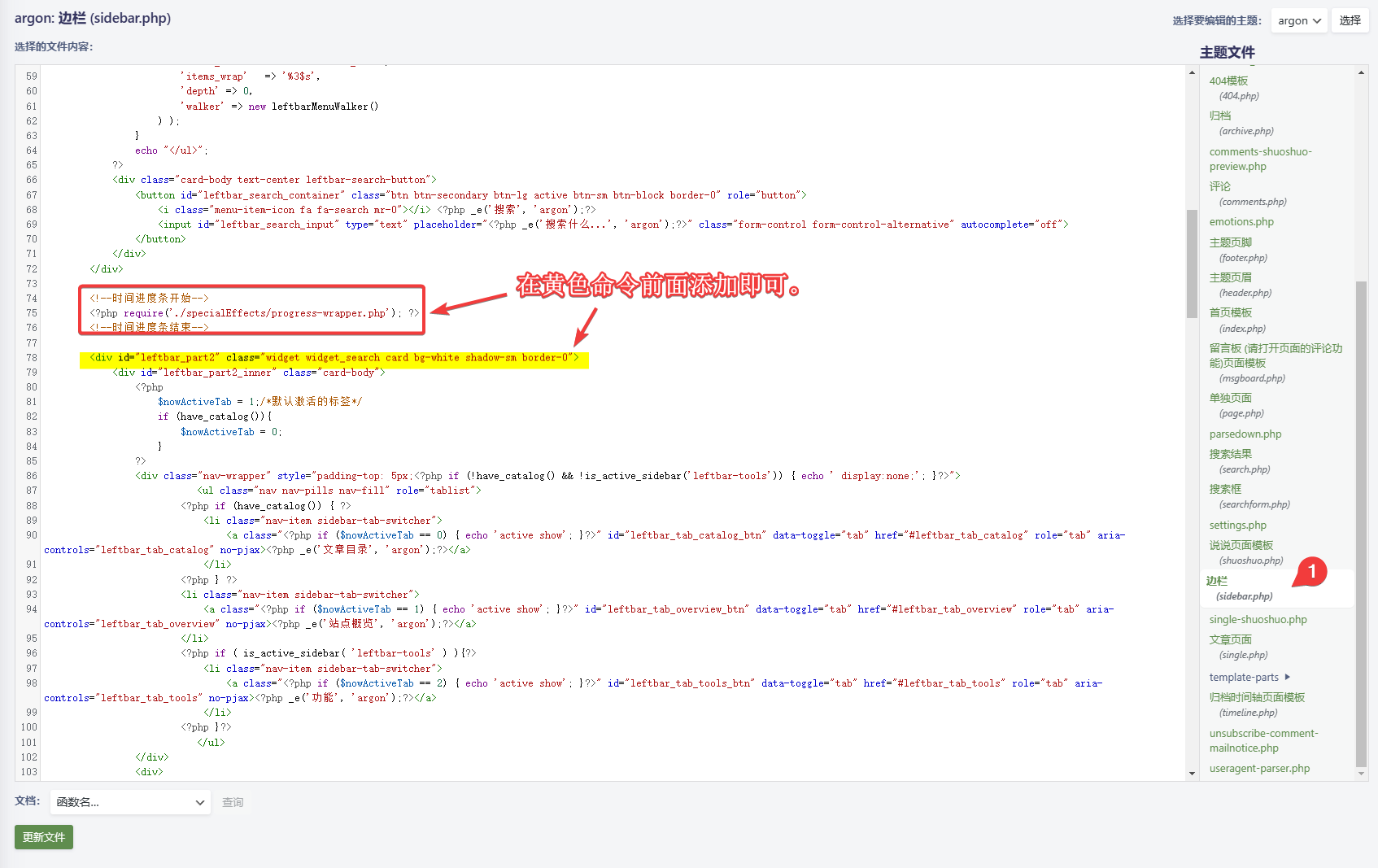
在主题编辑器中找到sidebar.php文件。
在sidebar.php的<div id="leftbar_part2" class="widget widget_search card bg-white shadow-sm border-0">标签前引用命令:<?php require('./specialEffects/progress-wrapper.php'); ?>,如图所示:
其中,./specialEffects/progress-wrapper.php是我实际使用的路径,请根据实际情况修改。
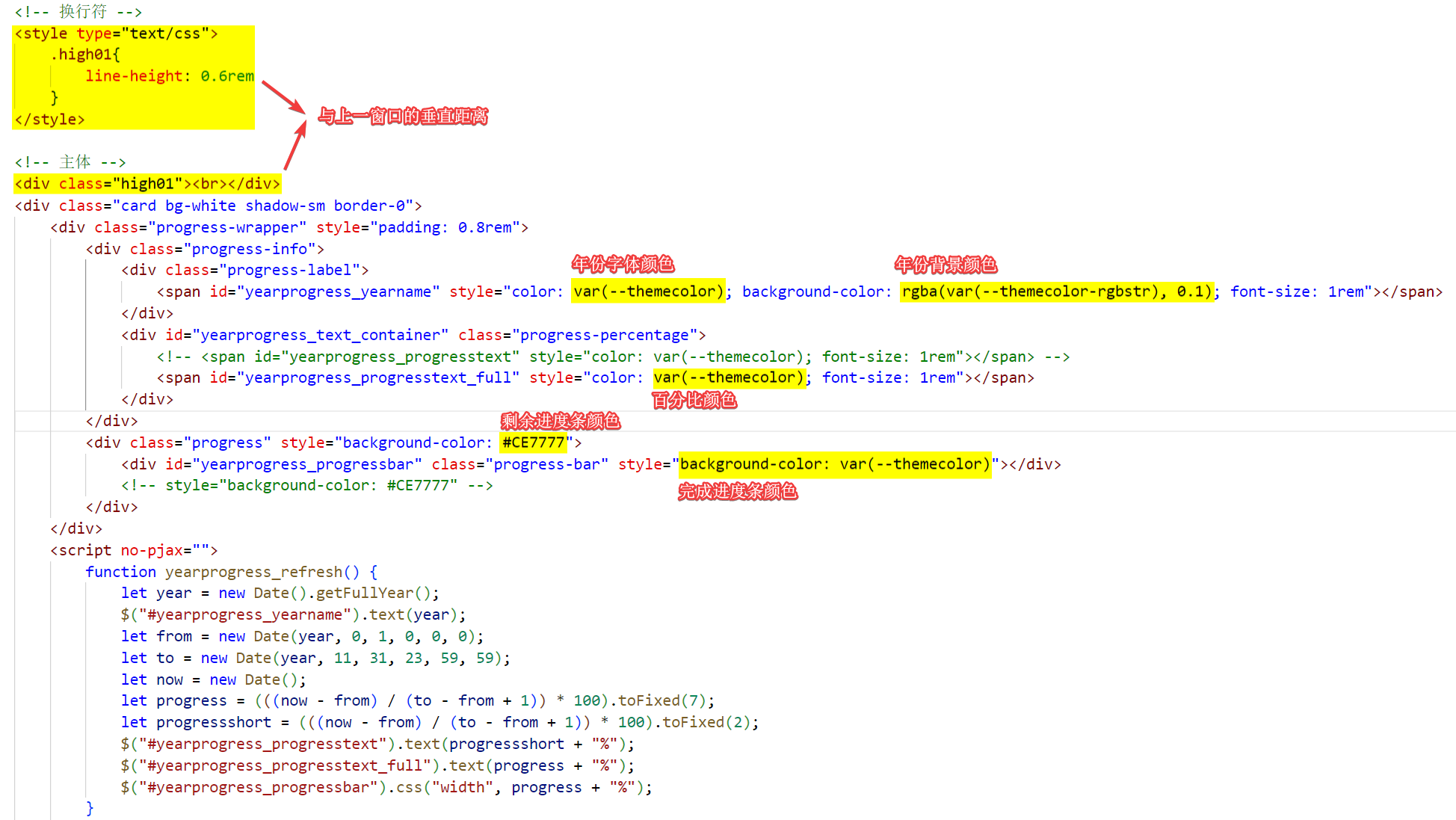
此外,progress-wrapper.php中有一些重要的参数,可根据实际情况自定义。详见下图:
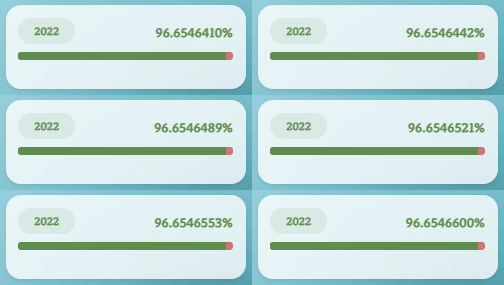
百分比有2种模式,一种是yearprogress_progresstext,另一种是yearprogress_progresstext_full。full会返回一个更加精确的数字:
这个模式效果也不错 (☆ω☆) (☆ω☆) (☆ω☆)。
代码已经给出,大家根据需要也可以自定义,这里不再赘述。总体上,时间进度条小工具的添加和修改并不复杂。请试试看!以下是progress-wrapper.php的内容:
<!-- 用法
    在sidebar.php中<div id="leftbar_part2" class="widget widget_search card bg-white shadow-sm border-0">标签前引用下列命令即可.
    注意,第一个!记得去掉!
    <!?php require('./specialEffects/progress-wrapper.php'); ?>
-->

<!-- 换行符 -->
<style type="text/css">
    .high01{
        line-height: 0.6rem
    }
</style>

<!-- 主体 -->
<div class="high01"><br></div>
<!--<div class="card bg-white shadow-sm border-0">-->
<div id="leftbar_part1" class="card bg-white shadow-sm border-0">
<div class="progress-wrapper" style="padding: 0.8rem">
        <div class="progress-info">
            <div class="progress-label">
                <span id="yearprogress_yearname" style="color: var(--themecolor); background-color: rgba(var(--themecolor-rgbstr), 0.1); font-size: 1rem"></span>
            </div>
            <div id="yearprogress_text_container" class="progress-percentage">
                <!--<span id="yearprogress_progresstext" style="color: var(--themecolor); font-size: 1rem"></span> -->
                <span id="yearprogress_progresstext_full" style="color: var(--themecolor); font-size: 1rem"></span>
            </div>
        </div>
        <div class="progress" style="background-color: #CE7777">
            <div id="yearprogress_progressbar" class="progress-bar" style="background-color: var(--themecolor)"></div>
            <!-- style="background-color: #CE7777" -->
        </div>
    </div>
    <script no-pjax="">
        function yearprogress_refresh() {
            let year = new Date().getFullYear();
            $("#yearprogress_yearname").text(year);
            let from = new Date(year, 0, 1, 0, 0, 0);
            let to = new Date(year, 11, 31, 23, 59, 59);
            let now = new Date();
            let progress = (((now - from) / (to - from + 1)) * 100).toFixed(7);
            let progressshort = (((now - from) / (to - from + 1)) * 100).toFixed(2);
            $("#yearprogress_progresstext").text(progressshort + "%");
            $("#yearprogress_progresstext_full").text(progress + "%");
            $("#yearprogress_progressbar").css("width", progress + "%");
        }
        yearprogress_refresh();
        if (typeof yearProgressIntervalHasSet == "undefined") {
            var yearProgressIntervalHasSet = true;
            setInterval(function () {
                yearprogress_refresh();
            }, 500);
        }
    </script>
    <style>
        #yearprogress_text_container {
            width: 100%;
            height: 22px;
            overflow: hidden;
            user-select: none;
        }

        #yearprogress_text_container>span {
            transition: all 0.3s ease;
        }

        /* #yearprogress_text_container:hover>span {
            transform: translateY(-20px);
        } */
    </style>
</div>
<!-- <div class="high01"><br></div> -->
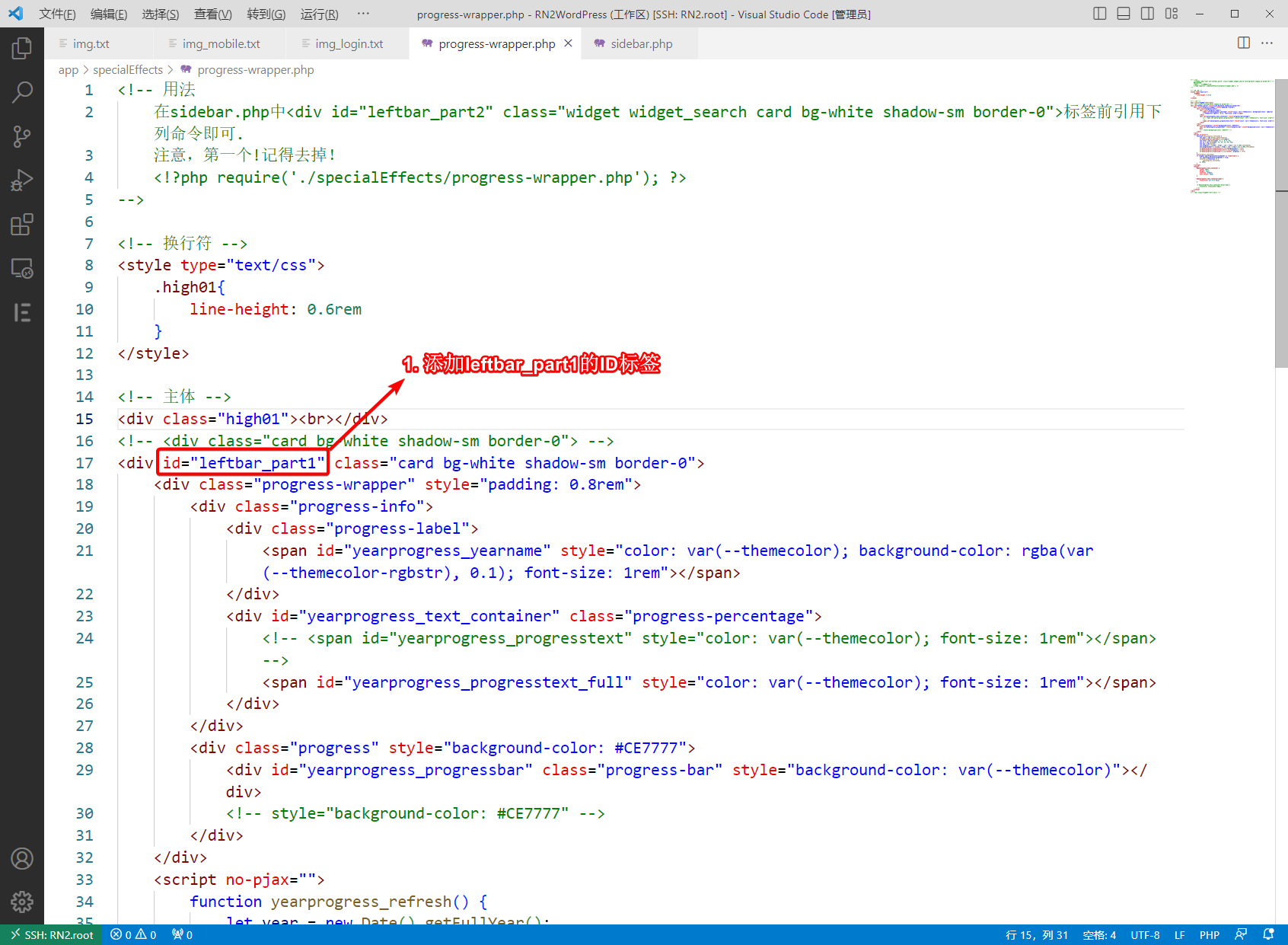
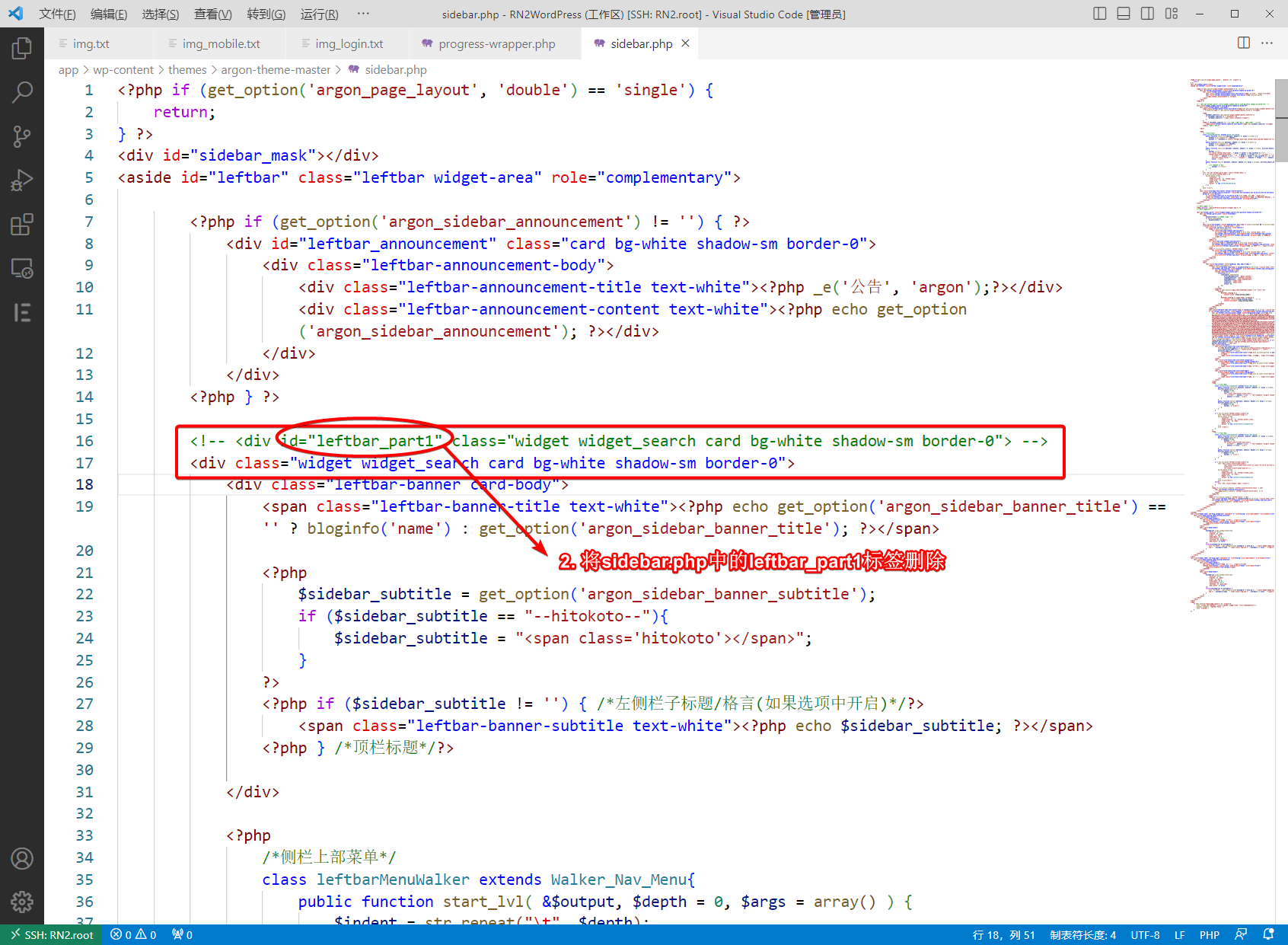
以上设置时间进度条会有重叠的情况,据测试,argon主题判断向上隐藏某卡片时依据其ID标签是否为left_part1。因此,基本的思路是给时间进度条添加该标签,然后将旧标签删除(原来是属于搜索框的)。修复方法如下:
给时间进度条添加leftbar_part1的标签:
将sidebar.php中原来的left_part1对应的ID标签删除:
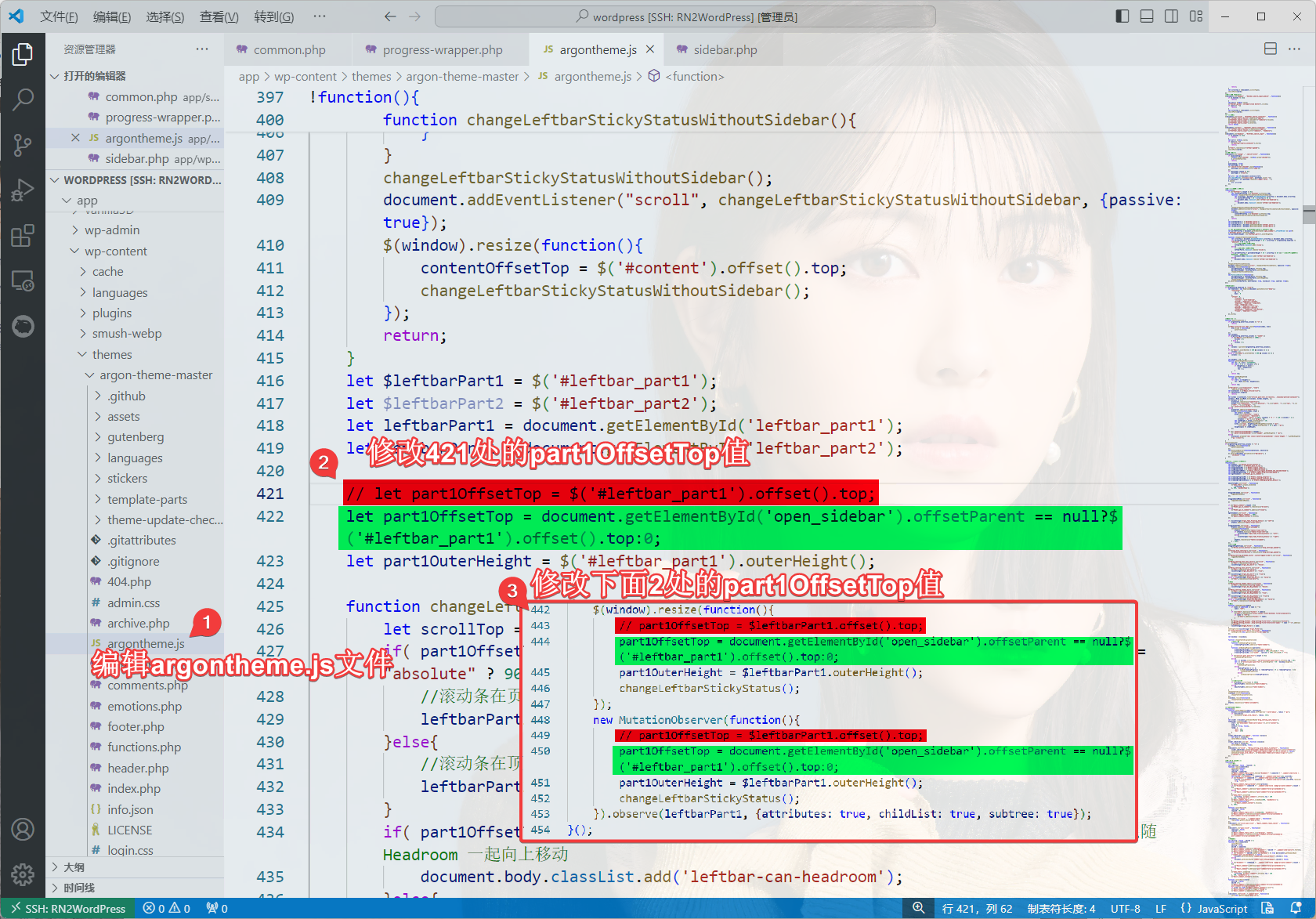
由jacky567 提供解决方案:修改argontheme.js代码,改变part1OffsetTop的赋值。用于解决移动端菜单栏不能自动隐藏 的bug。
新代码为:
let part1OffsetTop = document.getElementById('open_sidebar').offsetParent == null?$('#leftbar_part1').offset().top:0;
修改并保存后即时生效。注意事项:
后面两处代码的开头没有let
如果您使用了CDN托管argon主题资源,您应该去CDN托管的后台里修改argontheme.js文件 额外CSS 仅限argon主题。
额外CSS一般用于增加一些自定义样式,比较改大某些字体的属性(大小、颜色)。这里修改的好处就是主题切换、升级时,该设置也不会丢失。
如果你想自定义CSS,最好通过Chrome/Edge浏览器+F12键 探索一下。下面的内容部分参考了鸦鸦的Argon 主题修改记录 ,我还进行了一些增删。有这些CSS加持,整个主题视觉效果好得多!
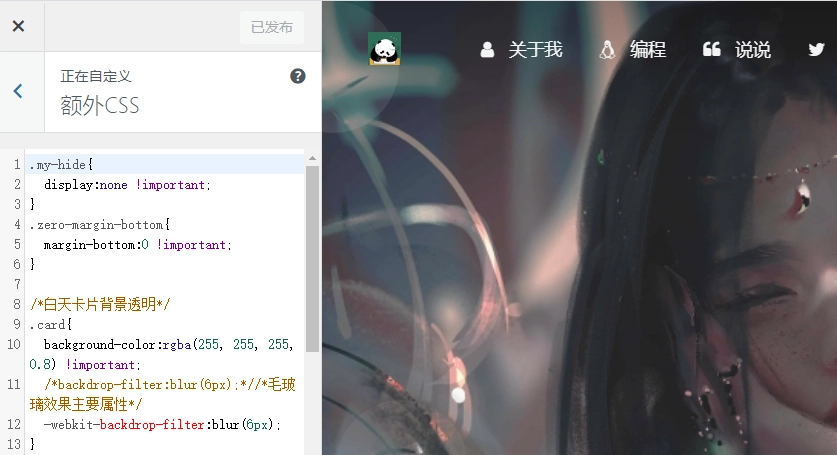
我们可以从后台左侧栏的外观——自定义,找到额外CSS:
在左下方空白处填写(按需增删):
<style type="text/css" id="wp-custom-css">

/*设置网站字体*/
/*原则上你可以设置多个字体,然后在不同的部位使用不同的字体*/
@font-face{
    font-family:btfFont;
  src: url(https://cdn.jsdelivr.net/gh/huangwb8/bloghelper@latest/fonts/13.woff2) format('woff2')
  /*     src: url(https://bensz.onmicrosoft.cn/fonts/13.woff2) format('woff2')*/

}
body{
    font-family:"btfFont" !important
}

/*设置加粗字体颜色*/
strong {
    color: #A7727D;
}
html.darkmode strong {
    color: #FAAB78;
}

/*说说预览模式*/
pre {
    /*白天*/
    color: #A7727D;
}
html.darkmode pre {
    /*夜晚*/
    color: #FAAB78;
}

/* Github卡片样式*/
.github-info-card-header a {
    /*Github卡片抬头颜色*/
    color: black !important;
    font-size: 1.5rem;
}
html.darkmode .github-info-card-header a {
    /*Github卡片抬头颜色——夜间*/
    color: #FAAB78 !important;
    font-size: 1.5rem;
}
.github-info-card {
    /*Github卡片文字(非链接)*/
    font-size: 1rem;
    color: black !important;
}
html.darkmode .github-info-card {
    /*Github卡片文字(非链接)——夜间*/
    font-size: 1rem;
    color: #FAAB78 !important;
}
.github-info-card.github-info-card-full.card.shadow-sm {
    /*Github卡片背景色*/
    background-color: rgba(var(--themecolor-rgbstr), 0.1) !important;
}

/*横幅字体大小*/
.banner-title {
  font-size: 2.5em;
}
.banner-subtitle{
  font-size: 20px;
}

/*文章标题字体大小*/
.post-title {
    font-size: 30px
}

/*正文字体大小(不包含代码)*/
.post-content p{
    font-size: 1.25rem;
}
li{
    font-size: 1.2rem;
}

/*评论区字体大小*/
p {
    font-size: 1.2rem
}

/*评论发送区字体大小*/
.form-control{
    font-size: 1.2rem
}

/*评论勾选项目字体大小*/
.custom-checkbox .custom-control-input~.custom-control-label{
    font-size: 1.2rem
}
/*评论区代码的强调色*/
code {
  color: rgba(var(--themecolor-rgbstr));
}

/*说说字体大小和颜色设置*/
.shuoshuo-title {
    font-size: 25px;
/*  color: rgba(var(--themecolor-rgbstr)); */
}

/*尾注字体大小*/
.additional-content-after-post{
    font-size: 1.2rem
}

/*========颜色设置===========*/

/*文章或页面的正文颜色*/
body{
    color:#364863
}

/*引文属性设置*/
blockquote {
    /*添加弱主题色为背景色*/
    background: rgba(var(--themecolor-rgbstr), 0.1) !important;
    width: 100%
}

/*引文颜色 建议用主题色*/
:root {
    /*也可以用类似于--color-border-on-foreground-deeper: #009688;这样的命令*/
    --color-border-on-foreground-deeper: rgba(var(--themecolor-rgbstr));
}

/*左侧菜单栏突出颜色修改*/
.leftbar-menu-item > a:hover, .leftbar-menu-item.current > a{
    background-color: #f9f9f980;
}

/*站点概览分隔线颜色修改*/
.site-state-item{
    border-left: 1px solid #aaa;
}
.site-friend-links-title {
    border-top: 1px dotted #aaa;
}
#leftbar_tab_tools ul li {
    padding-top: 3px;
    padding-bottom: 3px;
    border-bottom:none;
}
html.darkmode #leftbar_tab_tools ul li {
    border-bottom:none;
}

/*左侧栏搜索框的颜色*/
button#leftbar_search_container {
    background-color: transparent;
}

/*========透明设置===========*/

/*白天卡片背景透明*/
.card{
    background-color:rgba(255, 255, 255, 0.85) !important;
    /*backdrop-filter:blur(6px);*//*毛玻璃效果主要属性*/
    -webkit-backdrop-filter:blur(6px);
}

/*小工具栏背景完全透明*/
/*小工具栏是card的子元素,如果用同一个透明度会叠加变色,故改为完全透明*/
.card .widget,.darkmode .card .widget,#post_content > div > div > div.argon-timeline-card.card.bg-gradient-secondary.archive-timeline-title{
    background-color:#ffffff00 !important;
    backdrop-filter:none;
    -webkit-backdrop-filter:none;
}
.emotion-keyboard,#fabtn_blog_settings_popup{
    background-color:rgba(255, 255, 255, 0.95) !important;
}

/*分类卡片透明*/
.bg-gradient-secondary{
    background:rgba(255, 255, 255, 0.1) !important;
    backdrop-filter: blur(10px);
    -webkit-backdrop-filter:blur(10px);
}

/*夜间透明*/
html.darkmode.bg-white,html.darkmode .card,html.darkmode #footer{
    background:rgba(66, 66, 66, 0.9) !important;
}
html.darkmode #fabtn_blog_settings_popup{
    background:rgba(66, 66, 66, 0.95) !important;
}

/*标签背景
.post-meta-detail-tag {
    background:rgba(255, 255, 255, 0.5)!important;
}*/


/*========排版设置===========*/

/*左侧栏层级置于上层*/
#leftbar_part1 {
    z-index: 1;
}

/*分类卡片文本居中*/
#content > div.page-information-card-container > div > div{
    text-align:center;
}

/*子菜单对齐及样式调整*/
.dropdown-menu .dropdown-item>i{
    width: 10px;
}
.dropdown-menu>a {
    color:var(--themecolor);
}
.dropdown-menu{
    min-width:max-content;
}
.dropdown-menu .dropdown-item {
    padding: .5rem 1.5rem 0.5rem 1rem;
}
.leftbar-menu-subitem{
    min-width:max-content;
}
.leftbar-menu-subitem .leftbar-menu-item>a{
    padding: 0rem 1.5rem 0rem 1rem;
}

/*左侧栏边距修改*/
.tab-content{
    padding:10px 0px 0px 0px !important;
}
.site-author-links{
    padding:0px 0px 0px 10px ;
}
/*目录位置偏移修改*/
#leftbar_catalog{
    margin-left: 0px;
}
/*目录条目边距修改*/
#leftbar_catalog .index-link{
    padding: 4px 4px 4px 4px;
}
/*左侧栏小工具栏字体缩小*/
#leftbar_tab_tools{
    font-size: 14px;
}

/*正文图片边距修改*/
article figure {margin:0;}
/*正文图片居中显示*/
.fancybox-wrapper {
    margin: auto;
}
/*正文表格样式修改*/
article table > tbody > tr > td,
article table > tbody > tr > th,
article table > tfoot > tr > td,
article table > tfoot > tr > th,
article table > thead > tr > td,
article table > thead > tr > th{
    padding: 8px 10px;
    border: 1px solid;
}
/*表格居中样式*/
.wp-block-table.aligncenter{margin:10px auto;}

/*回顶图标放大*/
button#fabtn_back_to_top, button#fabtn_go_to_comment, button#fabtn_toggle_blog_settings_popup, button#fabtn_toggle_sides, button#fabtn_open_sidebar{
    font-size: 1.2rem;
}

/*顶栏菜单*/
/*这里也可以设置刚刚我们设置的btfFont字体。试试看!*/
.navbar-nav .nav-link {
    font-size: 1.2rem;
    font-family: 'btfFont';
}
.nav-link-inner--text {
    /*顶栏菜单字体大小*/
    font-size: 1.1rem;
}
.navbar-nav .nav-item {
    margin-right:0;
}
.mr-lg-5, .mx-lg-5 {
    margin-right:1rem !important;
}
.navbar-toggler-icon {
    width: 1.5rem;
    height: 1.5rem;
}
.navbar-expand-lg .navbar-nav .nav-link {
    padding-right: 0.9rem;
    padding-left: 1rem;
}

/*顶栏图标*/
.navbar-brand {
    font-family: 'Noto Serif SC',serif;
    font-size: 1.25rem;
    /*顶栏图标边界微调*/
    margin-right: 0rem; /*左右偏移*/
    padding-bottom: 0.3rem;
}
.navbar-brand img {
  /* 图片高度*/
    height: 24px;
}

/*隐藏wp-SEO插件带来的线条阴影(不一定要装)*/
*[style='position: relative; z-index: 99998;'] {
    display: none;
}

/*头像调大*/
#leftbar_overview_author_image{
  width: 180px !important;
  height: 180px !important;
}

/*网站黑白色(悼念)需要添加在最底部否则容易与其它样式冲突*/
/* html {
    filter: grayscale(100%);
    -webkit-filter: grayscale(100%);
    -moz-filter: grayscale(100%);
    -ms-filter: grayscale(100%);
    -o-filter: grayscale(100%);
    filter: url("data:image/svg+xml;utf8,#grayscale");
    filter:progid:DXImageTransform.Microsoft.BasicImage(grayscale=1);
    -webkit-filter: grayscale(1);
} */
</style>
如果你不太懂某一项的意义,可以评论区留言咨询,有空我会解答!
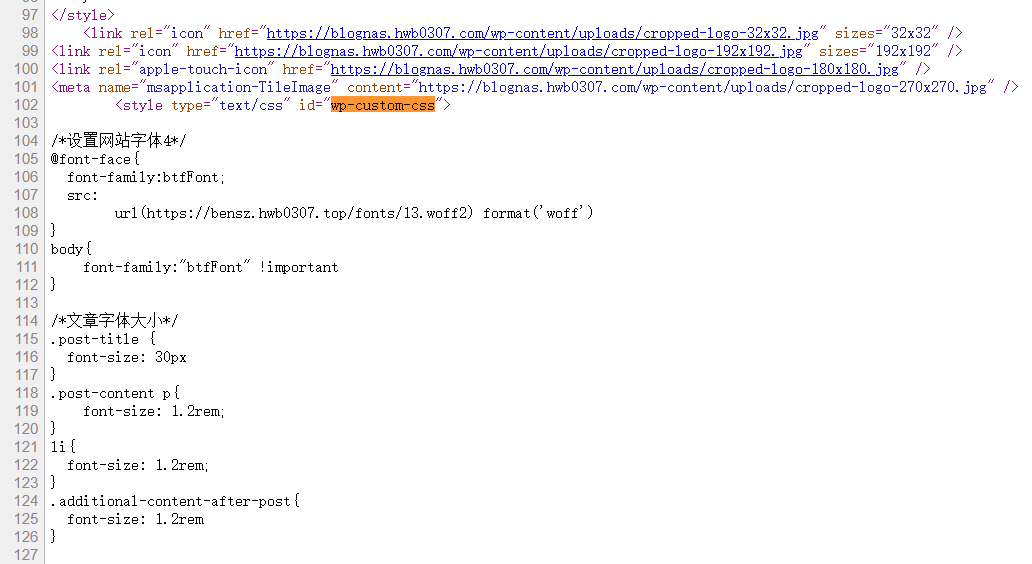
如果你对我正在使用的额外CSS感兴趣,也可以直接查看我博客网页的源代码,搜索wp-custom-css即可快速定位 :
font awesome v7 v7有一些特别的图标。在/usr/apps/blog/wordpressData/wp-content/themes/argon/functions.php里添加以下代码:
//保留旧版本图标并引入新版本图标库
function enqueue_font_awesome_shim() {
    wp_enqueue_style( 'fa7', 'https://cdnjs.cloudflare.com/ajax/libs/font-awesome/7.0.0/css/all.min.css' );
    wp_enqueue_style( 'fa7-v4-shims', 'https://cdnjs.cloudflare.com/ajax/libs/font-awesome/7.0.0/css/v4-shims.min.css' );
}
add_action( 'wp_enqueue_scripts', 'enqueue_font_awesome_shim' );
在这里搜索图标:https://fontawesome.com/search。与v4版本相比有很多新的图标。
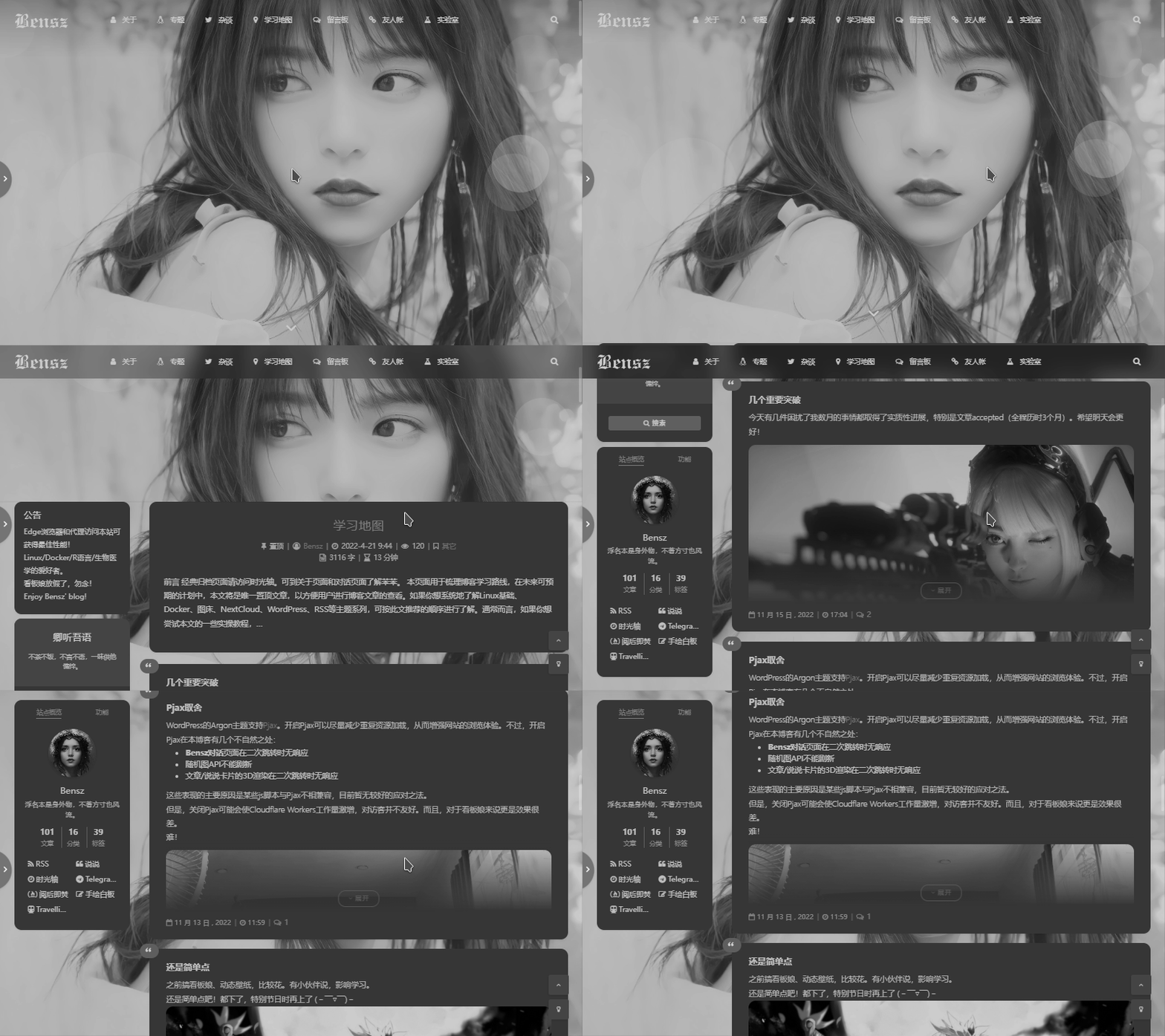
悼念色 遇到国家重要人物逝世、抗战纪念日等重大时点,为了表示悲悼,很多网站会选择全黑白的配色。效果如下:
只需要在额外CSS的最底部 (否则容易和其它CSS代码冲突)添加下列代码即可:
/*网站黑白色(悼念)*/
html {
    filter: grayscale(100%);
    -webkit-filter: grayscale(100%);
    -moz-filter: grayscale(100%);
    -ms-filter: grayscale(100%);
    -o-filter: grayscale(100%);
    filter: url("data:image/svg+xml;utf8,#grayscale");
    filter:progid:DXImageTransform.Microsoft.BasicImage(grayscale=1);
    -webkit-filter: grayscale(1);
}
该CSS代码对于任何WordPress主题都是适用的。
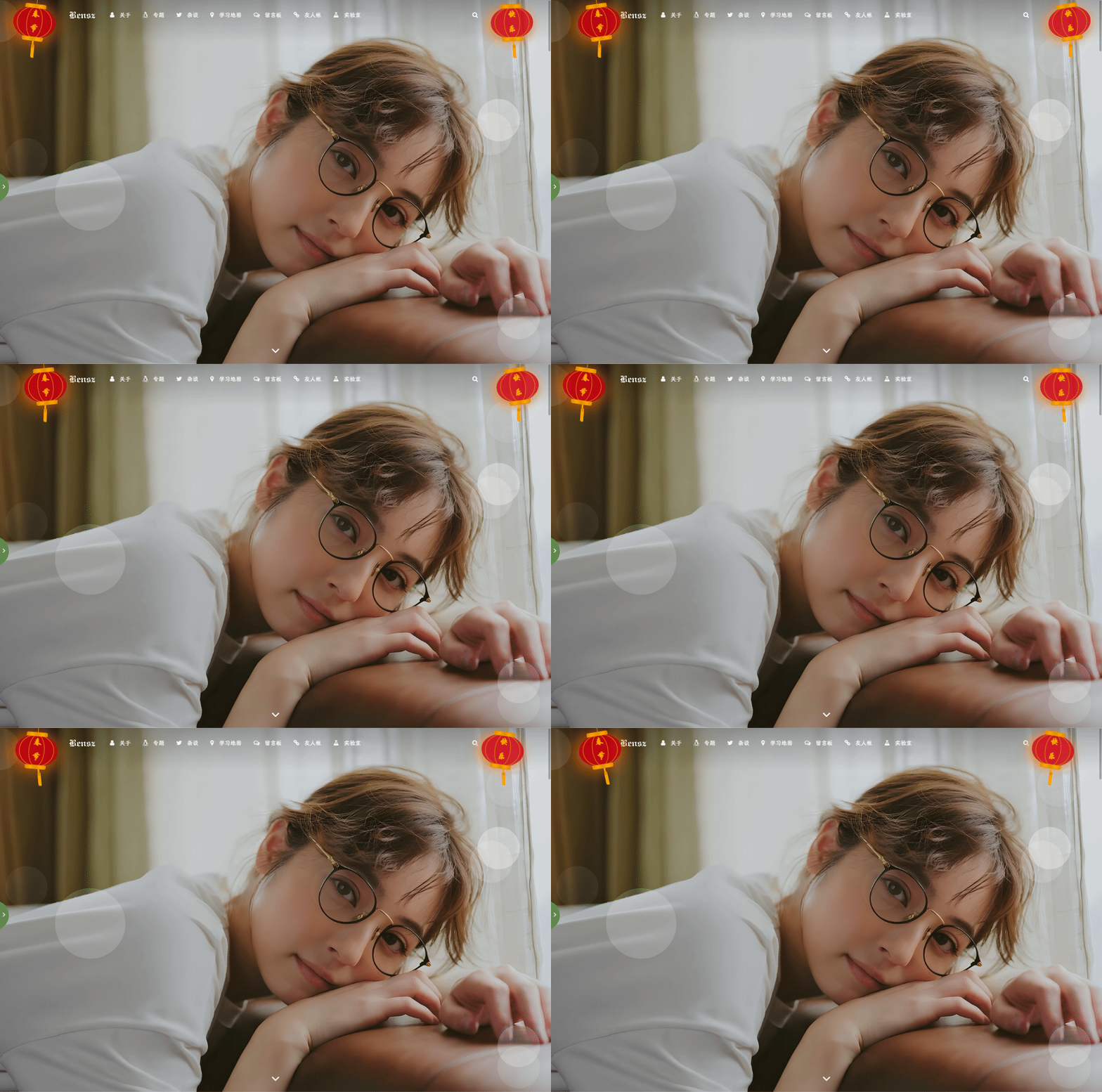
春节灯笼挂件 效果大致如下:
方法一 :在footer.php的</body>标签前加入下列HTML代码:
<!--春节灯笼-->
<link href="https://cdn.jsdelivr.net/gh/huangwb8/bloghelper@latest/css/deng.css" rel="stylesheet">
<div class="deng-box">
<div class="deng">
<div class="xian"></div>
<div class="deng-a">
<div class="deng-b"><div class="deng-t">春节</div></div>
</div>
<div class="shui shui-a"><div class="shui-c"></div><div class="shui-b"></div></div>
</div>
</div>

<div class="deng-box1">
<div class="deng">
<div class="xian"></div>
<div class="deng-a">
<div class="deng-b"><div class="deng-t">快乐</div></div>
</div>
<div class="shui shui-a"><div class="shui-c"></div><div class="shui-b"></div></div>
</div>
</div>
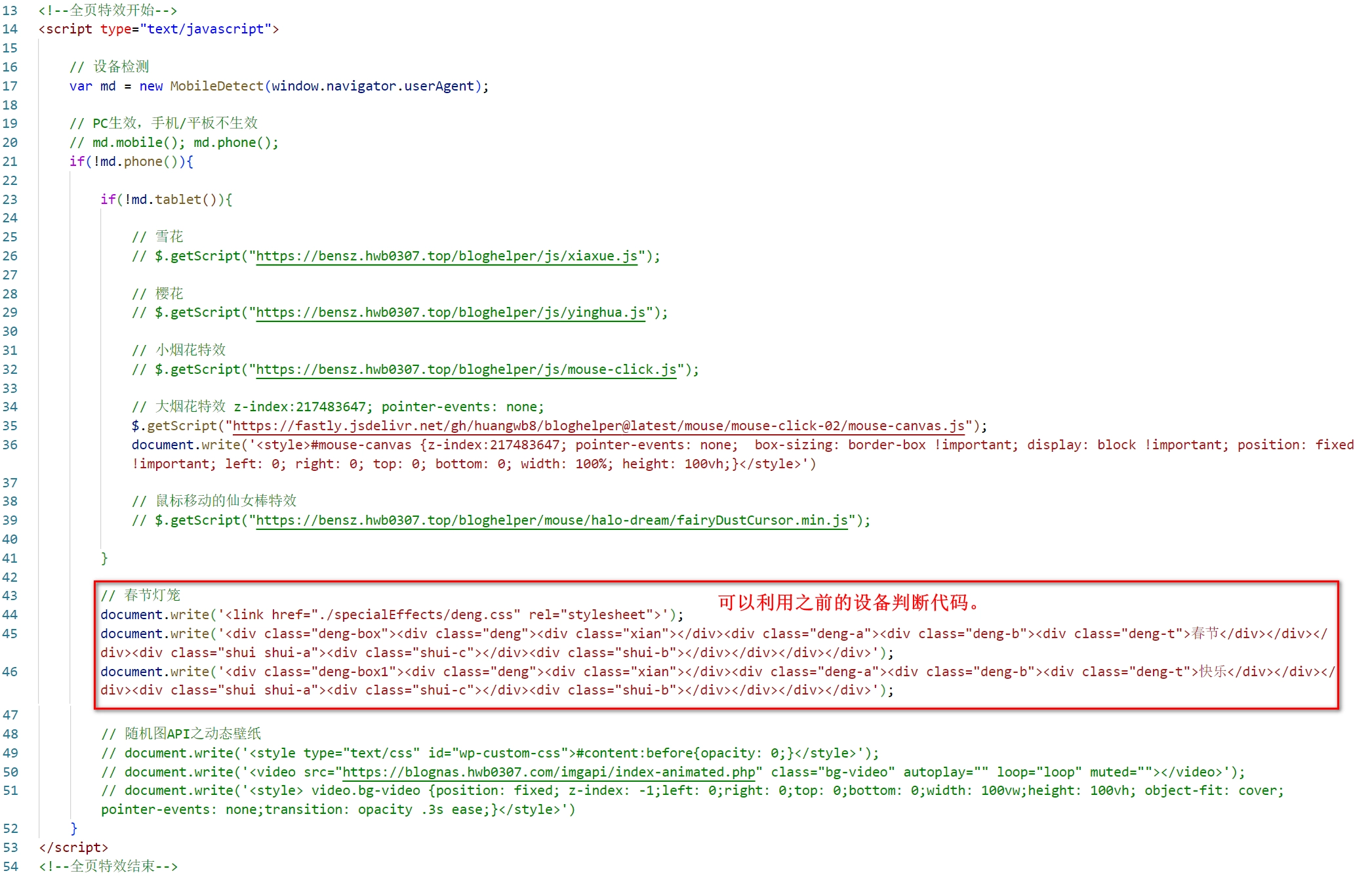
方法二 :像我一样,为了利用js的设备判断,在js中加入代码:
// 春节灯笼
document.write('<link href="https://cdn.jsdelivr.net/gh/huangwb8/bloghelper@latest/css/deng.css" rel="stylesheet">');
document.write('<div class="deng-box"><div class="deng"><div class="xian"></div><div class="deng-a"><div class="deng-b"><div class="deng-t">春节</div></div></div><div class="shui shui-a"><div class="shui-c"></div><div class="shui-b"></div></div></div></div>');
document.write('<div class="deng-box1"><div class="deng"><div class="xian"></div><div class="deng-a"><div class="deng-b"><div class="deng-t">快乐</div></div></div><div class="shui shui-a"><div class="shui-c"></div><div class="shui-b"></div></div></div></div>');
如下图所示:
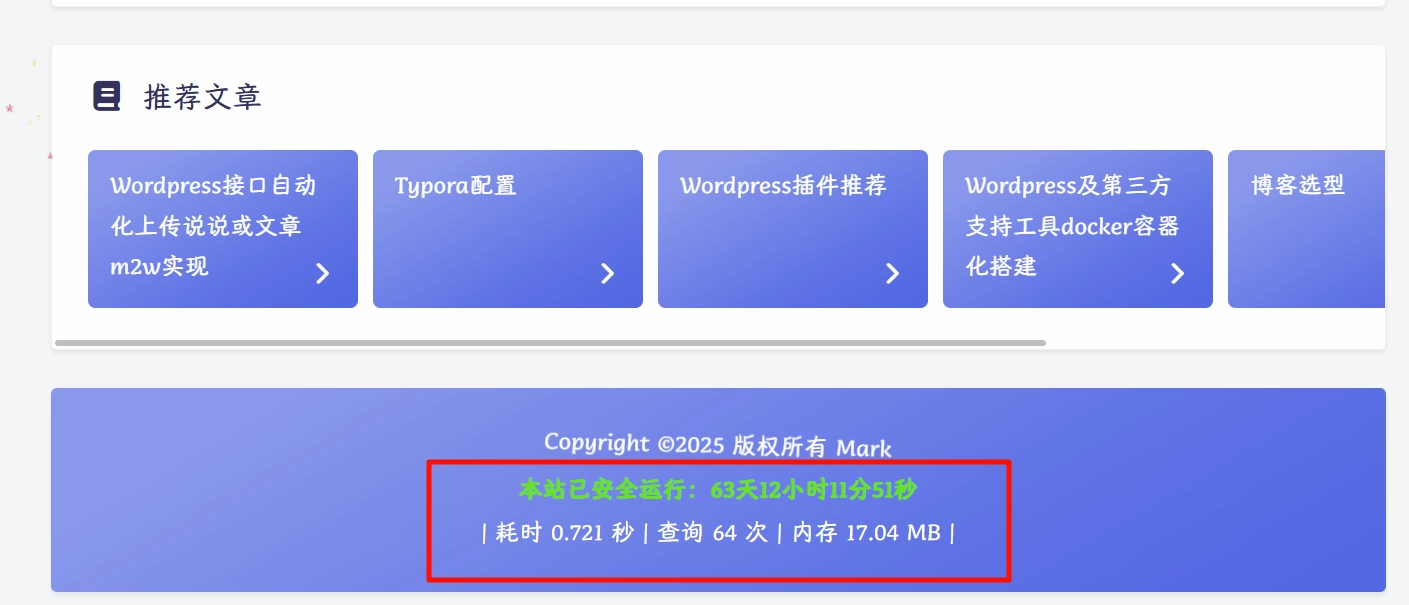
运行时间、耗时及占用内存 在footer.php同级目录新建文件夹和文件/specialEffects/timeRAM.php,以下是详细内容,图省事可以直接复制使用,下方有详细说明。
<!--耗时及占用内存开始-->
<span id="momk"></span><span id="momk" style="color: #ff0000;"></span>
<script type="text/javascript">
function NewDate(str) {
str = str.split('-');
var date = new Date();
date.setUTCFullYear(str[0], str[1] - 1, str[2]);
date.setUTCHours(0, 0, 0, 0);
return date;
}
function momxc() {
var birthDay =NewDate("2025-07-01");
var today=new Date();
var timeold=today.getTime()-birthDay.getTime();
var sectimeold=timeold/1000
var secondsold=Math.floor(sectimeold);
var msPerDay=24*60*60*1000; var e_daysold=timeold/msPerDay;
var daysold=Math.floor(e_daysold);
var e_hrsold=(daysold-e_daysold)*-24;
var hrsold=Math.floor(e_hrsold);
var e_minsold=(hrsold-e_hrsold)*-60;
var minsold=Math.floor((hrsold-e_hrsold)*-60); var seconds=Math.floor((minsold-e_minsold)*-60).toString();
document.getElementById("momk").innerHTML = "本站已安全运行:"+daysold+"天"+hrsold+"小时"+minsold+"分"+seconds+"秒<br>";
setTimeout(momxc, 1000);
}momxc();
</script>
<style>
#momk{animation:change 10s infinite;font-weight:800; }
@keyframes change{0%{color:#5cb85c;}25%{color:#556bd8;}50%{color:#e40707;}75%{color:#66e616;}100% {color:#67bd31;}}
</style>
<?php printf(' | 耗时 %.3f 秒 | 查询 %d 次 | 内存 %.2f MB |',timer_stop( 0, 3 ),get_num_queries(),memory_get_peak_usage() / 1024 / 1024);?>
<br>
<!--耗时及占用内存结束-->
添加后显示效果如下:
禁用wordpress大小写转换器 问题源于我文章名都是用wordpress 小写或者不标准的大小写,发布文章的时候WordPress会转换成标准的WordPresss 文章名,导致发布的名称不对,再次使用m2w发布文章的时候获取文章列表跟本地的对比就对比不上,文章就会重新发布。解决起来也很简单,只需要在funtions.php添加以下代码即可:
# 禁用 capital_P_dangit 过滤器,这个函数专门用来 自动把“Wordpress”修正成“WordPress”。
remove_filter( 'the_title', 'capital_P_dangit', 11 );
remove_filter( 'the_content', 'capital_P_dangit', 11 );
remove_filter( 'comment_text', 'capital_P_dangit', 31 );
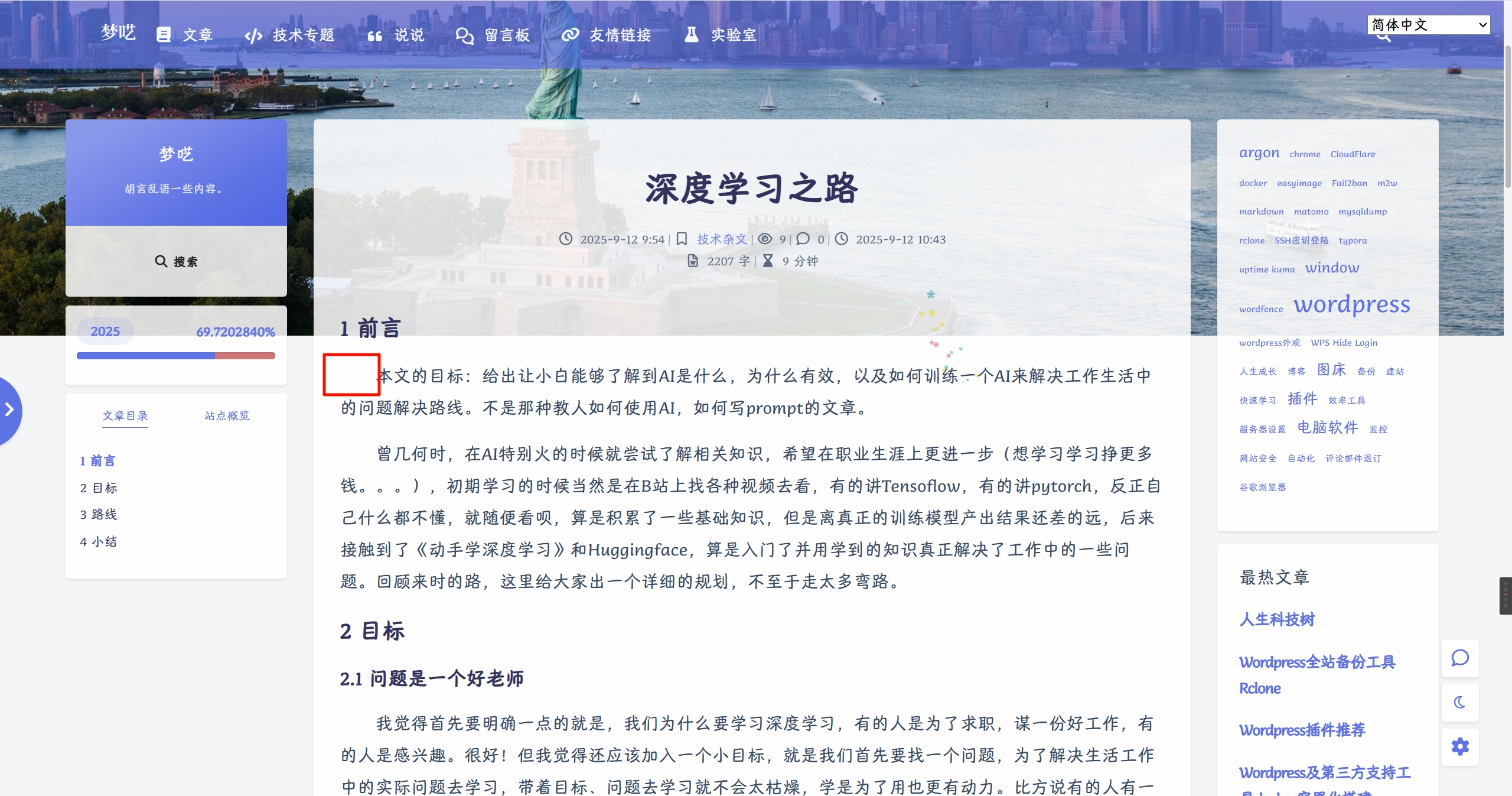
正文首行缩进 默认情况下markdown是不会默认首行缩进的,除非在每个段落开头添加两个  才能实现首行缩进两字符,但是每个段落都挨个添加太麻烦了,就可以在/usr/apps/blog/wordpressData/wp-content/themes/argon/specialEffects/common.php里面wordpress全局段落首行缩进的css样式:
/*只对正文文字缩进2字符,而不影响引用、标题、列表*/
.post-content p {
    text-indent: 2em;
    //margin-top: 0.8em;   /* 段落之间留点间距 */
    //line-height: 1.8;    /* 增加行距,可读性更好 */
}
.post-content blockquote p,
.post-content h1,
.post-content h2,
.post-content h3,
.post-content h4,
.post-content h5,
.post-content h6,
.post-content h7,
.post-content li {
    text-indent: 0; /* 保证标题、引用、列表、图片不缩进 */
}
/* 取消只有图片的段落缩进 */
.post-content p:has(img) {
    text-indent: 0 !important;
}
效果如下:
文章置顶 文章置顶还是很有必要的,当我们文章比较多的时候,会有几篇是核心概括本分类主旨的基石(SEO的概念)文章,而且基石文章大多数指向了本分类其它的具体文章,所以为了用户来到我们网站能直接看到当前条件下最重要的几篇文章,快速了解核心观点,也能增加用户的留存率,我们采用了文章置顶。
Wordpress默认的文章置顶在多个文章都同时置顶的情况下顺序是不好控制的,而且只能首页置顶,想在分类页、搜索结果页列表上方优先展示置顶文章是不行的,接下来就需要我们进行一些改造。首先在functions.php文件最下方添加代码:
# 添加首页、分类页、搜索结果页文章置顶
function sticky_posts_everywhere( $query ) {
    if ( ! is_admin() && $query->is_main_query() ) {
        if ( is_home() || is_category() || is_tag() || is_search() ) {
            $query->set( 'ignore_sticky_posts', 1 ); // 忽略默认置顶逻辑
            add_filter( 'posts_orderby', 'sticky_posts_orderby', 10, 2 );
        }
    }
}
add_action( 'pre_get_posts', 'sticky_posts_everywhere' );

function sticky_posts_orderby( $orderby, $query ) {
    $sticky = get_option( 'sticky_posts' );
    if ( ! empty( $sticky ) ) {
        global $wpdb;
        // 在SQL里让置顶文章排在前面
        $sticky_ids = implode( ',', array_map( 'absint', $sticky ) );
        $orderby = "FIELD({$wpdb->posts}.ID, {$sticky_ids}) DESC, {$wpdb->posts}.post_date DESC";
    }
    // 移除过滤器,避免影响其他查询
    remove_filter( 'posts_orderby', 'sticky_posts_orderby', 10, 2 );
    return $orderby;
}
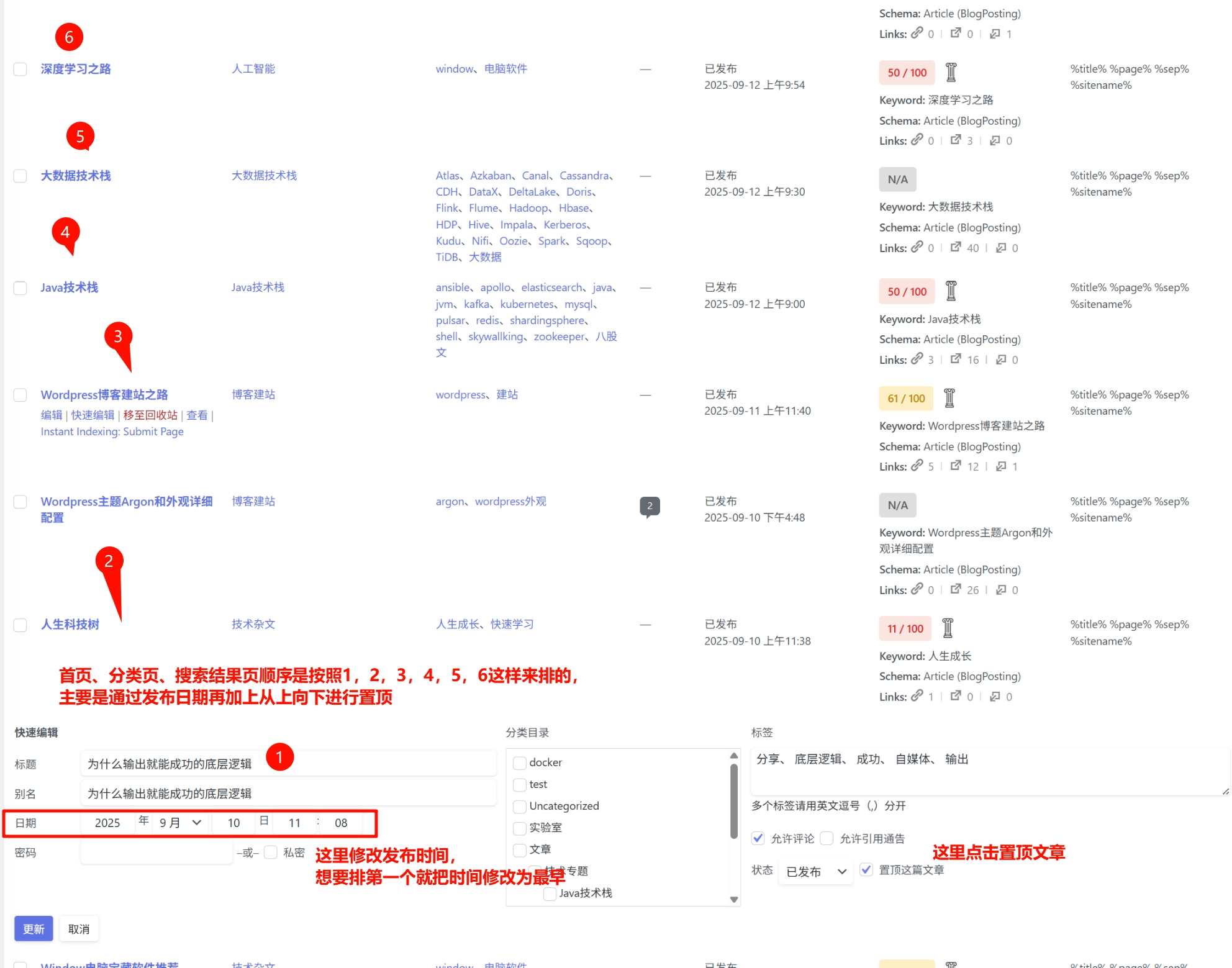
其次在文章列表 先把想要置顶的文章点击快速编辑 把文章的发布时间按照想要排第一个放在下边排好序,像这样:
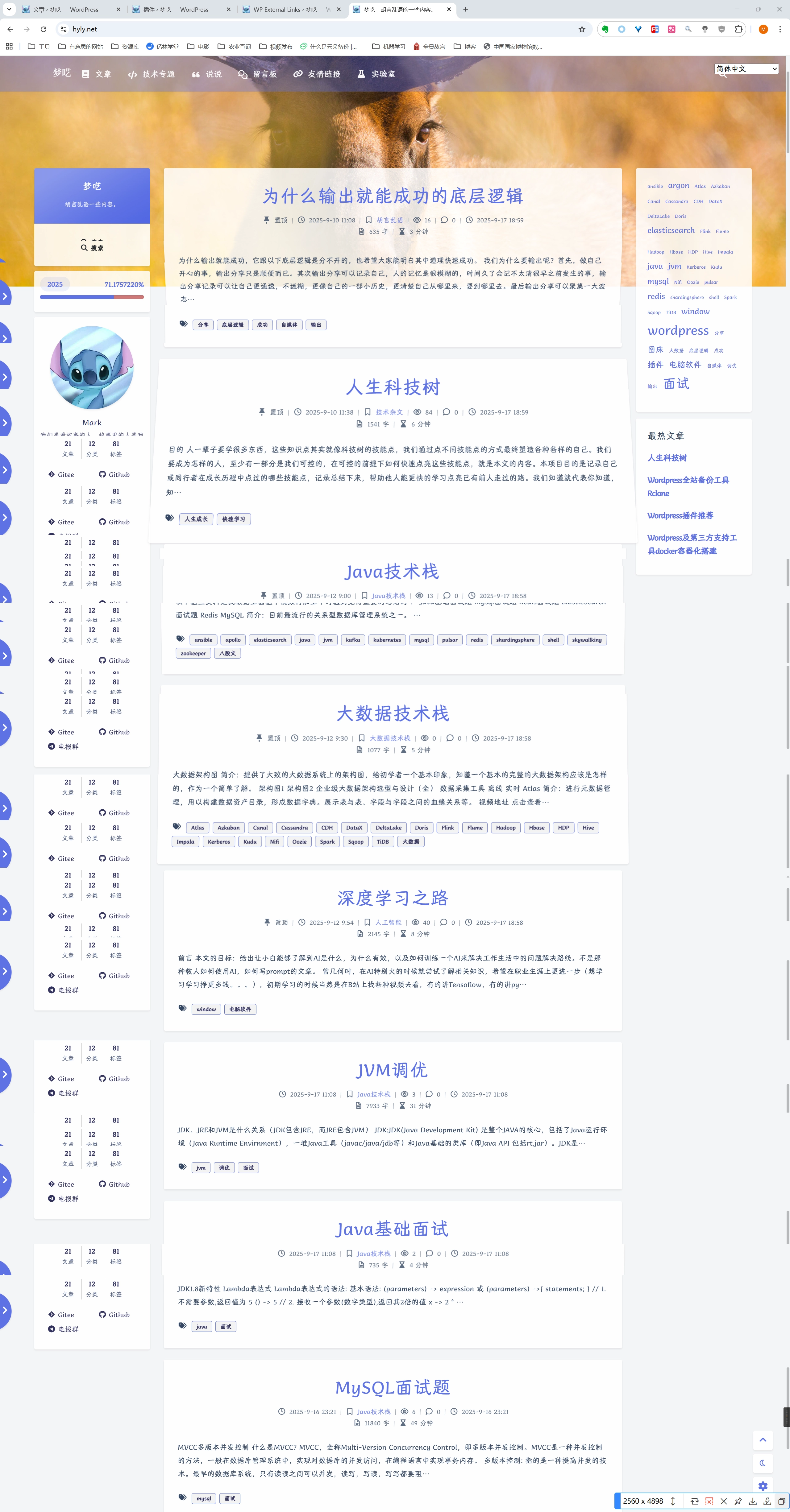
其次然后从标号6,5,4,3,2,1这样开始进行置顶,注意一定是要这个顺序,然后再首页、分类页、搜索结果页就是自己期望的排序了。未置顶的文章、说说按照默认发布时间排序:
如果想中间插入一篇文章、修改排序、排序错乱重新恢复只需要把发布时间按照上面规则排列好然后重新按照6、5、4、3、2、1这样重新进行置顶就可以了。
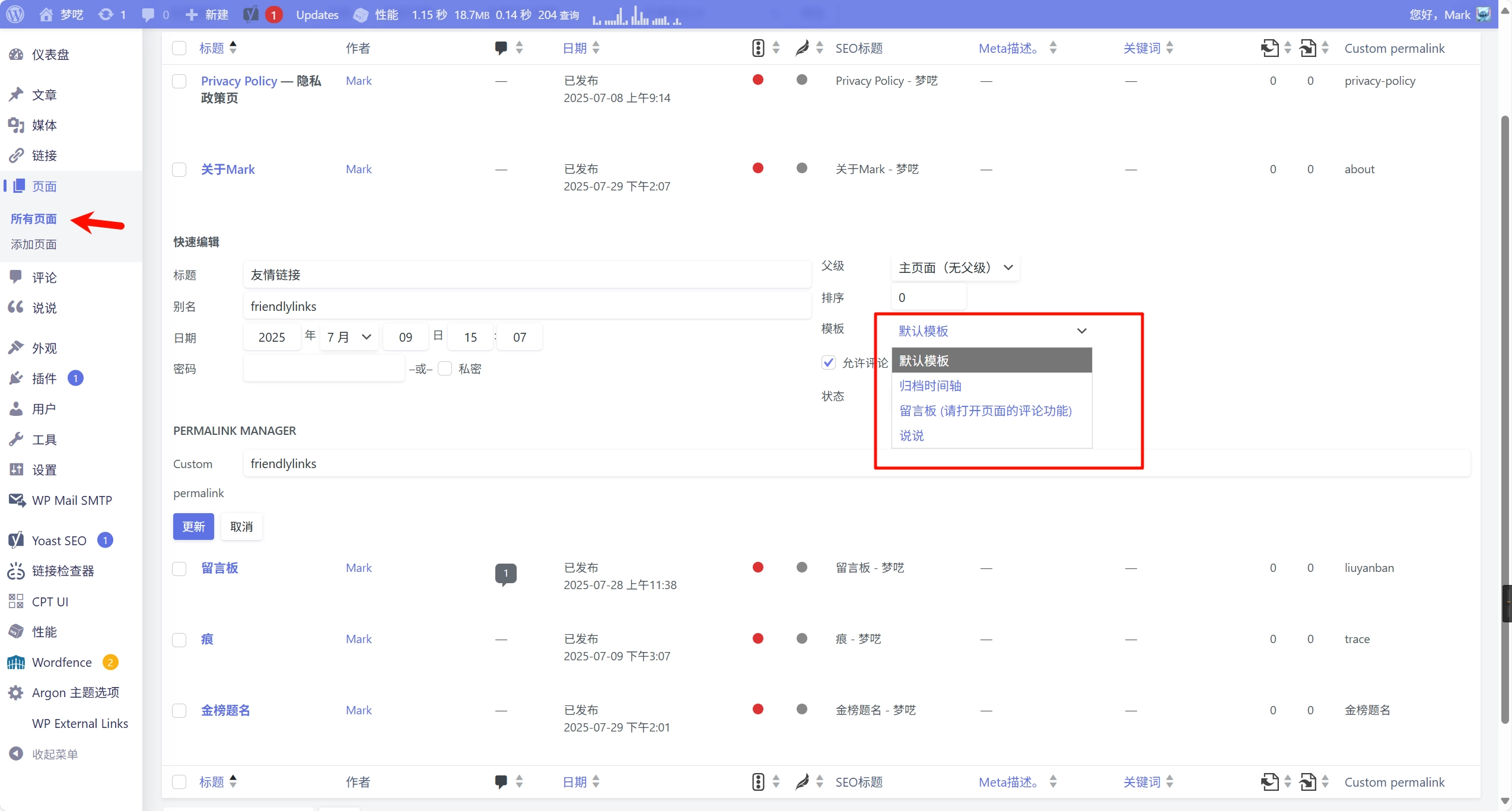
Wordpress页面配置 新近成立的个人博客通常还会有一些特殊页面,比如关于我、留言板、说说、友情链接、归档、隐私政策等。它会让你的博客布局更加丰满、更加成熟一些。它们均可以通过页面来进行配置。
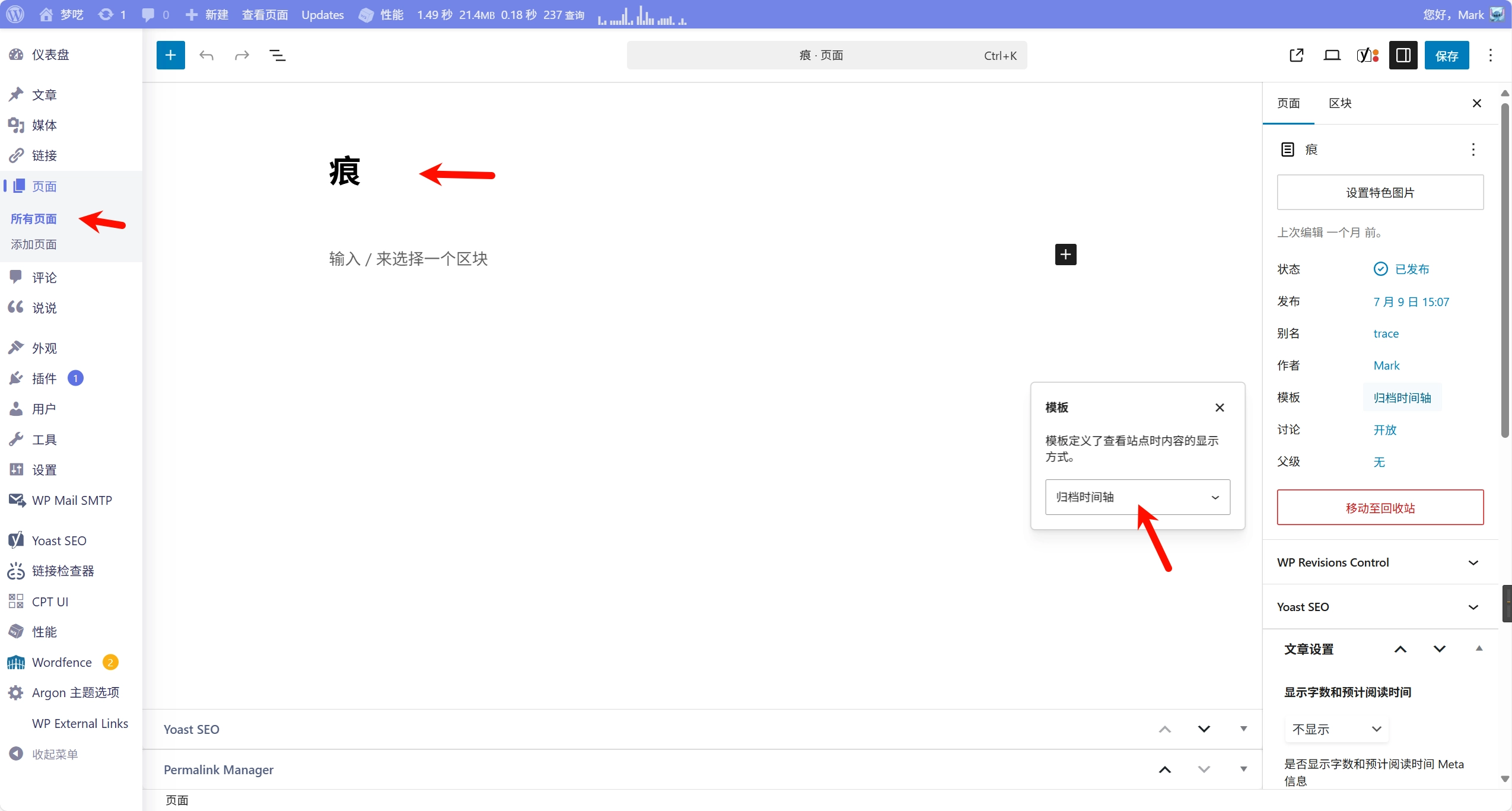
在后台,我们可以通过页面进入并添加和设置新页面,页面可以设置wordpress里的特色页面和一般页面,主要是通过模板来选择的:
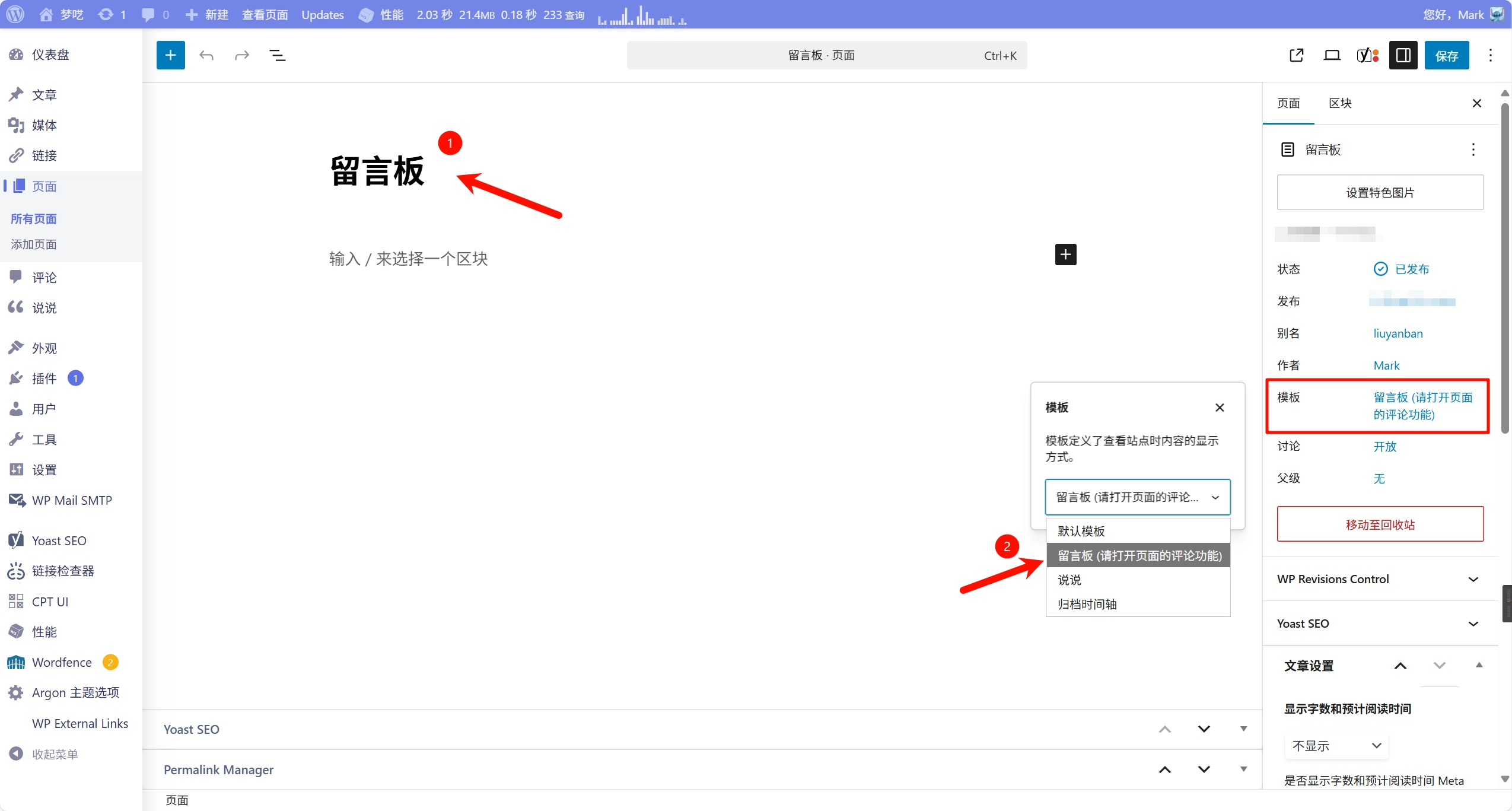
留言板 首先我们添加一个页面,标题写为留言板然后把模板设置为留言板就可以了:
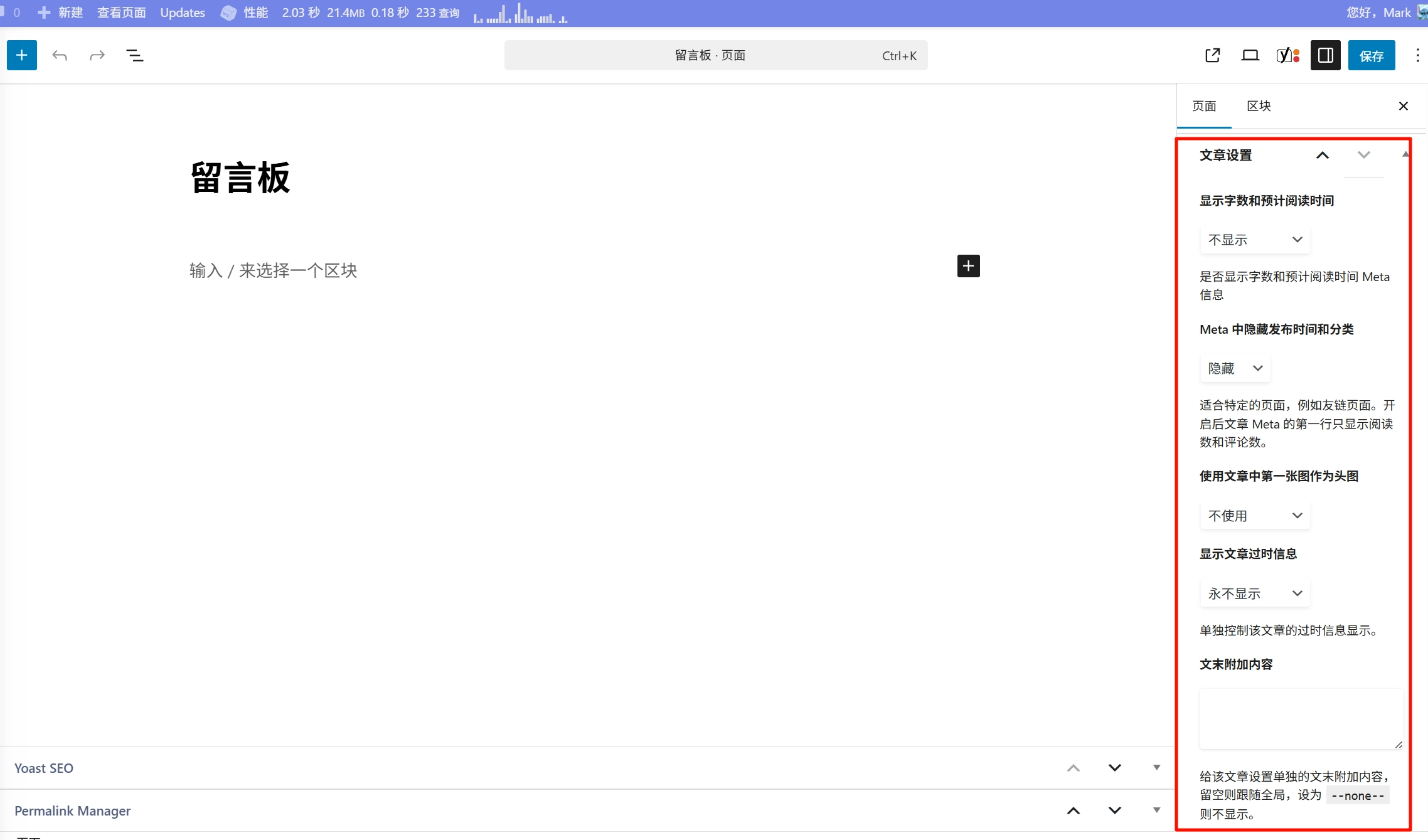
同时进行一些简单的文章设置就可以了:
接下来把它添加到菜单里就可以了,等会我们统一添加。
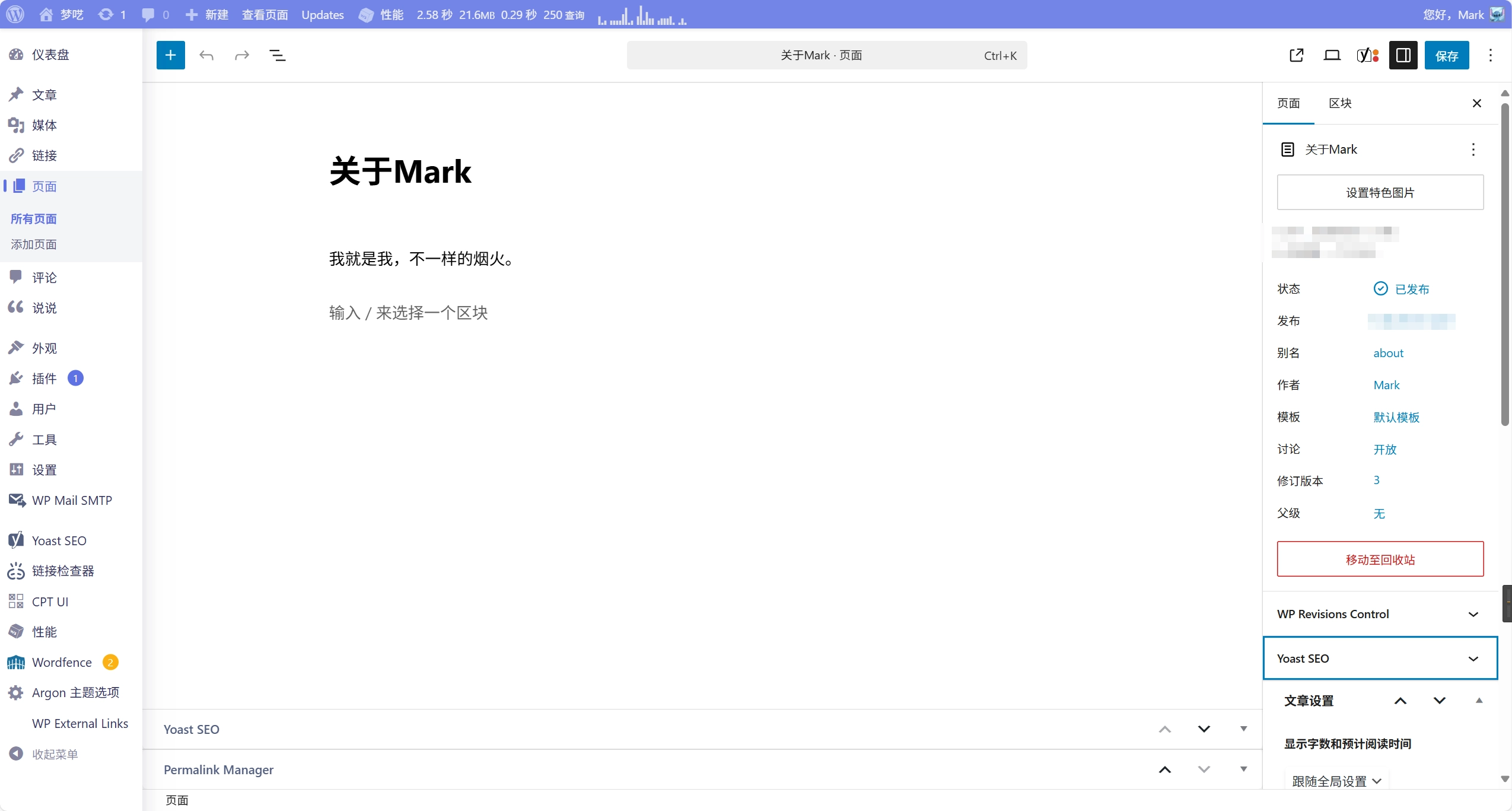
关于我 我们新建一个关于我的页面用于自我介绍。我觉得这个页面是比较重要的,它可以让访客快速了解你 。
作为展示,我随便写些内容进去:
模板用默认的就行。文章设置可以自己自定义,这个看自己喜好。
友情链接 友情链接其实是非常重要的 !这或许是一个最简单的SEO了!简单来说,就是互加一些志同道合的朋友,在一定程度上可以增加自己网站的曝光度。知乎上也有相关的问题及回答,比如:友情链接有什么用?详解友链的四大作用? 。自己去了解吧!
在Argon里,友情链接的实现非常简洁。不知道其它主题是不是也是类似!
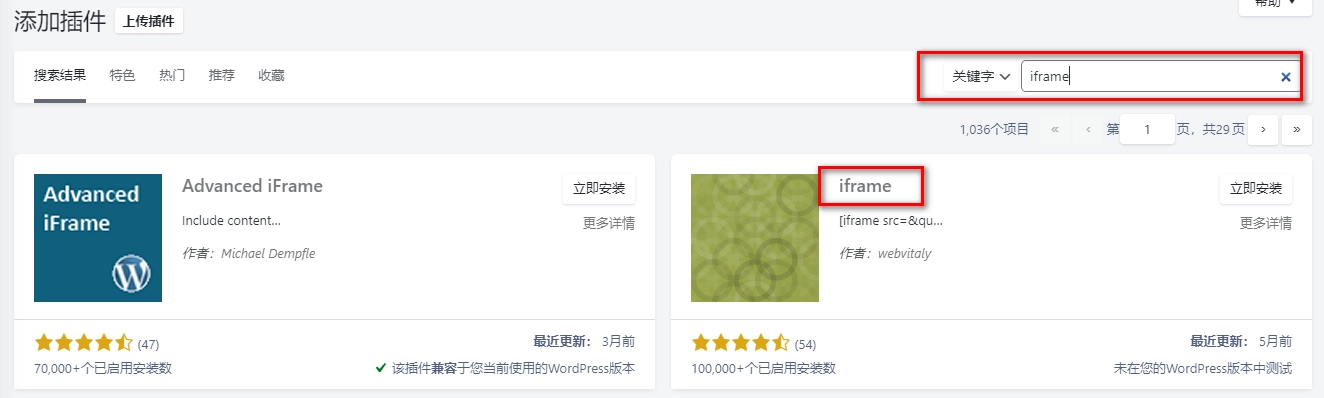
我们要先安装启用一个插件,叫iframe。这个插件是用于进行shortcode的插入:
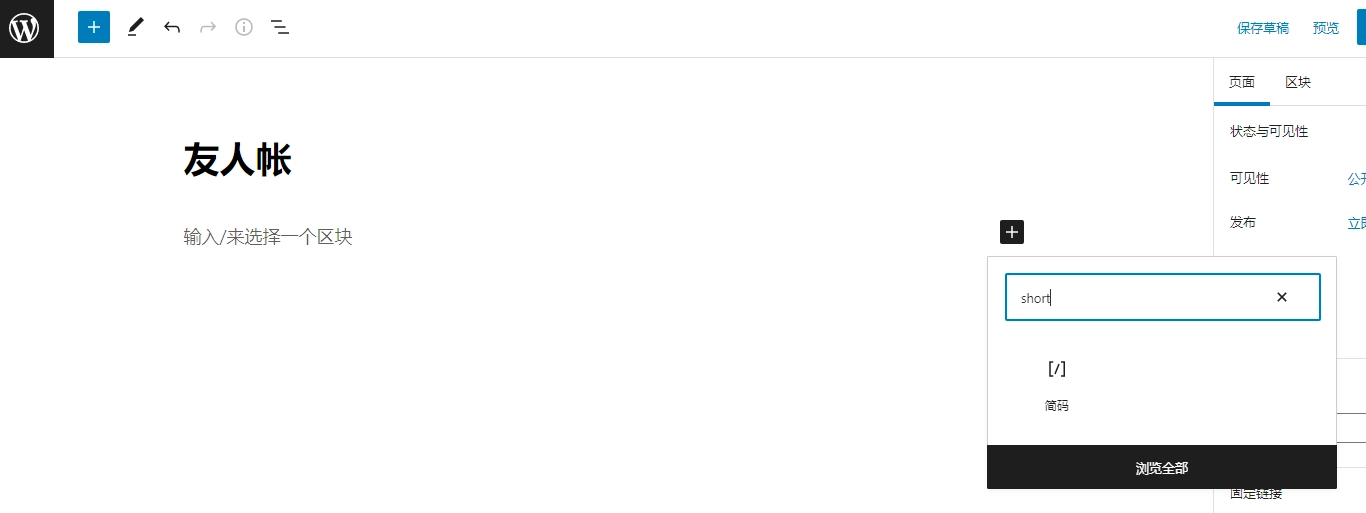
我们用默认模板新建一个页面,并且添加一个简码。类似于:
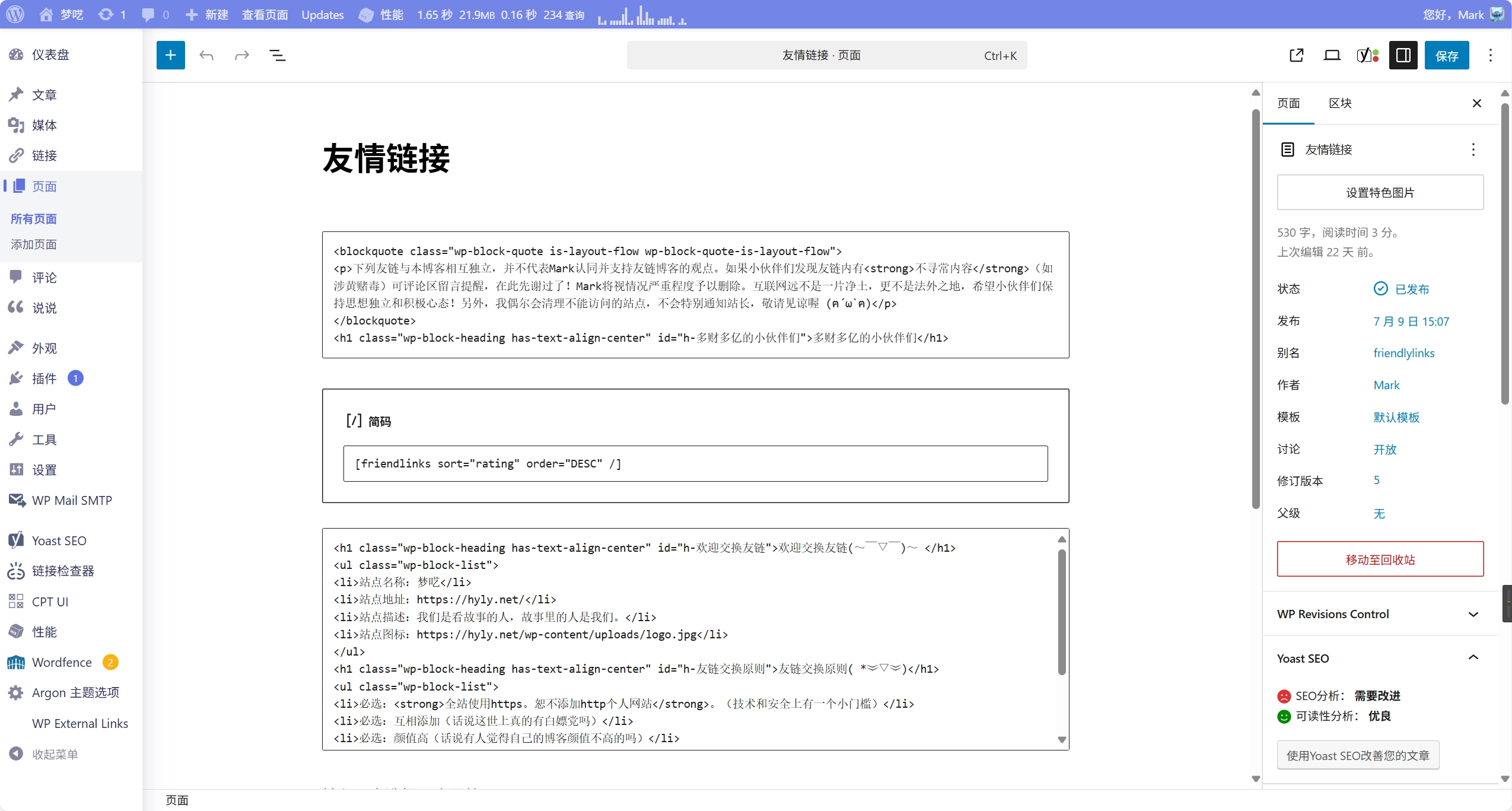
我们在里面加入:
除了简码之外的文本内容可以根据自己情况修改:
<blockquote class="wp-block-quote is-layout-flow wp-block-quote-is-layout-flow">
<p>下列友链与本博客相互独立,并不代表Mark认同并支持友链博客的观点。如果小伙伴们发现友链内有<strong>不寻常内容</strong>(如涉黄赌毒)可评论区留言提醒,在此先谢过了!Mark将视情况严重程度予以删除。互联网远不是一片净土,更不是法外之地,希望小伙伴们保持思想独立和积极心态!另外,我偶尔会清理不能访问的站点,不会特别通知站长,敬请见谅喔 (ฅ´ω`ฅ)</p>
</blockquote>
<h1 class="wp-block-heading has-text-align-center" id="h-多财多亿的小伙伴们">多财多亿的小伙伴们</h1>
百代繁华一朝都,谁非过客;千秋明月吹角寒,花是主人。
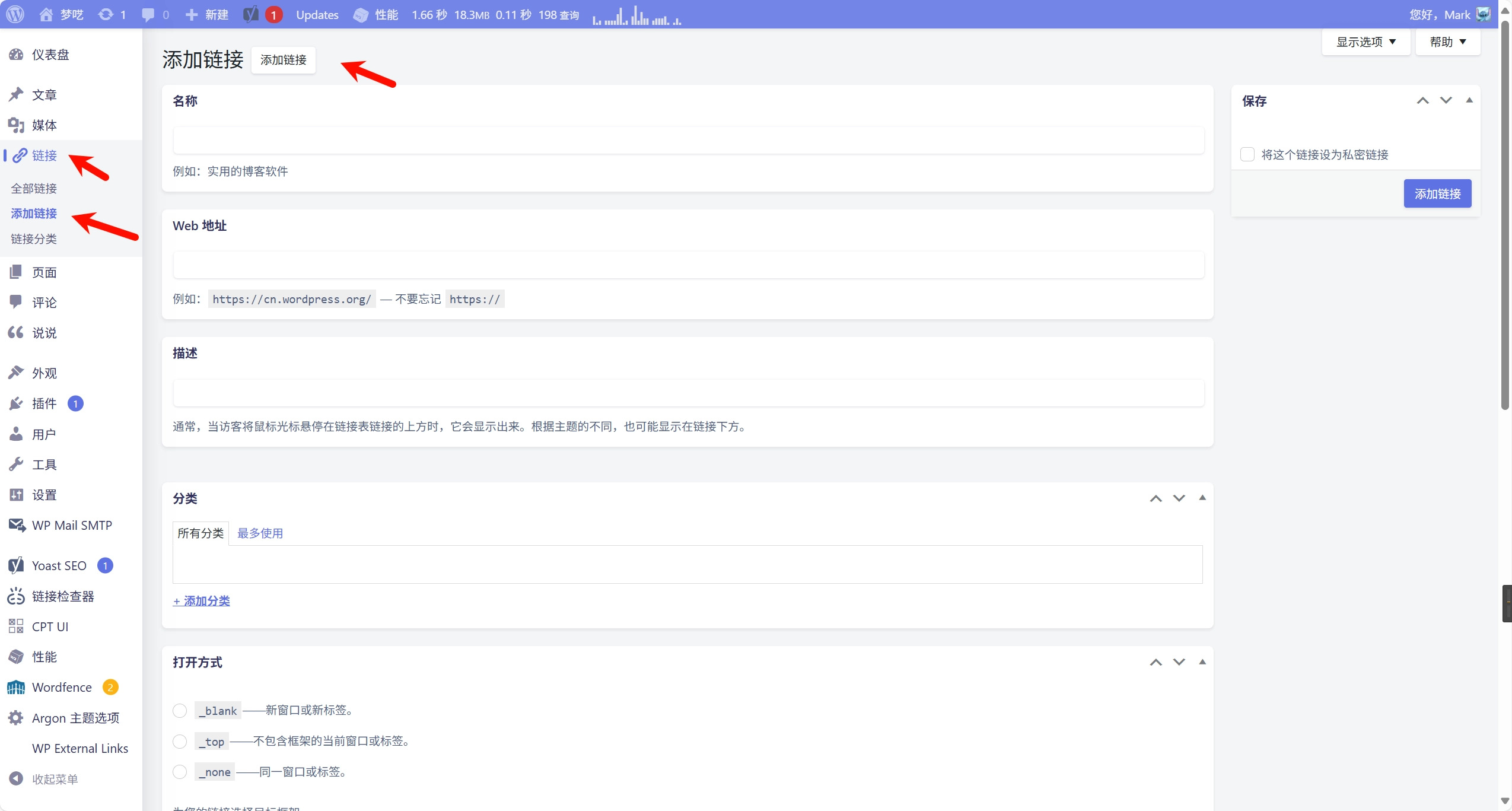
这里,可以在链接里添加内容:
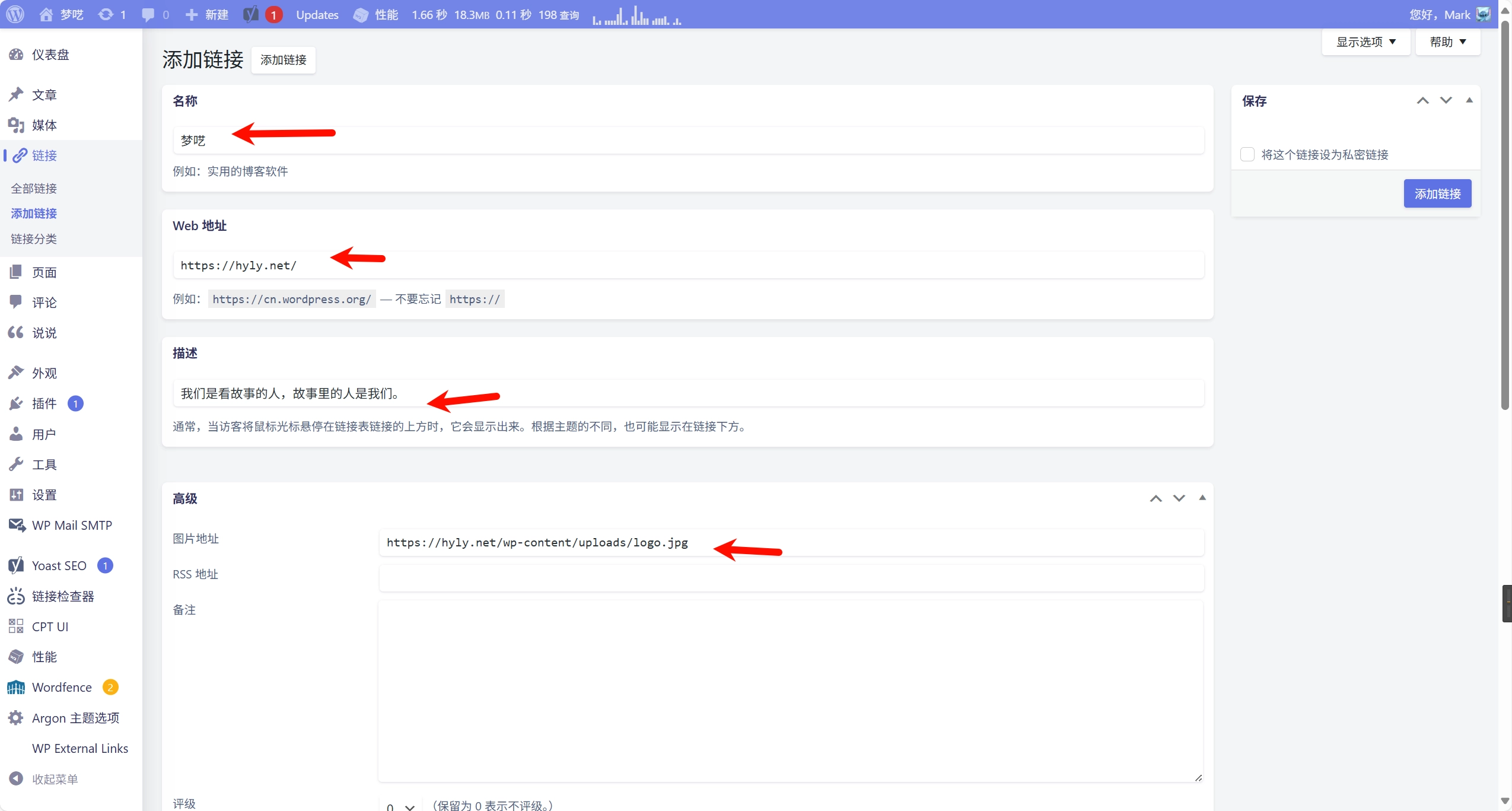
比如,你可以试试添加我的友链:
站点名称:梦呓
站点地址:https://hyly.net/
站点描述:我们是看故事的人,故事里的人是我们。
站点图标:https://hyly.net/wp-content/uploads/logo.jpg
如图所示:
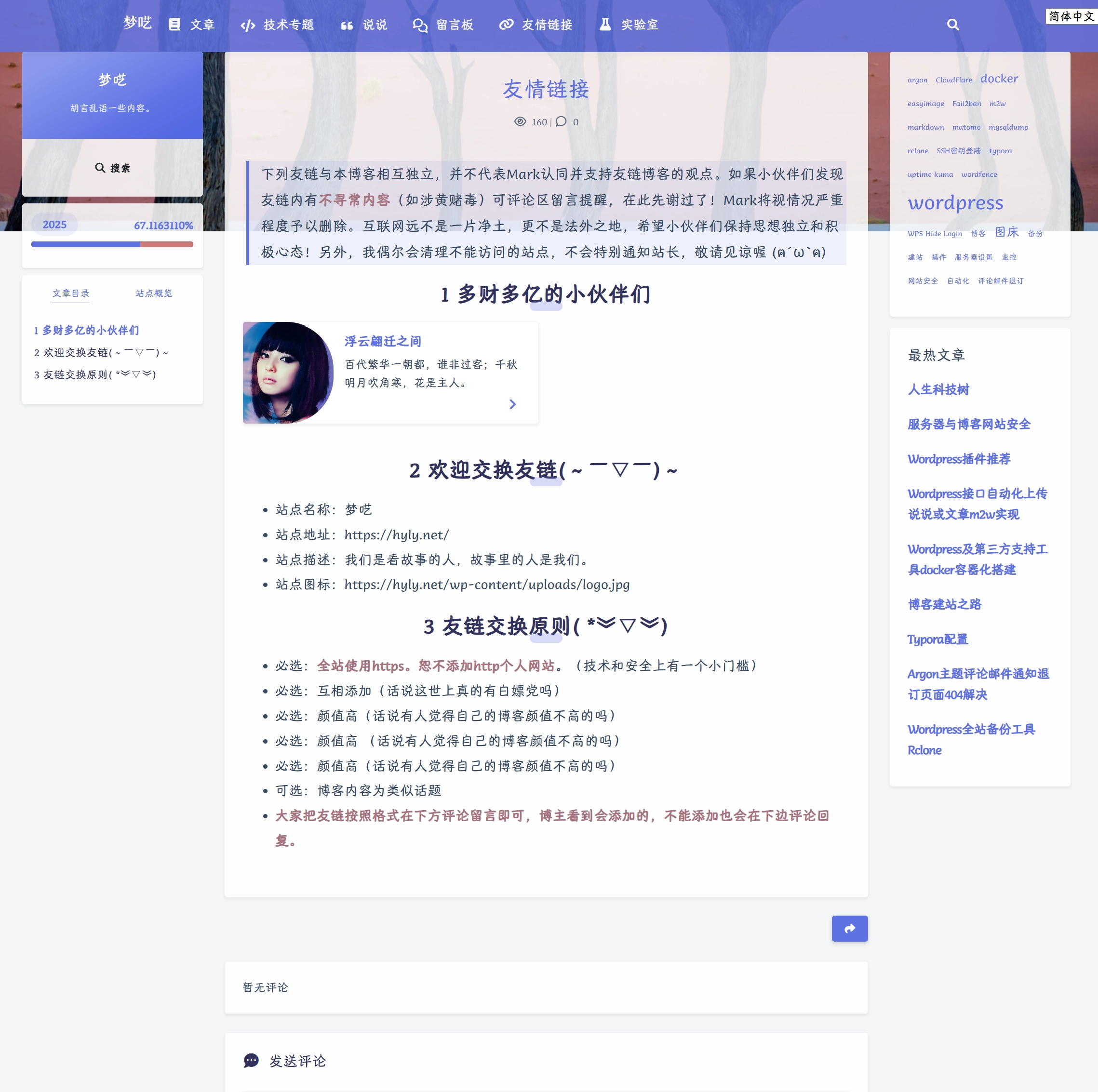
记得按添加链接保存。弄好之后效果是这样的,这是我添加了一个别人的友链:
当然,这个页面你可以加一些内容进去。比如加上你的友链信息、加你友链的限制条件等等。这个你模仿一下别人吧!没有什么固定的规则,全凭个人喜好。
在实际操作中,我比较喜欢使用额外参数。比如,我页面中的实际代码是:
百代繁华一朝都,谁非过客;千秋明月吹角寒,花是主人。
这个的意思是说,我要按评分进行倒序排序。如果你想将喜欢的博主往前排,就将TA的评分值调低一些,这样TA就会排在比较前面。
更多的参数设置可以看argon文档的友链参数 。
最后,还有一种旧短代码的使用方式,大家也可以试试看:
结果如下:
归档/时光轴 新建一个归档页面,模板主要选为归档时间轴 即可:
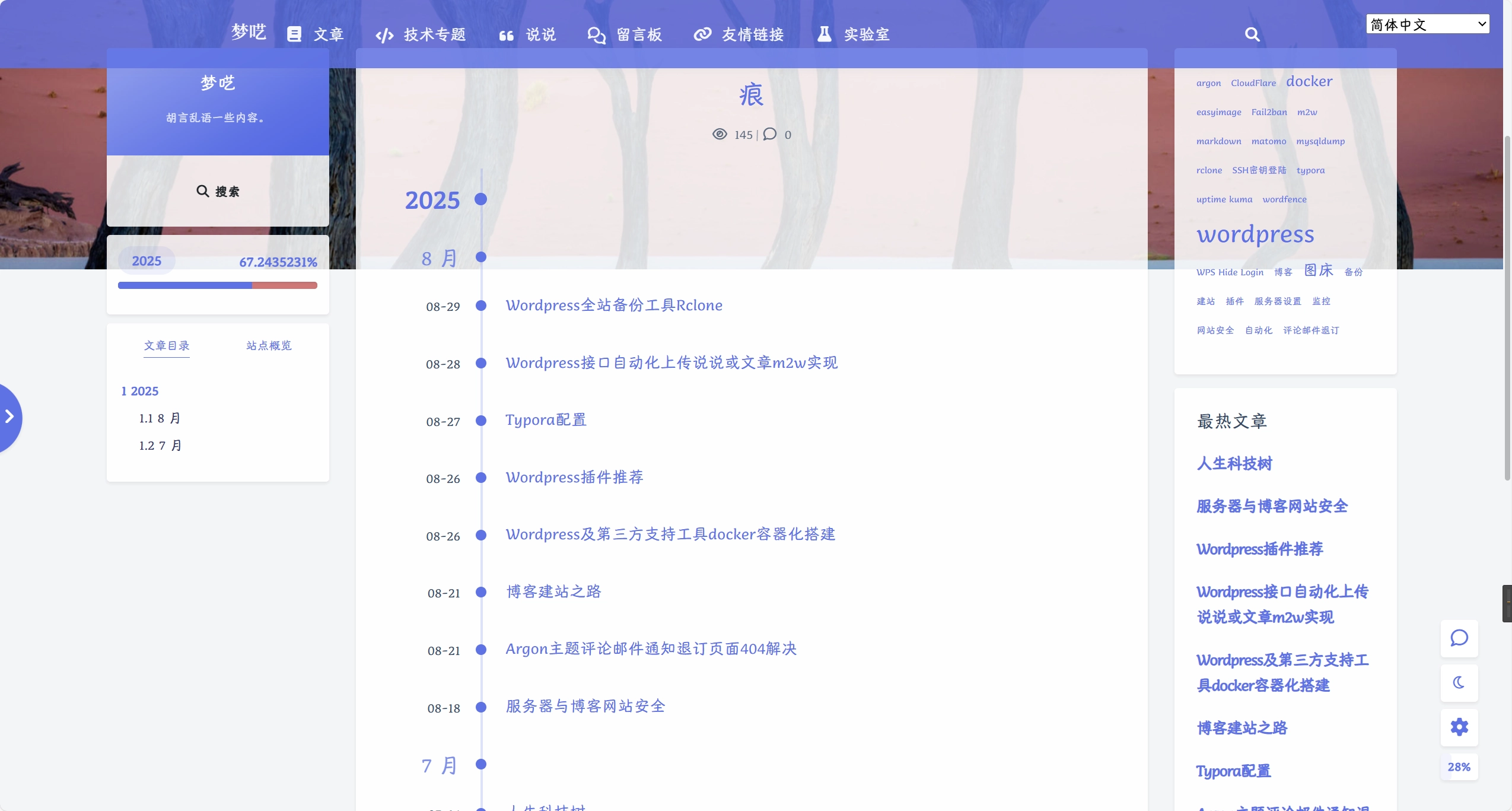
归档页面的效果大致是这样的:
记得刚刚开始设置的时候,对于页面的概念不是很理解,不太清楚它和文章的区别。现在我知道,WordPress页面适合用来适合一些数量和内容均比较有限的信息 。其实和文章没有太大的区别!
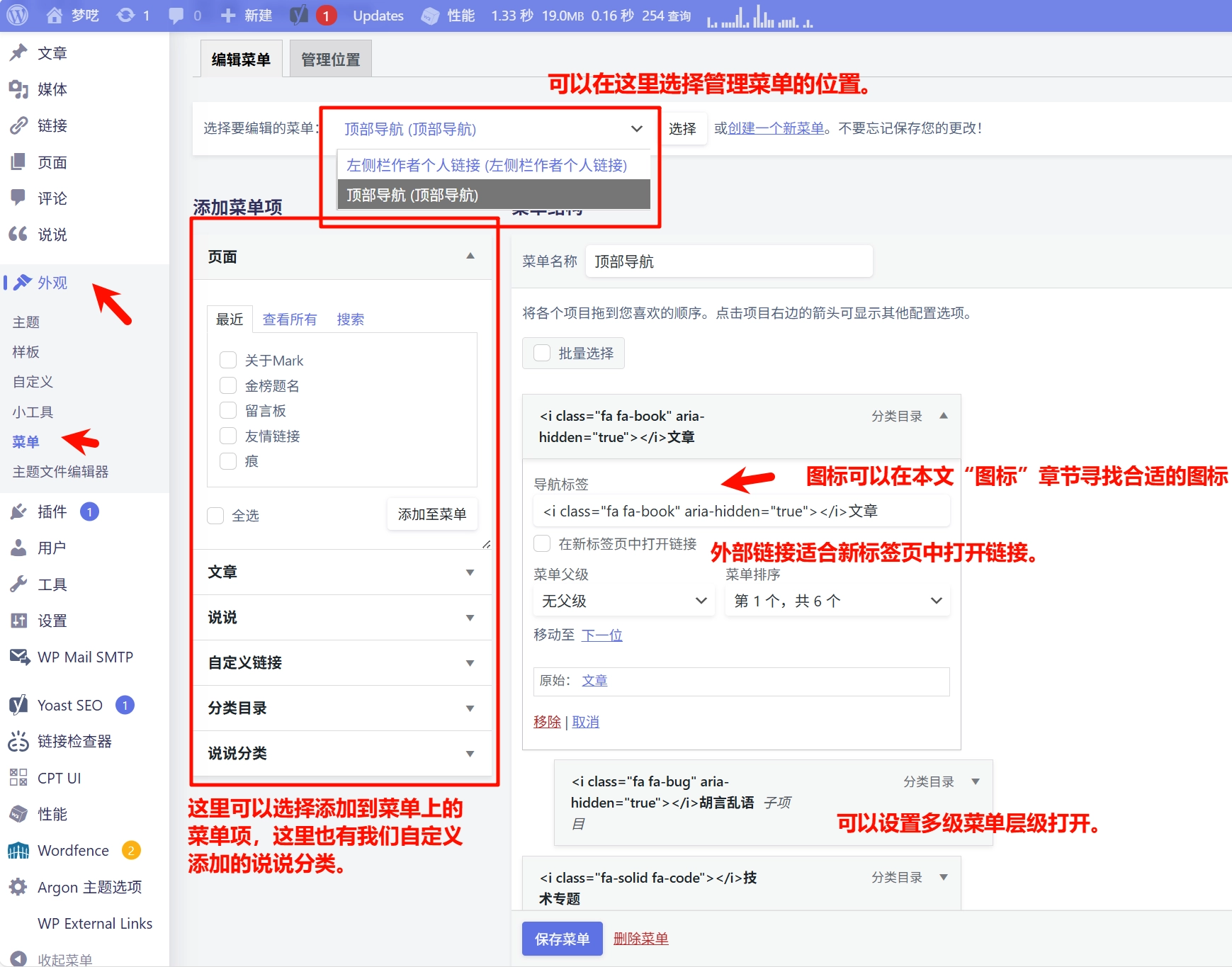
Wordpress菜单配置
设置完效果是这样的:
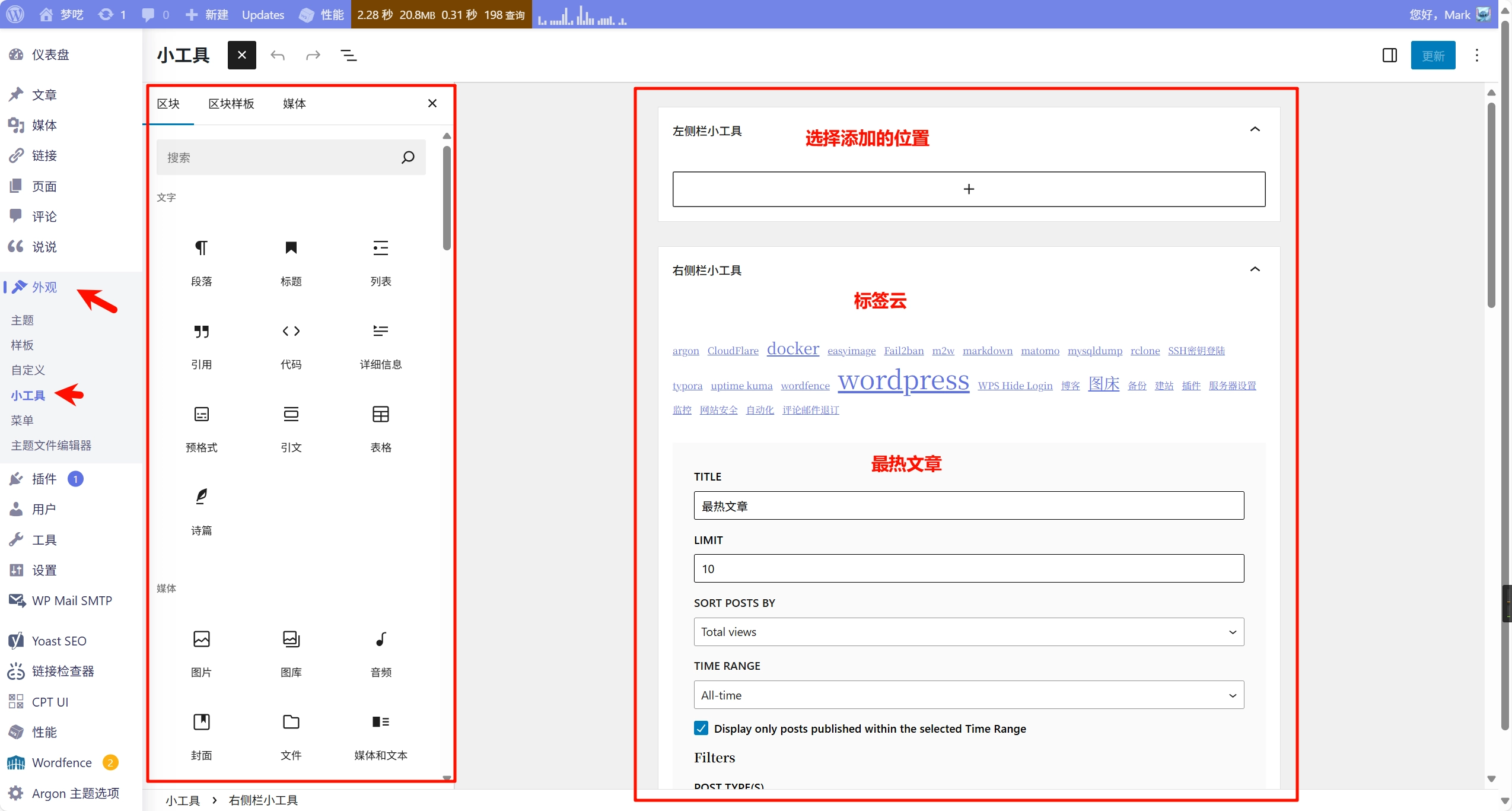
小工具配置 小工具可以在外观->小工具这里可以配置的:
小结 相信大家经过上面的设置,博客会变得比之前炫酷多了,如果配置过程中有什么问题可以在文章下方留言,喜欢的小伙伴也麻烦多点赞转发哈~
扩展阅读
Docker系列 WordPress系列 特效 版权声明:除特殊说明,博客文章均为Mark原创,依据
CC BY-SA 4.0 许可证进行授权,转载请附上出处链接及本声明。
VIP内容严禁转载! | 广告招租请留言










好详细୧(๑•̀⌄•́๑)૭
😊